
What is ContX IQ?
ContX IQ (CIQ) lets an application read, write, and delete data in the IndyKite Knowledge Graph (IKG) only through queries a policy has authorized. A typical use: a car-rental app shows a signed-in customer the contracts and vehicles that belong to them, and nothing else. The graph pattern that defines "belongs to them" lives in a CIQ policy, the fields to return live in a Knowledge Query, and the app runs it with the customer's access token. The platform compiles both into one Cypher query, binds the caller, and returns only what the policy allows.
Three objects are involved:
| Object | Role | Created with |
| CIQ policy | The graph pattern the caller must match, plus what may be read, written, or deleted. | POST /configs/v1/authorization-policies (Service Account credentials) or Terraform indykite_authorization_policy |
| Knowledge Query | What to do within that pattern: which fields to return, which nodes and relationships to upsert or delete. It references one policy. | POST /configs/v1/knowledge-queries (Service Account credentials) or Terraform indykite_knowledge_query |
| Execute request | Runs a stored Knowledge Query now, with input parameters, as the caller identified by the request's tokens. | POST /contx-iq/v1/execute (Application Agent credentials, plus the user's token) |
Terms used in this guide
- IKG: the IndyKite Knowledge Graph, a property graph of nodes and relationships (see the Data Schema guide).
- Identity node: a node ingested with
is_identity: true; the only kind of node that can be the subject of a CIQ query. In Cypher it carries theDigitalTwinlabel. - Application Agent (AppAgent): the credential your application calls the runtime APIs with, sent as
X-IK-ClientKey. It needs theContXIQAPI permission (see the Credentials guide). - User token: the end user's OAuth 2.0 access token from your identity provider, sent as
Authorization: Bearer. A Token Introspect configuration validates it and maps its subject to an identity node. This guide uses only this one name for it. - Delegation token: an optional second token in
X-IK-Token, minted by the IndyKite Token Service, carrying the chain of agents acting for the user. Covered under Advanced. - GID: the platform's globally unique identifier for a configuration object or node, prefixed
gid:. - Input parameter: a value supplied at execute time under
input_paramsand referenced in a policy or query as$name.
A complete example
The example graph below is the one every ContX IQ resource in this library ingests. A Person accepts a Contract that covers a Vehicle; a Company owns the vehicles and has an agreement with your Application.
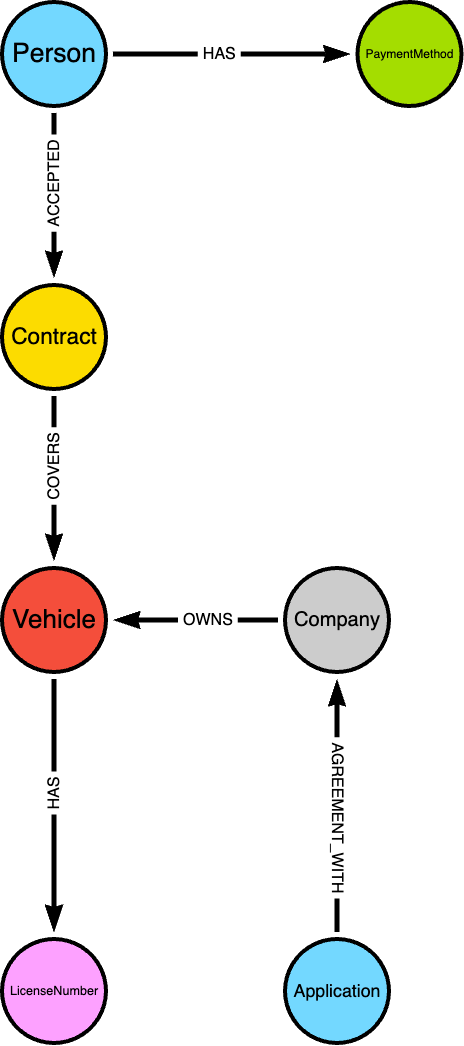
Example graph: Person -ACCEPTED-> Contract -COVERS-> Vehicle -HAS-> LicenseNumber; Company -OWNS-> Vehicle; Application -AGREEMENT_WITH-> Company; Person -HAS-> PaymentMethod
Goal: a signed-in person lists their active contracts and the vehicles they cover. Four steps: ingest, policy, Knowledge Query, execute.
Step 1: Ingest the graph
Nodes and relationships go in through the Capture API with AppAgent credentials; the person must be an identity node. The full payload for this graph is in resource ciq-2; the relevant part:
POST /capture/v1/nodes
{
  "nodes": [
    {
      "external_id": "ryan",
      "type": "Person",
      "is_identity": true,
      "properties": [
        {
          "type": "email",
          "value": "ryan@yahoo.co.uk"
        }
      ]
    },
    {
      "external_id": "ct123",
      "type": "Contract",
      "properties": [
        {
          "type": "status",
          "value": "Active"
        },
        {
          "type": "number",
          "value": "hfgrten123"
        }
      ]
    },
    {
      "external_id": "car1",
      "type": "Vehicle"
    }
  ]
}
POST /capture/v1/relationships
{
  "relationships": [
    {
      "source": {
        "external_id": "ryan",
        "type": "Person"
      },
      "target": {
        "external_id": "ct123",
        "type": "Contract"
      },
      "type": "ACCEPTED"
    },
    {
      "source": {
        "external_id": "ct123",
        "type": "Contract"
      },
      "target": {
        "external_id": "car1",
        "type": "Vehicle"
      },
      "type": "COVERS"
    }
  ]
}
The person's external_id (ryan) must equal the sub claim of their token, because that is how the policy will tie the two together.
Step 2: Write the policy
{
  "meta": {
    "policy_version": "1.0-ciq"
  },
  "subject": {
    "type": "Person"
  },
  "condition": {
    "cypher": "MATCH (subject:Person)-[accepted:ACCEPTED]->(contract:Contract)-[:COVERS]->(vehicle:Vehicle)",
    "filter": [
      {
        "operator": "AND",
        "operands": [
          {
            "operator": "=",
            "attribute": "subject.external_id",
            "value": "$token.sub"
          },
          {
            "operator": "=",
            "attribute": "contract.property.status",
            "value": "Active"
          }
        ]
      }
    ]
  },
  "allowed_reads": {
    "nodes": [
      "contract.external_id",
      "contract.property.number",
      "vehicle.external_id"
    ],
    "relationships": [
      "accepted"
    ]
  }
}
Three things make this policy work, and each is a rule, not a convention:
- The subject is bound to the caller by the policy, not by the platform. The line
subject.external_id = $token.subis what stops one person from reading another's contracts. Without it, the query would match every person in the graph. The platform never pinssubjectto the token by itself. - The subject variable must be named
subjectand carry the label ofsubject.type. The platform adds the identity label to it, so only identity nodes can match. - Every node the query will use has a variable and a label.
accepted,contract,vehicleare the namesallowed_readsand the Knowledge Query refer to.
Store it with the Config API. The policy JSON travels as a string in the policy field:
POST /configs/v1/authorization-policies
Authorization: Bearer <service-account-token>
{
  "project_id": "gid:AAAABbbbCCCC...",
  "name": "person-active-contracts",
  "display_name": "A person's active contracts",
  "policy": "<the policy JSON above, serialized as one string>",
  "status": "ACTIVE",
  "tags": []
}
The response carries the policy's id (a GID), needed in the next step.
Step 3: Write the Knowledge Query
{
  "nodes": [
    "contract.external_id",
    "contract.property.number",
    "vehicle.external_id"
  ],
  "relationships": [
    "accepted"
  ]
}
POST /configs/v1/knowledge-queries
Authorization: Bearer <service-account-token>
{
"project_id": "gid:AAAABbbbCCCC...",
"name": "kq-my-active-contracts",
"policy_id": "<policy id from step 2>",
"query": "<the Knowledge Query JSON above, serialized as one string>",
"status": "ACTIVE"
}A Knowledge Query may only ask for what its policy lists under allowed_reads; anything else is refused when the query is saved.
Step 4: Execute as the user
curl -X POST https://eu.api.indykite.com/contx-iq/v1/execute \
  -H "X-IK-ClientKey: $CLIENT_KEY" \
  -H "Authorization: Bearer $USER_TOKEN" \
  -H "Content-Type: application/json" \
  -d '{
  "id": "kq-my-active-contracts",
  "input_params": {}
}'
Response for ryan's token (sub = ryan):
{
  "data": [
    {
      "nodes": {
        "contract.external_id": "ct123",
        "contract.property.number": "hfgrten123",
        "vehicle.external_id": "car1"
      },
      "relationships": {
        "accepted": {
          "Id": 1155177702467043300,
          "ElementId": "5:3a2b09d5-...:1155177702467043332",
          "StartId": 4,
          "StartElementId": "4:3a2b09d5-...:4",
          "EndId": 8,
          "EndElementId": "4:3a2b09d5-...:8",
          "Type": "ACCEPTED",
          "Props": {
            "id": "gid:AAAAF...",
            "create_time": "2026-09-01T10:15:23.494Z",
            "update_time": "2026-09-01T10:15:23.494Z"
          }
        }
      }
    }
  ]
}
Another person's token returns their own contracts; a token whose subject accepted no active contract returns {"data": []}. No input parameter was needed because the binding came from the token. The same policy could instead bind through a parameter ("value": "$subject_external_id") for cases where the application itself decides whom to query, at the price of the caller choosing the subject.
CIQ policy reference
Syntax
{
  "meta": {
    "policy_version": "1.0-ciq"
  },
  "subject": {
    "type": "<node type>"
  },
  "condition": {
    "cypher": "<Cypher MATCH pattern naming subject and every variable used below>",
    "filter": [
      {
        "operator": "AND",
        "operands": [
          {
            "operator": "<op>",
            "attribute": "<ref>",
            "value": <any>
          }
        ]
      }
    ],
    "token_filter": {
      "operator": "<op>",
      "attribute": "$token.<claim>",
      "value": <any>,
      "advice": {
        "error": "<string>",
        "error_description": "<string>"
      }
    }
  },
  "allowed_reads": {
    "nodes": [
      "<ref>"
    ],
    "relationships": [
      "<ref>"
    ],
    "aggregate_values": [
      "<alias>"
    ]
  },
  "allowed_upserts": {
    "nodes": {
      "existing_nodes": [
        "<var>"
      ],
      "node_types": [
        "<type>"
      ]
    },
    "relationships": {
      "existing_relationships": [
        "<var>"
      ],
      "relationship_types": [
        {
          "type": "<TYPE>",
          "source_node_label": "<type>",
          "target_node_label": "<type>"
        }
      ]
    }
  },
  "allowed_deletes": {
    "nodes": [
      "<ref>"
    ],
    "relationships": [
      "<ref>"
    ]
  }
}
Omit any allowed_* block, or sub-field, that is empty. token_filter is optional.
meta and subject
meta.policy_version:1.0-ciq, the stable dialect this guide describes. Any other value is refused withinvalid policy version: <value>.subject.type: the node type of the caller: an identity node type such asPerson, or_Applicationfor the application itself (see Advanced). One type per policy; two subject types need two policies.
condition.cypher
A read-only Cypher pattern: MATCH, OPTIONAL MATCH, WHERE, WITH, and aggregate functions such as COLLECT and COUNT projected with AS. The CIQ Cypher guide covers the dialect in depth. Rules enforced when the policy is saved:
- A node variable named
subjectmust exist, labelled withsubject.type. Missing:required variables [subject] are not present within the query. Wrong label:subject type for policy <type> does not match subject type in cypher. - Every named node needs a label:
No labels provided for node <var> in cypher. - Only variables named in the Cypher can be referenced by filters,
allowed_*, and the Knowledge Query. An anonymous node such as(:Car)cannot be referenced; give it a name. - The labels
_AppAgent,_API,_TrustScore, andSourcecannot be matched:invalid node type `<label>` in cypher for node `<var>`. Trust scores are read through the<var>.trust_score.*accessor (see the Trust Score guide). - Parameters:
$nameis filled frominput_params;$token.<claim>,$ik_token.<claim>, and$_appIdare bound by the platform (see References).
condition.filter
A boolean expression compiled into the query's WHERE clause. The field is an array, but only its first element is evaluated; put several conditions under one AND as in the worked example. Each node is either a branch (operator plus operands) or a leaf (operator, attribute, value).
| Operator | Meaning | Operands |
AND, OR | Conjunction, disjunction | At least 2, or the policy is refused with invalid field operands: len is 1 and should be >= 2 |
NOT | Negation | At least 1 (only the first is used) |
=, <>, <, <=, >, >= | Comparison of attribute with value | - |
IN | attribute is one of the values in the array value | - |
=~ | Regular-expression match | - |
STARTS WITH, ENDS WITH, CONTAINS | String prefix, suffix, substring | - |
IS NULL, IS NOT NULL | Null test; no value | - |
One nuance of IS NULL: a filter on <var>.property.<name> first matches the property node, so a node that lacks the property is dropped rather than treated as null. IS NULL on a property therefore only matches nodes that carry the property with a null value.
attribute and value references
| Form | Meaning | Example |
<var>.<attr> | Attribute of a node or relationship variable | subject.external_id |
<var>.property.<name> | A property of a node | contract.property.status |
<var>.property.<name>.metadata.<field> | Metadata of that property | contract.property.number.metadata.source |
$name | Input parameter supplied at execute time | $license_number |
$token.<claim> | Claim of the user token | $token.sub, $token.acr |
$ik_token.<claim> | Claim of the delegation token; dot paths walk the act chain | $ik_token.act.act.sub |
$_appId | The calling application's external_id | with _Application subjects |
@<var>.<ref> | Another matched attribute, for attribute-to-attribute comparison (as value) | @venue.property.max_loudness |
\$..., \@... | A literal string starting with $ or @ | \$5 plan |
- The
attributeof a leaf is a variable reference (<var>...) or a token reference ($token...,$ik_token...). Thevalueis a literal, a$reference, or an@reference. tokenandik_tokenare reserved names. The platform binds them from the request's tokens, never asks for them ininput_params, and ignores caller-supplied values under those names. A token that did not arrive binds an empty claim set, so a reference to it resolves tonulland the query returns no rows rather than an error.- A
$name that is not a token reference is an input parameter; a misspelt$iktoken.act.subis therefore a missing parameter, refused at execute time with422andmissing or wrong input params, 'iktoken.act.sub'. - A
valuemay be a typed object for non-string comparisons:{ "type": "datetime", "value": "2026-01-15T00:00:00Z" }or{ "type": "datetime", "value": "$control_date" }. A plain value is treated as typeany.
condition.token_filter
A filter evaluated before the graph is queried, against the user and delegation token claims only ($token.*, $ik_token.* attributes). Same operators and tree shape as filter, with two differences: NOT must have exactly one operand at evaluation time, and CONTAINS tests membership in a whitespace-separated list, which is how an OAuth scope claim is checked.
"token_filter": {
  "operator": "CONTAINS",
  "attribute": "$token.scope",
  "value": "contracts.read",
  "advice": {
    "error": "insufficient_scope",
    "error_description": "The contracts.read scope is required"
  }
}
When the filter fails, or references a token that was not sent, execute answers 401 with {"message": "Unauthorized: invalid token. see response Www-Authenticate headers"} and a WWW-Authenticate header built from the leaf's advice: Bearer error="insufficient_scope", error_description="The contracts.read scope is required". Any extra keys in advice are appended as further key="value" pairs. advice is allowed on leaves only; on AND, OR, NOT the policy is refused with advice should be excluded without attribute. Resource ciq-12 uses this for step-up authentication.
allowed_reads, allowed_upserts, allowed_deletes
| Field | Accepts |
allowed_reads.nodes | Node references a Knowledge Query may return: contract (the whole node), contract.external_id, contract.property.number, contract.property.* (every property), contract.* (everything), and <var>.trust_score.*. |
allowed_reads.relationships | Relationship variables, with the same .<prop> and .* forms. |
allowed_reads.aggregate_values | Aliases projected with AS in the Cypher, e.g. COLLECT({name: p.value}) AS names. |
allowed_upserts.nodes.existing_nodes | Cypher variables whose nodes a query may update. |
allowed_upserts.nodes.node_types | Node types a query may create. Source and Property are refused. |
allowed_upserts.relationships.existing_relationships | Cypher variables whose relationships a query may update. |
allowed_upserts.relationships.relationship_types | {type, source_node_label, target_node_label} triples a query may create. |
allowed_deletes.nodes, allowed_deletes.relationships | Variables (car), single properties (car.property.model), or wildcards (car.*) a query may delete. |
The system properties id, external_id, type, create_time, update_time, and _service can never be listed for deletion (property <name> and cannot be deleted for <ref>), and the _Application node can neither be updated nor deleted through CIQ.
Knowledge Query reference
Syntax
{
  "nodes": [
    "<ref>"
  ],
  "relationships": [
    "<ref>"
  ],
  "aggregate_values": [
    "<alias>"
  ],
  "filter": {
    "operator": "<op>",
    "attribute": "<ref>",
    "value": <any>,
    "operands": []
  },
  "upsert_nodes": [
    {
      "name": "<var>",
      "type": "<type>",
      "external_id": "<string or $param>",
      "is_identity": <bool>,
      "labels": [
        "<label>"
      ],
      "properties": [
        {
          "type": "<name>",
          "value": <any or $param>,
          "metadata": [
            {
              "type": "<field>",
              "value": <any>
            }
          ]
        },
        {
          "type": "<name>",
          "external_value": "<resolver name, gid or $param>"
        }
      ]
    }
  ],
  "upsert_relationships": [
    {
      "name": "<var>",
      "source": "<var>",
      "target": "<var>",
      "type": "<TYPE>",
      "properties": [
        {
          "type": "<name>",
          "value": <any or $param>
        }
      ]
    }
  ],
  "delete_nodes": [
    "<ref>"
  ],
  "delete_relationships": [
    "<ref>"
  ],
  "batch_read": false
}
Every field is optional; omit what is empty. Unknown fields are refused when the query is saved.
Reading: nodes, relationships, aggregate_values, filter
nodes,relationships,aggregate_values: what to return, using the same reference forms asallowed_reads. Each must be covered by the policy'sallowed_reads, or saving fails withrequested variable <ref> is not in the allowed_reads.nodes list. A name fromupsert_nodesorupsert_relationshipscan be read back the same way.filter: one additional filter tree, same shape as the policy filter, ANDed with it. Use it for per-query narrowing such as{"attribute": "contract.property.status", "operator": "=", "value": "$status"}.
Writing: upsert_nodes and upsert_relationships
A name decides whether an entry updates or creates:
| Case | Node entry | Relationship entry |
Update an existing element (name is a Cypher variable) |
Listed in allowed_upserts.nodes.existing_nodes; must not carry type or external_id (upsert for node <name> must not contain type and external_id). |
Listed in existing_relationships; must not carry type, source, or target. |
Create a new element (name is new) |
Must carry both type and external_id (upsert for new node <name> must have type and external_id), and type must be in node_types. |
Must carry type, source, and target (Cypher or new-node names), and the (type, source label, target label) triple must be in relationship_types. |
external_idand propertyvalues may be literals or$paramreferences. Property and metadatatypenames must be literals.- A node property carries either
valueorexternal_value, the name or GID of an External Data Resolver, or a$paramholding one. Other shapes are refused with... external_value is not valid external value, must be valid GID of external data resolver, config name or start with $. - Node properties may carry
metadata(array of{type, value}, e.g.source,assurance_level). Relationship properties accept neithermetadatanorexternal_value; a relationship property with ametadatakey fails to save. is_identity: true(or"labels": ["DigitalTwin"]) creates the node as an identity node, which it must be to ever act as a subject. The flag cannot be misspelt; prefer it over the label.
Deleting: delete_nodes and delete_relationships
References to delete: a variable (car), one property (car.property.model, r1.status), or a wildcard (car.*). Each must be covered by the policy's allowed_deletes (requested variable <ref> is not in the allowed_deletes.nodes list), and the system properties named above cannot be deleted from either nodes or relationships. Deleting a node removes its relationships too.
batch_read
For read-only queries only. false (default) runs the query with a 30 second timeout; true raises it to 5 minutes for large traversals. It changes nothing else, and it is ignored on a query that has upserts or deletes, which always run with a 1 minute timeout.
Execute reference
Request
POST https://eu.api.indykite.com/contx-iq/v1/execute   (or https://us.api.indykite.com)
X-IK-ClientKey: <AppAgent credential token>
Authorization: Bearer <user token>        required unless the policy subject is _Application
X-IK-Token: <delegation token>            optional, see Advanced
Content-Type: application/json
{
"id": "kq-my-active-contracts",
"input_params": {
"status": "Active"
},
"page_token": 1,
"page_size": 100
}| Field | Rules |
id | GID or name of the stored Knowledge Query. Required. |
input_params | One entry per $name the policy and query reference, without the $. Keys: 2 to 20 characters, a letter followed by letters, digits, or underscores. Top-level string values: 1 to 256 characters (400, invalid field input_params[<key>]: string "..." must not be shorter than 1 and longer than 256 characters). Values may also be numbers, booleans, arrays, or objects. A referenced parameter that is missing gives 422, missing or wrong input params, '<name>'. |
page_token | 1-based page number. Omitted, 0, or negative all mean page 1. |
page_size | Rows per page. Default 100; no upper bound is enforced. |
Paging is plain offset paging (SKIP (page_token - 1) * page_size LIMIT page_size); a page shorter than page_size is the last one. Resource ciq-23 walks through it.
Response
200 with data, one record per matched row. Each record has the keys the query asked for; empty ones are omitted:
| Requested | Returned as |
contract.external_id, contract.property.number | Scalar under that exact key in nodes. A property the node lacks comes back as null. |
contract.property.* | An array of { "type", "value" } under nodes["contract.property.*"]. |
contract (whole node) | An object with Id, ElementId, Labels and Props (id as a GID, external_id, type, create_time, update_time). A whole relationship carries Id, ElementId, StartId, StartElementId, EndId, EndElementId, Type and Props. Use Props; the other keys are database identifiers. |
accepted (relationship) | An object with Type and Props (id as a GID, timestamps, and the relationship's own properties) under relationships. Relationships have no external_id; accepted.since returns one property, accepted.* all of them. |
names (aggregate) | The projected value under aggregate_values. |
A query that reads nothing (a pure upsert or delete with no nodes, relationships, or aggregate_values) returns a single count record, the number of rows the operation applied to:
{
  "data": [
    {
      "aggregate_values": {
        "result": 3
      }
    }
  ]
}
Every response carries an X-Indykite-Requestid header; quote it in support tickets.
Status codes
| Status | Body and cause |
200, empty data | The pattern matched no row for this caller. Also what a write or delete returns when the policy does not authorize it for the matched rows: no error, no change, result: 0 for a count-only query. And what a reference to a token that was not sent produces. |
| 400 | {"message": "Bad Request", "errors": ["Unprocessable Entity: invalid field ..."]}: request body invalid, e.g. an input_params key or string value outside the limits. |
| 401 | {"message": "Unauthorized: missing bearer token"}: the policy subject is not _Application and no Authorization header was sent.{"message": "Invalid token in Authorization header"}: the user token failed introspection, or its subject has no identity node in the IKG and the Token Introspect configuration has perform_upsert: false.{"message": "Unauthorized: invalid token. see response Www-Authenticate headers"}: token_filter failed.{"message": "insufficient API access level for appAgent"}: the agent lacks the ContXIQ permission.{"message": "Missing or malformed AppAgent credential token in X-IK-ClientKey header"} or {"message": "Invalid AppAgent JWT in X-IK-ClientKey header"}.Delegation token messages: see Advanced. |
| 422 | {"message": "invalid_argument: missing or wrong input params, '<name>'"}: a referenced parameter was not supplied.{"message": "Unprocessable Entity", "errors": ["input_params[<name>] is not valid external value, ..."]}: a $param used as external_value holds neither a resolver name nor a GID.failed to evaluate token filter: a token_filter NOT with other than one operand. |
| 424 | An External Data Resolver referenced by a returned property could not be fetched (see the resolver guide), or the stored query and policy no longer agree. |
| 500 | The compiled Cypher failed in the graph database; with 1.0-ciq this is also what a parameter referenced only inside condition.cypher and missing from input_params produces. |
| 503 | {"message": "Unable to verify the AppAgent credential token, retry the request"}: transient; retry with the same credential. |
Which subject does a user token resolve to? GET /contx-iq/v1/whoami
Returns the identity node the platform maps the user token to, so a client can see and reuse the subject without decoding the token. It takes X-IK-ClientKey (with the ContXIQ permission) and a required Authorization: Bearer user token; there is no _Application form, no body, and no parameters.
{
  "type": "Person",
  "id": "ryan"
}type: theikg_node_typeof the Token Introspect configuration that validated the token (required there, so never empty).id: the token's subject, thesubclaim or the claim named bysub_claim; equal to the node'sexternal_id.
These are the subject.type and subject.id to send in an AuthZEN request for the same user, and the value a CIQ policy compares subject.external_id against through $token.sub. Errors: 406 when Accept is neither application/json nor */*; 401 {"message": "end-user token is required"} without the bearer; 401 {"message": "Invalid token in Authorization header"} when it fails introspection; the same X-IK-ClientKey 401s and the 503 as on execute. Full example: resource ciq-24.
Advanced
The application as subject
Every application with credentials has an _Application node in the IKG. A policy with "subject": {"type": "_Application"} runs as the application: no user token is needed (one may still be sent, and its claims are available as $token.*), and the platform binds $_appId to the application's external_id. Bind the subject with it exactly as a user policy binds through the token:
"filter": [
  {
    "operator": "=",
    "attribute": "subject.external_id",
    "value": "$_appId"
  }
]
This is the way to bootstrap data: a user policy can only run for an identity node that already exists, so the first identities are created either through the Capture API, by an _Application policy with upsert_nodes, or by a Token Introspect configuration with perform_upsert: true, which creates the user's node on their first call. Resources ciq-8, ciq-9, and ciq-17 show application-subject flows.
Delegation tokens: X-IK-Token and $ik_token
When an Agent Gateway runs with the IndyKite Token Service, requests reach the platform with the user token untouched in Authorization and a delegation token in X-IK-Token (no prefix). Its claims are available to policies and queries as $ik_token.<claim>; $ik_token.act.sub is the agent making this call, $ik_token.act.act.sub the one before it. The header is validated through the project's Token Introspect configurations and answered with 401 and one of: {"message": "Invalid token in X-IK-Token header"}, {"message": "Token in X-IK-Token header is missing the sub claim"}, or {"message": "Token in X-IK-Token header carries a different sub than the subject token"}. The sub comparison only runs when a user token is present. Absent, the header is simply not there and $ik_token.* resolves to null in filters and Cypher, or fails a token_filter with 401.
Reading trust scores and resolver-backed properties
A property whose value is an external_value is fetched from its External Data Resolver when the query reads it, with the request's input_params available to the resolver's placeholders. Trust scores are read through <var>.trust_score._final_score and the per-dimension keys. Both guides document the details: External Data Resolver, Trust Score.
Troubleshooting
| Symptom | Cause |
| Every user sees every row | The policy does not bind subject.external_id to $token.sub (or to $_appId for an application). Add the filter. |
A user whose data exists gets {"data": []} | The subject node was ingested without is_identity: true; the token's sub does not equal the node's external_id (check with whoami); or a filter references a token that was not sent. |
| Second filter condition has no effect | Only the first element of the filter array is used. Nest conditions under one AND. |
Nodes without a property vanish from an IS NULL filter | A property filter matches the property first. Filter on presence with OPTIONAL MATCH in the Cypher instead. |
| Upsert or delete returns 200 but changes nothing | The matched rows were not authorized for that write. The count record shows result: 0. |
| Query creation fails naming a variable | The query reads, upserts, or deletes something the policy's allowed_* lists do not cover, or an upsert entry mixes the "existing" and "new" shapes. |
500 on execute with 1.0-ciq | A parameter used only in condition.cypher is missing from input_params; the graph database reports it. Reference the parameter in a filter as well to get a 422 that names it. |
Related
- Read flows: ciq-2 (this graph, application and user policies), ciq-10 (roles from token claims), ciq-18 (wildcards), ciq-21 (aggregates), ciq-22 (OPTIONAL MATCH and CASE)
- Write and delete flows: ciq-4, ciq-5, ciq-6, ciq-11 (consent), ciq-15 (metadata), ciq-16 (property deletes)
- Step-up and tokens: ciq-12, ciq-13, ciq-24 (whoami)
- Cypher dialect: CIQ Cypher guide; graph shapes: Data Schema guide; credentials and headers: Credentials guide
- Config API reference: openapi.indykite.com; Terraform: IndyKite provider