
What is the IndyKite MCP Server?
The IndyKite MCP (Model Context Protocol) server enables AI agents and LLM applications to interact with IndyKite's authorization and data services. It provides a standardized interface for:
- AuthZEN authorization: Make access control decisions (evaluate, search resources, search actions).
- ContX IQ (CIQ): Execute knowledge queries to read and write graph data.
- Resource discovery: List available knowledge queries with agent-friendly descriptions.
The server implements the Model Context Protocol specification, making it compatible with MCP-enabled AI tools and agents.
What is the MCP URL?
The MCP server is available in two regions:
Full endpoint URL:
<MCP_REGIONAL_URL>/mcp/v1/<project_gid>
Replace <project_gid> with your IndyKite project GID.
What do I need before using the MCP server?
Prerequisites
- IndyKite environment: Project, Application, Application Agent, and Application Agent credentials.
- Token Introspect configuration: Required to validate user access tokens.
- MCP Server configuration: Binds the runtime MCP endpoint to an AppAgent and a Token Introspect, and declares the OAuth scopes the server advertises. The MCP server will not accept requests for a project until this configuration exists.
- See: How do I create an MCP server configuration? below.
- Project GID: Your IndyKite project identifier.
- Data and policies: Captured data, KBAC policies, and/or CIQ policies and Knowledge Queries.
- See: MCP Example
How do I create an MCP server configuration?
Before the MCP runtime endpoint will accept requests for your project, you must create an MCP Server configuration. This configuration tells IndyKite which AppAgent and Token Introspect the MCP server should use, and which OAuth scopes it advertises.
Required fields
| Field | Type | Description |
|---|---|---|
name | string | URL-friendly identifier, unique within the project. Immutable. |
project_id | string (GID) | Project that owns this MCP server configuration. |
app_agent_id | string (GID) | AppAgent the MCP server uses to call IndyKite APIs at runtime. Needs Authorization API and ContX IQ API permissions. |
token_introspect_id | string (GID) | Token Introspect configuration used to validate inbound Bearer tokens. |
enabled | boolean | Whether the MCP server accepts requests. |
scopes_supported | string[] | OAuth scopes advertised in .well-known/oauth-protected-resource. Must contain at least one entry. |
Optional fields
display_name(string, 2-254 chars): Human-readable name.description(string, 2-65000 chars): Free-text description.
Example: create an MCP server configuration
curl -X POST <API_URL>/configs/v1/mcp-servers \
-H "Content-Type: application/json" \
-H "Authorization: Bearer $SERVICE_ACCOUNT_TOKEN" \
-d '{
      "name": "mcp-server-name",
      "display_name": "MCP Server name",
      "description": "MCP Server configuration description",
      "project_id": "gid-of-project",
      "app_agent_id": "gid-of-app-agent",
      "token_introspect_id": "gid-of-token-introspect",
      "enabled": true,
      "scopes_supported": ["name", "email"]
    }'
Response (201 Created): Returns the new configuration's id (GID), create_time, created_by, and update_time.
Reference: POST /mcp-servers
How do I authenticate with the MCP server?
The MCP server authenticates each request with a single Bearer token - the end-user's OAuth 2.0 access token. The AppAgent the server uses to call IndyKite APIs at runtime is resolved server-side from your MCP Server configuration (app_agent_id). Clients send only the Bearer token.
Bearer Token (Authorization)
This identifies the user (subject) making the request.
- Header:
Authorization: Bearer <user-access-token> - Source: OAuth 2.0 access token from your identity provider
- Validation: Token is introspected using your Token Introspect configuration
- Purpose: Used as the subject in authorization decisions
Configure token introspection: POST /token-introspects
Delegation token (X-IK-Token), optional
When the caller is an agent acting on a user's behalf through the Agent Gateway in Token Service mode, the request also carries a delegation token minted by the self-hosted IndyKite Token Service:
- Header:
X-IK-Token: <delegation-token>, sent as is with no prefix, beside the untouchedAuthorization: Bearerheader. - Validation: introspected through the project's Token Introspect configurations like the Bearer token; its
submust equal the Bearer token'ssub. - Purpose: forwarded with every
ciq_executeandauthzen_*call, where ContX IQ and KBAC policies read its claims as$ik_token, including the nestedactdelegation chain.
A delegation token that does not hold up is refused before anything is forwarded, with 400 Bad Request and no WWW-Authenticate challenge, because the Bearer token itself is fine and re-authenticating would not help:
{
  "error": "invalid_request",
  "error_description": "Token in X-IK-Token header is invalid or expired"
}
The same shape with carries a different sub than the subject token or is missing the sub claim means the two tokens are not about the same user.
What happens without a Bearer token?
If you call the MCP server without a Bearer token, it returns:
401 Unauthorizedstatus.well-known/oauth-protected-resourcemetadata (per RFC9728)
Note: Contact IndyKite to have your identity providers and scopes added to the .well-known/oauth-protected-resource file for your project.
Why does a multi-audience Bearer token return 401?
A multi-audience Bearer token - one whose aud claim lists more than one audience - works through the MCP server only if exactly one Token Introspect configuration in the relevant app space matches it. The MCP Server configuration binds a single token_introspect_id, but that binding does not protect you from ambiguity created by other Token Introspect configurations that share the same issuer in that app space.
Two independent audience checks
An inbound token passes through two checks that use different selection logic:
- Pre-check (membership): the audience bound to the MCP server must be present in the token's
audclaim. - Introspection (lookup): the token's audiences are matched against the Token Introspect configurations in the app space.
- 0 matches →
NotFound - 2 or more matches →
FailedPrecondition:"multiple matches for issuer-audiences"
- 0 matches →
Why ambiguity produces a 401
Consider a token with aud = [A, B], an MCP server bound to the Token Introspect for audience A, and a second (even unlinked) Token Introspect for audience B that shares the same issuer in that app space:
- Pre-check:
A ∈ [A, B]→ passes. - Introspection: matching
ANY('{A,B}')hits bothAandB→ 2 rows →FailedPrecondition, which the MCP server maps to a generic401 invalid_token.
Configuration facts to keep in mind
- A Token Introspect configuration holds one audience; "two audiences" means two separate configuration rows. The combination
(app_space_id, issuer, audience)is unique. - The MCP Server configuration binds exactly one
token_introspect_id.
To avoid this: for a given issuer in an app space, make sure a multi-audience token resolves to a single Token Introspect configuration - do not keep multiple Token Introspect configs whose audiences overlap with the same token's aud claim.
Which protocol revisions does the MCP server support?
The MCP server uses JSON-RPC over HTTP POST and supports two request styles, selected by the protocol version your client sends:
| Style | Protocol revisions | How it works |
|---|---|---|
| Session-based | Before 2026-07-28 (e.g. 2025-11-25) |
initialize handshake first; the server returns an Mcp-Session-Id header that every follow-up request must send back. |
| Stateless | 2026-07-28 and later |
No handshake and no session: every request is self-contained, carrying the protocol metadata in the request's params._meta plus the standard MCP headers. See How do I use the stateless protocol? |
Both styles authenticate the same way (Bearer token) and expose the same tools and resources. You can query the supported revisions at runtime with the stateless server/discover method (see below).
How does the MCP session work? (session-based protocol)
- Initialize: Send an
initializerequest to start a session. - Receive Session ID: The server returns an
Mcp-Session-Idheader. - Include Session ID: All subsequent requests must include the
Mcp-Session-Idheader.
The server is built using the official MCP Go SDK, so you can also use Go SDK clients to interact with it.
What is the MCP process flow?
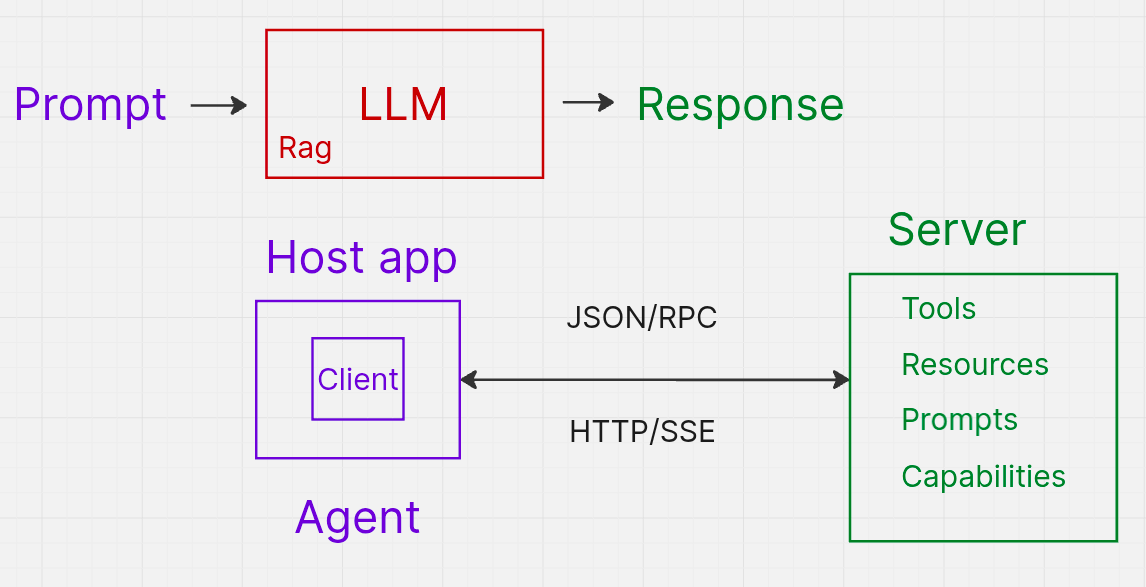
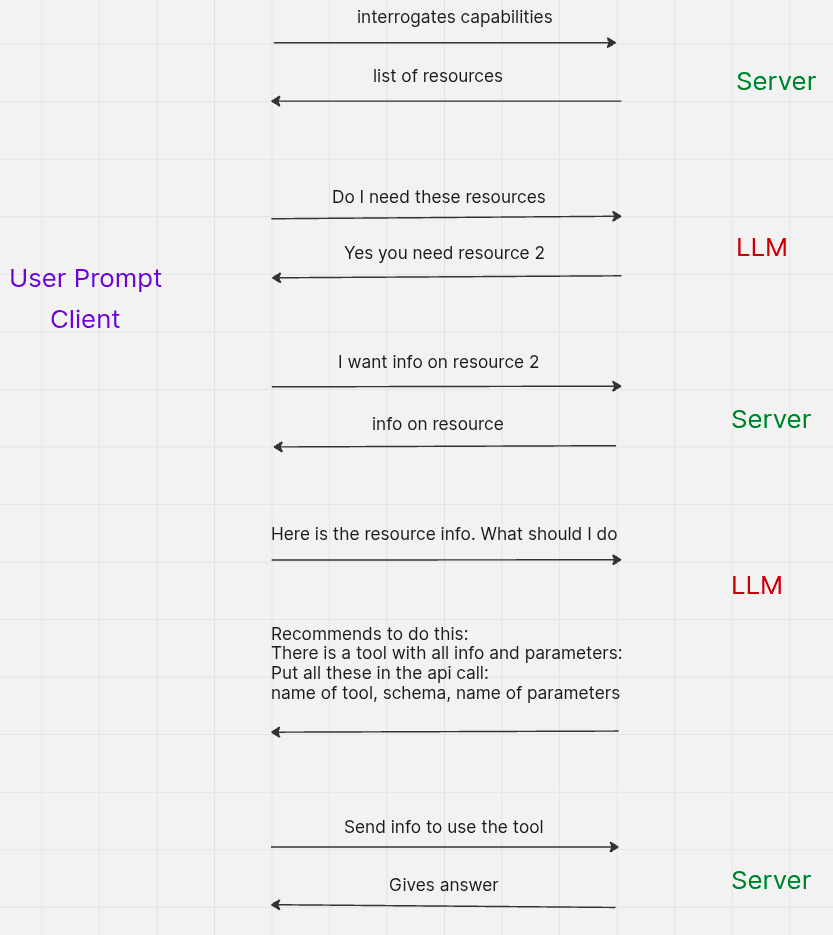
How do I make MCP requests? (session-based protocol)
Step 1: Initialize the MCP session
Start a new MCP session and receive a session ID.
curl -v -i -X POST <MCP_URL>/mcp/v1/<project_gid> \
-H "Content-Type: application/json" \
-H "Authorization: Bearer $BEARER_TOKEN" \
-d '{
      "jsonrpc": "2.0",
      "id": 1,
      "method": "initialize",
      "params": {
        "protocolVersion": "2025-11-25",
        "capabilities": {},
        "clientInfo": {"name": "curl", "version": "1.0"}
      }
    }'
Response: Returns Mcp-Session-Id header. Save this for subsequent requests.
What happens without a Bearer token?
curl -v -i -X POST <MCP_URL>/mcp/v1/<project_gid>
-H "Content-Type: application/json"
-d '{
      "jsonrpc": "2.0",
      "id": 1,
      "method": "initialize",
      "params": {
        "protocolVersion": "2025-11-25",
        "capabilities": {},
        "clientInfo": {"name": "curl", "version": "1.0"}
      }
    }'
Response: Returns 401 Unauthorized and .well-known/oauth-protected-resource metadata.
Step 2: Confirm initialization
Verify the session is initialized.
curl -v -i -X POST <MCP_URL>/mcp/v1/<project_gid> \
-H "Content-Type: application/json" \
-H "Authorization: Bearer $BEARER_TOKEN" \
-H "Mcp-Session-Id: $SESSION_ID" \
-d '{
      "jsonrpc": "2.0",
      "id": 1,
      "method": "notifications/initialized",
      "params": {
        "protocolVersion": "2025-11-25",
        "capabilities": {},
        "clientInfo": {"name": "curl", "version": "1.0"}
      }
    }'
How do I use the stateless protocol? (revision 2026-07-28)
Starting with protocol revision 2026-07-28, the MCP server also accepts stateless requests: there is no initialize/initialized handshake and no Mcp-Session-Id - each request stands on its own. This suits serverless and multi-instance clients where holding a session between calls is impractical.
What every stateless request must carry
- In the body, a
params._metaobject with:"io.modelcontextprotocol/protocolVersion": the protocol revision, e.g."2026-07-28"(required - a request without it is treated as session-based)."io.modelcontextprotocol/clientCapabilities": the client's capabilities ({}if none)."io.modelcontextprotocol/clientInfo": optional client name and version.
- In the headers, the standard MCP headers for this revision:
Mcp-Protocol-Version: 2026-07-28Mcp-Method: must equal the JSON-RPCmethodin the body (mismatch or absence is rejected).Mcp-Name: required fortools/call(the tool name),resources/read(the resource URI), andprompts/get(the prompt name); must match the body.
- The usual
Authorization: Bearer,Content-Type: application/json, andAccept: application/json, text/event-streamheaders - authentication is unchanged, and responses may arrive as an SSE stream with the JSON result in the event data.
No session is created: the response carries no Mcp-Session-Id header. If a mixed-version client sends a stale Mcp-Session-Id alongside a 2026-07-28 _meta, the _meta wins and the header is ignored.
server/discover: check what the endpoint supports
The stateless protocol adds a server/discover method that returns the server's capabilities and the protocol revisions it accepts - use it to decide which style to speak:
curl -v -i -X POST <MCP_URL>/mcp/v1/<project_gid> \
-H "Content-Type: application/json" \
-H "Accept: application/json, text/event-stream" \
-H "Authorization: Bearer $BEARER_TOKEN" \
-H "Mcp-Protocol-Version: 2026-07-28" \
-H "Mcp-Method: server/discover" \
-d '{
      "jsonrpc": "2.0",
      "id": 1,
      "method": "server/discover",
      "params": {
        "_meta": {
          "io.modelcontextprotocol/protocolVersion": "2026-07-28",
          "io.modelcontextprotocol/clientCapabilities": {},
          "io.modelcontextprotocol/clientInfo": {"name": "curl", "version": "1.0"}
        }
      }
    }'
Response: 200 with result.supportedVersions (for example ["2026-07-28", "2024-11-05", …]), result.capabilities, and the server's instructions. No Mcp-Session-Id header is returned.
Example: list tools statelessly
curl -v -i -X POST <MCP_URL>/mcp/v1/<project_gid> \
-H "Content-Type: application/json" \
-H "Accept: application/json, text/event-stream" \
-H "Authorization: Bearer $BEARER_TOKEN" \
-H "Mcp-Protocol-Version: 2026-07-28" \
-H "Mcp-Method: tools/list" \
-d '{
      "jsonrpc": "2.0",
      "id": 2,
      "method": "tools/list",
      "params": {
        "_meta": {
          "io.modelcontextprotocol/protocolVersion": "2026-07-28",
          "io.modelcontextprotocol/clientCapabilities": {}
        }
      }
    }'
Example: call a tool statelessly
The same authzen_evaluate call as in the session-based section - note the Mcp-Name header naming the tool, and the _meta object inside params next to the tool arguments:
# random values to adapt in arguments
# subject_id is Bearer token sub
curl -v -i -X POST <MCP_URL>/mcp/v1/<project_gid> \
-H "Content-Type: application/json" \
-H "Accept: application/json, text/event-stream" \
-H "Authorization: Bearer $BEARER_TOKEN" \
-H "Mcp-Protocol-Version: 2026-07-28" \
-H "Mcp-Method: tools/call" \
-H "Mcp-Name: authzen_evaluate" \
-d '{
      "jsonrpc": "2.0",
      "id": 3,
      "method": "tools/call",
      "params": {
        "name": "authzen_evaluate",
        "arguments": {
          "subject_type": "Person",
          "subject_id": "alice",
          "resource_type": "Car",
          "resource_id": "cadillacv16",
          "action_name": "CAN_DRIVE"
        },
        "_meta": {
          "io.modelcontextprotocol/protocolVersion": "2026-07-28",
          "io.modelcontextprotocol/clientCapabilities": {}
        }
      }
    }'
Response: 200 with the tool result in result.content (a text item whose body holds the JSON decision), exactly as in the session-based flow - and no Mcp-Session-Id header.
What happens with an unsupported protocol version?
Requesting a protocol revision the server does not support returns 400 with a JSON-RPC error naming what was asked for and what is available:
{
  "error": {
    "code": -32022,
    "message": "unsupported protocol version",
    "data": {
      "requested": "2099-01-01",
      "supported": ["2026-07-28", "..."]
    }
  }
}
How do I discover available resources and tools?
The examples below use the session-based style. On the stateless protocol, drop the Mcp-Session-Id header and add the _meta object and standard headers shown above instead - the methods, tools, and arguments are identical.
List MCP resources
Discover what resources are available in the MCP server.
curl -v -i -X POST <MCP_URL>/mcp/v1/<project_gid>
-H "Content-Type: application/json"
-H "Authorization: Bearer $BEARER_TOKEN"
-H "Mcp-Session-Id: $SESSION_ID"
-d '{
      "jsonrpc": "2.0",
      "id": 2,
      "method": "resources/list",
      "params": {}
    }'
List MCP tools
Discover what tools are available for the AI agent to call.
curl -v -i -X POST <MCP_URL>/mcp/v1/<project_gid>
-H "Content-Type: application/json"
-H "Authorization: Bearer $BEARER_TOKEN"
-H "Mcp-Session-Id: $SESSION_ID"
-d '{
      "jsonrpc": "2.0",
      "id": 3,
      "method": "tools/list",
      "params": {}
    }'
List Knowledge Queries
Get a list of available CIQ Knowledge Queries with agent-friendly descriptions.
curl -v -i -X POST <MCP_URL>/mcp/v1/<project_gid> \
-H "Content-Type: application/json" \
-H "Authorization: Bearer $BEARER_TOKEN" \
-H "Mcp-Session-Id: $SESSION_ID" \
-d '{
      "jsonrpc": "2.0",
      "id": 4,
      "method": "resources/read",
      "params": {
        "uri": "indykite://knowledge-queries/"
      }
    }'
Response: Returns list of Knowledge Query IDs and descriptions, formatted for AI agents to understand how to call the ciq_execute tool.
What tools are available?
AuthZEN Tools
These tools make authorization decisions based on KBAC policies.
| Tool | Description |
|---|---|
authzen_evaluate |
Check if a subject can perform an action on a resource |
authzen_evaluations |
Batch evaluate multiple authorization requests |
authzen_search_resource |
Find all resources a subject can access with a given action |
authzen_search_action |
Find all actions a subject can perform on a resource |
CIQ Tools
| Tool | Description |
|---|---|
ciq_execute |
Execute a Knowledge Query to read or write graph data |
How do I use the AuthZEN tools?
authzen_evaluate: Single authorization check
Check if a subject can perform a specific action on a resource.
# random values to adapt in arguments
# subject_id is Bearer token sub
curl -v -i -X POST <MCP_URL>/mcp/v1/<project_gid>
-H "Content-Type: application/json"
-H "Authorization: Bearer $BEARER_TOKEN"
-H "Mcp-Session-Id: $SESSION_ID"
-d '{
      "jsonrpc": "2.0",
      "id": 5,
      "method": "tools/call",
      "params": {
        "name": "authzen_evaluate",
        "arguments": {
          "subject_type": "Person",
          "subject_id": "alice",
          "resource_type": "Car",
          "resource_id": "cadillacv16",
          "action_name": "CAN_DRIVE"
        }
      }
    }'
authzen_evaluations: Batch authorization checks
Evaluate multiple authorization requests in a single call.
# random values to adapt in arguments
# subject_id is Bearer token sub
curl -v -i -X POST <MCP_URL>/mcp/v1/<project_gid> \
-H "Content-Type: application/json" \
-H "Authorization: Bearer $BEARER_TOKEN" \
-H "Mcp-Session-Id: $SESSION_ID" \
-d '{
      "jsonrpc": "2.0",
      "id": 6,
      "method": "tools/call",
      "params": {
        "name": "authzen_evaluations",
        "arguments": {
          "subject_type": "user",
          "subject_id": "user-123",
          "evaluations": [
            {"action": {"name": "read"}, "resource": {"type": "doc", "id": "doc1"}},
            {"action": {"name": "write"}, "resource": {"type": "doc", "id": "doc2"}}
          ]
        }
      }
    }'
authzen_search_resource: Find accessible resources
Find all resources of a given type that a subject can access with a specific action.
# random values to adapt in arguments
# subject_id is Bearer token sub
curl -v -i -X POST <MCP_URL>/mcp/v1/<project_gid> \
-H "Content-Type: application/json" \
-H "Authorization: Bearer $BEARER_TOKEN" \
-H "Mcp-Session-Id: $SESSION_ID" \
-d '{
      "jsonrpc": "2.0",
      "id": 7,
      "method": "tools/call",
       "params": {
        "name": "authzen_search_resource",
        "arguments": {
          "subject_type": "User",
          "subject_id": "user-123",
          "action_name": "READ",
          "resource_type": "Document"
        }
      }
    }'
authzen_search_action: Find permitted actions
Find all actions a subject can perform on a specific resource.
# random values to adapt in arguments
# subject_id is Bearer token sub
curl -v -i -X POST <MCP_URL>/mcp/v1/<project_gid> \
-H "Content-Type: application/json" \
-H "Authorization: Bearer $BEARER_TOKEN" \
-H "Mcp-Session-Id: $SESSION_ID" \
-d '{
      "jsonrpc": "2.0",
      "id": 8,
      "method": "tools/call",
      "params": {
        "name": "authzen_search_action",
        "arguments": {
          "subject_type": "User",
          "subject_id": "user-123",
          "resource_type": "Document",
          "resource_id": "doc-456"
        }
      }
    }'
How do I use the CIQ tool?
ciq_execute: Run a Knowledge Query
Execute a CIQ Knowledge Query to read or write data in the Identity Knowledge Graph.
# random keys/values to adapt in input_params
curl -v -i -X POST <MCP_URL>/mcp/v1/<project_gid> \
-H "Content-Type: application/json" \
-H "Authorization: Bearer $BEARER_TOKEN" \
-H "Mcp-Session-Id: $SESSION_ID" \
-d '{
      "jsonrpc": "2.0",
      "id": 9,
      "method": "tools/call",
      "params": {
        "name": "ciq_execute",
        "arguments": {
          "id": ",
          "input_params": {"license": "AL98745", "app_external_id": "applicationParking"}
        }
      }
    }'
What arguments does ciq_execute need?
| Argument | Description |
|---|---|
id |
The GID or name of the Knowledge Query to execute |
input_params |
Key-value pairs for partial filter variables defined in the query |
Tip: Use the resources/read method with URI indykite://knowledge-queries/ to get agent-friendly descriptions of available queries and their required parameters.
Next Steps
- MCP example (session-based protocol): MCP Resource Example
- MCP example (stateless protocol 2026-07-28): Stateless MCP Resource Example
- Environment setup: Environment Setup
- AuthZEN guide: AuthZEN Guide
- CIQ guide: ContX IQ Guide
- Token Introspect: Token Introspect Guide
- MCP specification: Model Context Protocol
- Go SDK: MCP Go SDK