
What are Outbound Events?
Outbound Events (Signals) are real-time notifications sent to external systems when changes occur in your IndyKite environment.
Use Outbound Events when you need to:
- Synchronize data with external systems in real-time.
- Trigger workflows when specific data changes occur.
- Audit and log operations performed on your IKG.
- React to authorization or CIQ query executions.
Important: Only one Outbound Events configuration can exist per Project.
How do Outbound Events work?
The event flow consists of three stages:
- Configuration: Define which event types to subscribe to (routes) and where to send them (providers).
- Event Generation: When a matching operation occurs, IndyKite generates a message conforming to the CloudEvents standard.
- Event Publishing: The event is delivered to the configured provider(s).
After events are published, you are responsible for implementing any additional business logic for filtering and processing.
What providers are supported?
IndyKite supports four event providers:
- Kafka (Confluent Cloud or self-hosted)
- Azure Event Grid
- Azure Service Bus
- Google Cloud Pub/Sub
You can configure multiple providers and route different event types to different destinations.
How do I configure routing?
An Outbound Events configuration has two main components:
- Providers: The destinations where events will be sent (Kafka topic, Azure Event Grid, Azure Service Bus, Google Cloud Pub/Sub).
- Routes: Rules that determine which events go to which providers.
How does route ordering work?
Routes are evaluated sequentially in order. An event can match multiple routes and be sent to multiple destinations.
- If an event matches multiple routes, it is sent to all matching destinations.
- Wildcard routes (e.g.,
indykite.audit.capture.*) catch all matching events. - Place specific routes before wildcard routes to ensure correct processing.
What does the stop_processing flag do?
The stop_processing flag controls whether to continue evaluating routes after a match:
stop_processing = true: Stop after this route matches. Event is not evaluated against further routes.stop_processing = false(default): Continue matching. Event may be sent to multiple destinations.
What event types can I filter?
Capture Events (Data Operations)
| Operation | Event Type | Filters Available |
| BatchUpsertNodes | indykite.audit.capture.upsert.node |
captureLabel, property key/value |
| BatchUpsertRelationships | indykite.audit.capture.upsert.relationship |
captureLabel, property key/value |
| BatchDeleteNodes | indykite.audit.capture.delete.node |
captureLabel, property key/value |
| BatchDeleteRelationships | indykite.audit.capture.delete.relationship |
captureLabel |
| BatchDeleteNodeProperties | indykite.audit.capture.delete.node.property |
— |
| BatchDeleteRelationshipProperties | indykite.audit.capture.delete.relationship.property |
— |
| BatchDeleteNodeTags | indykite.audit.capture.delete.node.tag |
captureLabel |
| BatchDeleteNodePropertyMetadata | indykite.audit.capture.delete.node.property.metadata |
— |
| All Capture Events | indykite.audit.capture.* |
Wildcard matches all |
Configuration Events
| Operation | Event Type |
| Create configuration | indykite.audit.config.create |
| Read configuration | indykite.audit.config.read |
| Update configuration | indykite.audit.config.update |
| Delete configuration | indykite.audit.config.delete |
| Assign permission | indykite.audit.config.permission.assign |
| Revoke permission | indykite.audit.config.permission.revoke |
| All Config Events | indykite.audit.config.* |
Authorization and CIQ Events
| Operation | Event Type |
| Token Introspect | indykite.audit.credentials.token.introspected |
AuthZEN Evaluation (POST /access/v1/evaluation) |
indykite.audit.authorization.evaluation |
AuthZEN Evaluations (POST /access/v1/evaluations) |
indykite.audit.authorization.evaluations |
AuthZEN Subject Search (POST /access/v1/search/subject) |
indykite.audit.authorization.searchsubject |
AuthZEN Resource Search (POST /access/v1/search/resource) |
indykite.audit.authorization.searchresource |
AuthZEN Action Search (POST /access/v1/search/action) |
indykite.audit.authorization.searchaction |
| All Authorization Events | indykite.audit.authorization.* |
| CIQ Execute | indykite.audit.ciq.execute |
What are CDC events?
Change Data Capture (CDC) events deliver the actual content of a change alongside the audit event. Instead of just signaling that a node was updated, the sink receives the full before and after state of the change, following the Neo4j CDC Output Schema.
What is in a CDC payload?
- Event Type:
nodeorrelationship. - Operation:
create,update, ordelete. - Labels: The labels of the node or relationship involved.
- Before and After states: The property values before and after the change.
CDC events carry their own event types, combining the entity with the operation: indykite.audit.cdc.node.create, indykite.audit.cdc.node.update, indykite.audit.cdc.node.delete, and the same three under indykite.audit.cdc.relationship.*. Filter them in routes like any other event type, for example with the indykite.audit.cdc.* wildcard.
For example, a CDC event for an updated Person node shows that the email property changed from old@example.com to new@example.com, enabling a consuming system to correlate and act on the specific delta.
How do I enable CDC events?
CDC events are controlled per provider via the include_cdc_events boolean flag on the Event Sink configuration:
include_cdc_events = true: CDC events are emitted to the sink.include_cdc_events = falseor unset (default): CDC events are not emitted.
How do I configure Outbound Events?
Example 1: Send all Capture events to Kafka
Goal: Send an event to a Kafka topic each time a node or relationship is captured (upsert or delete).
Using Terraform
Documentation: indykite_event_sink resource
resource "indykite_event_sink" "outbound_events" {
	name         = "outbound-events"
	display_name = "Outbound Events"
	location     = "gid:YOUR_PROJECT_GID"
	providers {
		provider_name       = "confluent-provider"
		include_cdc_events  = false
		kafka {
			brokers  = ["pkc-xxxxx.region.gcp.confluent.cloud:9092"]
			topic    = "topic_signal"
			username = ""
			password = ""
		}
	}
	routes {
		provider_id        = "confluent-provider"
		route_id           = "capture-events"
		route_display_name = "Capture Events"
		stop_processing    = true
		keys_values_filter {
			event_type = "indykite.audit.capture.*"
		}
	}
}
Using REST API
Endpoint: POST /event-sinks
{
	"project_id": "YOUR_PROJECT_GID",
	"name": "outbound-events",
	"display_name": "Outbound Events",
	"description": "Capture events to Kafka",
	"providers": {
		"confluent-provider": {
			"include_cdc_events": false,
			"kafka": {
				"brokers": ["pkc-xxxxx.region.gcp.confluent.cloud:9092"],
				"topic": "topic_signal",
				"username": "",
				"password": "",
				"disable_tls": false,
				"tls_skip_verify": false
			}
		}
	},
	"routes": [
		{
			"provider_id": "confluent-provider",
			"route_id": "capture-events",
			"display_name": "Capture Events",
			"stop_processing": true,
			"event_type_key_values_filter": {
				"event_type": "indykite.audit.capture.*"
			}
		}
	]
}
Example 2: Filter events by node label and property
Goal: Send events only when a Person node with an email property is upserted.
Using Terraform
routes {
	provider_id        = "kafka-provider"
	route_id           = "person-email-events"
	route_display_name = "Person Email Events"
	stop_processing    = true
	keys_values_filter {
		event_type = "indykite.audit.capture.upsert.node"
		key_value_pairs {
			key   = "captureLabel"
			value = "Person"
		}
		key_value_pairs {
			key   = "email"
			value = "*"
		}
	}
}
Using REST API
{
  "provider_id": "kafka-provider",
  "route_id": "person-email-events",
  "display_name": "Person Email Events",
  "stop_processing": true,
  "event_type_key_values_filter": {
    "event_type": "indykite.audit.capture.upsert.node",
    "context_key_value": [
      {
        "key": "captureLabel",
        "value": "Person"
      },
      {
        "key": "email",
        "value": "*"
      }
    ]
  }
}
Example 3: Route to multiple providers
Goal: Route different event types to different providers:
- Person node captures → Kafka
- CIQ executions → Azure Event Grid
- Config changes → Azure Service Bus
Using Terraform
resource "indykite_event_sink" "multi_provider" {
	name         = "multi-provider-events"
	display_name = "Multi Provider Events"
	location     = "gid:YOUR_PROJECT_GID"
	providers {
		provider_name      = "kafka-provider"
		include_cdc_events = false
		kafka {
			brokers  = ["broker1:9092", "broker2:9092"]
			topic    = "capture-events"
			username = ""
			password = ""
		}
	}
	providers {
		provider_name      = "azure-grid-provider"
		include_cdc_events = false
		azure_event_grid {
			topic_endpoint = "https://your-topic.eventgrid.azure.net/api/events"
			access_key     = ""
		}
	}
	providers {
		provider_name      = "azure-bus-provider"
		include_cdc_events = false
		azure_service_bus {
			connection_string   = "Endpoint=sb://your-namespace.servicebus.windows.net/;SharedAccessKeyName=RootManageSharedAccessKey;SharedAccessKey="
			queue_or_topic_name = "config-events"
		}
	}
	routes {
		provider_id        = "kafka-provider"
		route_id           = "person-captures"
		route_display_name = "Person Captures"
		stop_processing    = true
		keys_values_filter {
			event_type = "indykite.audit.capture.upsert.node"
			key_value_pairs {
				key   = "captureLabel"
				value = "Person"
			}
		}
	}
	routes {
		provider_id        = "azure-grid-provider"
		route_id           = "ciq-executions"
		route_display_name = "CIQ Executions"
		stop_processing    = true
		keys_values_filter {
			event_type = "indykite.audit.ciq.execute"
		}
	}
	routes {
		provider_id        = "azure-bus-provider"
		route_id           = "config-changes"
		route_display_name = "Config Changes"
		stop_processing    = true
		keys_values_filter {
			event_type = "indykite.audit.config.*"
		}
	}
}
Example 4: Send events to Google Cloud Pub/Sub
Goal: Publish events to a Google Cloud Pub/Sub topic using a GCP service account.
The pubsub provider requires three fields:
project_id: The GCP project ID that owns the topic (6–30 characters).topic_name: The Pub/Sub topic name (3–255 characters).credentials_json: The full JSON of a GCP service account key with permission to publish to the topic (e.g.roles/pubsub.publisher).
Using Terraform
resource "indykite_event_sink" "pubsub_events" {
	name         = "pubsub-outbound-events"
	display_name = "Pub/Sub Outbound Events"
	location     = "gid:YOUR_PROJECT_GID"
	providers {
		provider_name      = "pubsub-provider"
		include_cdc_events = false
		pubsub {
			project_id       = "my-gcp-project"
			topic_name       = "my-pubsub-topic"
			credentials_json = file("${path.module}/service-account.json")
		}
	}
	routes {
		provider_id        = "pubsub-provider"
		route_id           = "capture-events"
		route_display_name = "Capture Events"
		stop_processing    = true
		keys_values_filter {
			event_type = "indykite.audit.capture.*"
		}
	}
}
Using REST API
{
  "project_id": "YOUR_PROJECT_GID",
  "name": "pubsub-outbound-events",
  "display_name": "Pub/Sub Outbound Events",
  "description": "Capture events to Google Cloud Pub/Sub",
  "providers": {
    "pubsub-provider": {
      "include_cdc_events": false,
      "pubsub": {
        "project_id": "my-gcp-project",
        "topic_name": "my-pubsub-topic",
        "credentials_json": "{\"type\":\"service_account\",...}"
      }
    }
  },
  "routes": [
    {
      "provider_id": "pubsub-provider",
      "route_id": "capture-events",
      "display_name": "Capture Events",
      "stop_processing": true,
      "event_type_key_values_filter": {
        "event_type": "indykite.audit.capture.*"
      }
    }
  ]
}
Security note: The credentials_json value is a sensitive secret. Store it outside of version control (for example, in Terraform Cloud variables, Vault, or a CI secret store) and load it at apply time.
How do I filter by multiple labels?
To match nodes with multiple labels, add multiple captureLabel key-value pairs:
{
	"key": "captureLabel",
	"value": "Person"
},
{
	"key": "captureLabel",
	"value": "Human"
}
For this filter to match, the captured node must have:
"type": "Person""tags": ["Human"]
What are Kafka brokers?
A Kafka Broker is a server that receives, stores, and distributes messages between producers and consumers.
Why specify multiple brokers?
The primary reason is resilience. If the first broker is unavailable, the client tries the next one in the array.
Best practice: Include at least two brokers to ensure connectivity even if one broker is down.
"brokers": ["broker1.confluent.cloud:9092", "broker2.confluent.cloud:9092"]
How do TLS settings work?
What does disable_tls do?
Setting disable_tls = true connects to Kafka without encryption (plain TCP).
| Setting | TLS Enabled (default) | TLS Disabled |
| Data encryption | Encrypted in transit | Unencrypted (vulnerable to interception) |
| Authentication | Certificate-based verification | None (unless using SASL) |
| Performance | Slight overhead | Slightly faster |
| Security | Production-ready | Development only |
What does tls_skip_verify do?
Setting tls_skip_verify = true skips certificate validation while still encrypting data.
| Setting | Verify Enabled (default) | Verify Skipped |
| Data encryption | Encrypted | Encrypted |
| Server authentication | Certificate validated | Certificate accepted without validation |
| MITM protection | Protected | Vulnerable |
| Use case | Production | Development with self-signed certs |
Recommendation: Only disable TLS or skip verification in development environments or highly secure private networks.
Verification
After configuring Outbound Events:
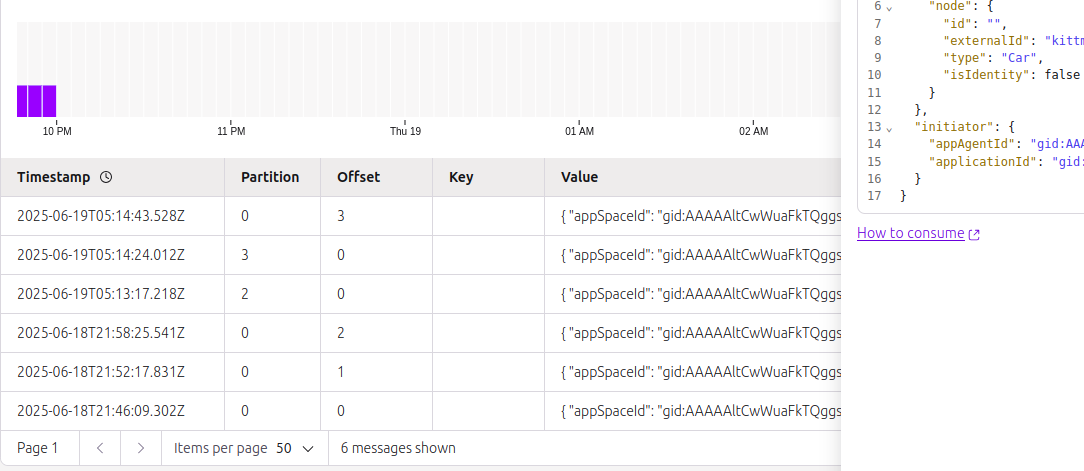
- Perform an operation that matches your route (e.g., capture a node).
- Check your provider (Kafka topic, Azure Event Grid, Azure Service Bus, Google Cloud Pub/Sub) for the event message.
- Verify the message conforms to the CloudEvents standard.
Checking a provider's health: last_error
Creating or updating an event sink does not test the connection synchronously; POST /configs/v1/event-sinks answers 201 as soon as the body is valid. The platform checks each provider afterwards, and records the outcome on the provider object. Read it back with GET /configs/v1/event-sinks/{id} (or the list endpoint with full_fetch=true): every provider block, whether kafka, azure_event_grid, azure_service_bus, or pubsub, carries an optional last_error field.
{
  "providers": {
    "kafka-provider": {
      "kafka": {
        "brokers": [
          "broker-1.example.com:9092"
        ],
        "topic": "indykite-events",
        "username": "user1",
        "disable_tls": false,
        "tls_skip_verify": false,
        "last_error": "the endpoint could not be reached"
      }
    }
  }
}
The field is absent while the provider is healthy. When present it holds one of three fixed messages; the underlying network or transport detail is deliberately not exposed:
| last_error | Meaning and fix |
the endpoint could not be reached |
DNS, dial, TLS, or timeout failure on the way to the broker or endpoint. Check the host and port, that the endpoint is reachable from the public internet, and the TLS settings (disable_tls, tls_skip_verify for Kafka). |
invalid access key or topic endpoint |
The endpoint answered but rejected the credentials or the target: wrong access_key or topic_endpoint (Event Grid), wrong connection_string or queue_or_topic_name (Service Bus), wrong username / password or topic (Kafka), wrong credentials_json or topic_name (Pub/Sub). |
the endpoint reported a server error |
The endpoint itself failed. Check the provider's own status and retry. |
A provider with a last_error is not retried on its own: every route pointing at it is skipped and receives no events until the sink is updated. Any PUT /configs/v1/event-sinks/{id} clears last_error on all providers of the sink and triggers a fresh check with the new configuration. After correcting the settings, read the sink again a little later: an absent field means the check passed, a present one names the remaining problem.
Next Steps
- Terraform examples: Terraform Configurations
- REST API reference: Event Sink API
- Full examples: Developer Hub Resources