
Audit Signing configuration
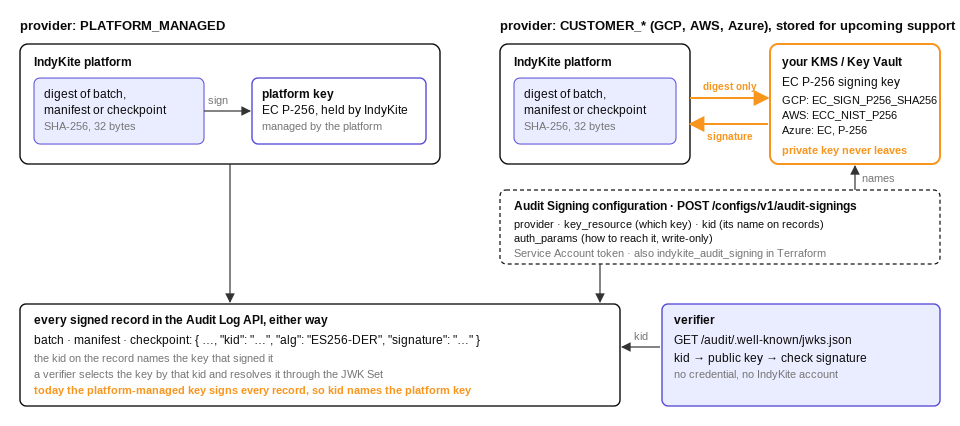
An Audit Signing configuration declares who manages the key that signs a project's audit records: every batch, manifest and checkpoint the Audit Log API serves carries a signature and the kid of the key that made it. Only the platform-managed key signs today; customer-managed configurations are stored for the upcoming support.
This Terraform configuration shows the four forms of the indykite_audit_signing resource:
1. PLATFORM_MANAGED: the platform holds the key; only name, project_id and key_provider are needed.
2. CUSTOMER_GCP_KMS: a crypto key version in Google Cloud KMS, identified by its full version resource name.
3. CUSTOMER_AWS_KMS: an asymmetric signing key in AWS KMS, identified by its key ARN.
4. CUSTOMER_AZURE_KEY_VAULT: a key in Azure Key Vault, identified by its key identifier URI.
It closes with the indykite_audit_signings data source, which reads configurations back by exact name.
Use case
Scenario: a compliance team wants the audit trail of a production project signed with a key the company controls, and wants that choice versioned with the rest of the project's infrastructure.
- The team creates an EC P-256 signing key in its own KMS and grants the platform permission to sign with it.
- The Terraform module declares the indykite_audit_signing resource with the key's identifier in key_resource, a kid the verifiers will look for, and the access material in auth_params. The platform does not prescribe the auth_params key names; the example follows each cloud's own guidance for third-party access (an IAM role with an external ID on AWS, a service account on Google Cloud) and keeps every value under the 256-character limit.
- Rotating the key is a change to key_resource and kid; verifiers tell old signatures from new ones by the kid on each record.
- auth_params values are write-only: the API never returns them, so Terraform keeps them in state and reconciles only the set of keys. Keep them in sensitive variables.
Requirements
- ServiceAccount credentials created in the IndyKite Hub for your organization (the provider reads them from the credentials file).
- The project GID for project_id (and app_space_id on the data source).
- For a customer-managed provider: an asymmetric EC P-256 signing key (ECDSA with SHA-256) in Google Cloud KMS, AWS KMS or Azure Key Vault, and credentials that allow the platform to sign with it and read its public key. The key is never exported.
- IndyKite Terraform provider 0.49.0 or later, the release the example pins in required_providers. The indykite_audit_signing resource and the indykite_audit_signings data source exist since 0.42.0, with key_provider required since 0.43.0; the Audit value of api_permissions on indykite_application_agent since 0.46.0.
Steps
1. Pick the resource example for your provider and delete the other resource blocks: a project holds exactly one Audit Signing configuration, so the example's three resources point at three different projects and a second one in the same project is refused with 409. Retarget the data source's filter and depends_on to the resource you kept, or remove the data source and its output, and drop the input variables your example no longer uses.
2. For a customer-managed key, create the key in your KMS and put its identifier in key_resource, choose a kid, and pass the access material through sensitive variables into auth_params.
3. Apply the configuration. The read-only attributes id, app_space_id, customer_id and the timestamps are filled by the platform.
4. Confirm with the data source, or with GET /configs/v1/audit-signings/{name}?project_id=<gid>: key_resource and kid come back, auth_params values come back empty.
5. Read the project's trail with the Audit Log API: the kid on every batch, manifest and checkpoint names the key that signed it, and GET /audit/.well-known/jwks.json publishes the matching public keys.
Four forms of the Audit Signing configuration (platform-managed, Google Cloud KMS, AWS KMS, Azure Key Vault), the sensitive variables that carry the access material, and the data source that reads a configuration back by name.
terraform {
  required_providers {
    indykite = {
      source  = "indykite/indykite"
      version = ">= 0.49.0" # or a later release; indykite_audit_signing needs 0.43.0 or later
    }
  }
}

# indykite provider integrates IndyKite platform with Terraform scripting.
# Provider for now does not support any parameters and all is set within service account credential file.
provider "indykite" {}

# A project holds exactly one Audit Signing configuration: a second one in the
# same project is refused with 409 "audit signing config already exists in project".
# The three examples below therefore target three different projects; in your own
# module keep one indykite_audit_signing block per project and edit it to change
# provider or key.

# Example 1: platform-managed signing key.
# Only PLATFORM_MANAGED is used for signing today; CUSTOMER_* configurations are
# stored for the upcoming customer-managed key support.
# key_provider is always required; key_resource, kid and auth_params are only
# needed for the CUSTOMER_* providers.
resource "indykite_audit_signing" "platform_managed" {
  name         = "terraform-audit-signing"
  display_name = "Audit signing, platform-managed key"
  project_id   = "gid:AAAAAmluZHlraURlgAABDwAAAAA" # your project GID
  key_provider = "PLATFORM_MANAGED"
}

# Example 2: customer-managed key in Google Cloud KMS.
# key_resource is the full crypto key VERSION resource name (ending in
# /cryptoKeyVersions/<n>), and the key version must use the EC_SIGN_P256_SHA256
# algorithm. kid is the name a record signed with this key carries.
# The service account named in auth_params needs cloudkms.cryptoKeyVersions.useToSign
# and cloudkms.cryptoKeyVersions.viewPublicKey on that key, and the platform's identity
# (IndyKite provides it) must be allowed to act as that account, for example through
# roles/iam.serviceAccountTokenCreator on it. Each auth_params value is
# capped at 256 characters, so a key file or a PEM private key cannot be passed here;
# the provider's own example uses credentials_json = file(...), which exceeds that limit.
resource "indykite_audit_signing" "gcp_kms" {
  name         = "terraform-audit-signing-gcp"
  display_name = "Audit signing with Cloud KMS"
  description  = "Audit records are signed with a key hosted in the customer's Cloud KMS"
  project_id   = "gid:AAAAAmluZHlraURlgAABDwAAAAE" # a second project: one configuration per project
  key_provider = "CUSTOMER_GCP_KMS"
  key_resource = "projects/my-project/locations/europe-west1/keyRings/audit/cryptoKeys/signing/cryptoKeyVersions/1"
  kid          = "audit-signing-2026"
  auth_params = {
    client_email = "audit-signer@my-project.iam.gserviceaccount.com"
  }
}

# Example 3: customer-managed key in AWS KMS.
# key_resource is the key ARN: the region segment of the ARN selects the KMS
# region. The key must be an ECC_NIST_P256 asymmetric signing key (ECDSA_SHA_256),
# and the principal used needs kms:Sign and kms:GetPublicKey on it.
# Prefer the key ARN over an alias so that kid always names one fixed key.
# The platform does not prescribe the auth_params key names. This example uses
# the IAM role pattern AWS recommends for third-party access: a role that trusts
# the platform's account, with an external ID in its trust policy. The provider's
# published example shows access_key_id / secret_access_key instead; both forms
# fit the 256-character limit on each value.
resource "indykite_audit_signing" "aws_kms" {
  name         = "terraform-audit-signing-aws"
  display_name = "Audit signing with AWS KMS"
  project_id   = "gid:AAAAAmluZHlraURlgAABDwAAAAI" # a third project: one configuration per project
  key_provider = "CUSTOMER_AWS_KMS"
  key_resource = "arn:aws:kms:eu-west-1:123456789012:key/1234abcd-12ab-34cd-56ef-1234567890ab"
  kid          = "audit-signing-aws"
  auth_params = {
    role_arn    = var.audit_signer_role_arn
    external_id = var.audit_signer_external_id
  }
}

# CUSTOMER_AZURE_KEY_VAULT follows the same shape: key_resource is the Key Vault
# key identifier URI of an EC P-256 key (https://<vault>.vault.azure.net/keys/<key>),
# kid names it on every signed record, and auth_params carries the access material
# your tenant requires.

# auth_params values are write-only: the API never returns them, so Terraform
# keeps the configured values in state and only reconciles the set of keys.
# Keep the secrets in variables or a secret store, never in the module itself.
variable "audit_signer_role_arn" {
  type = string
}
variable "audit_signer_external_id" {
  type      = string
  sensitive = true
}

# Read a configuration back by exact name. key_resource and kid are returned
# in clear; auth_params comes back with its keys only.
data "indykite_audit_signings" "platform_managed" {
  app_space_id = "gid:AAAAAmluZHlraURlgAABDwAAAAA" # your project GID
  filter       = [indykite_audit_signing.platform_managed.name]
  depends_on   = [indykite_audit_signing.platform_managed]
}

output "audit_signing_provider" {
  value = data.indykite_audit_signings.platform_managed.audit_signings[0].key_provider
}