Back to all tutorials
Agent Gateway

Follow a delegation chain across agents: Agent Gateway with the IndyKite Token Service

Send one prompt through three Agent Gateways - orchestrator, retriever, MCP server - and watch the delegation chain grow hop by hop, with delegation tokens minted by the IndyKite Token Service and users authenticated by an external identity provider, in the ibac-demo reference app.

This tutorial is grounded in the ibac-demo reference application. A fictional bank, CanBank, gives its staff and customers a console and a set of AI agents: an orchestrator, a retriever, a weather agent and an analyst. Every agent sits behind its own IndyKite Agent Gateway (IAG), and the agents reach the IndyKite MCP server through one more gateway. One prompt therefore crosses three gateways in a row, and each of them decides on its own whether this person may come this way.

What makes that possible is the delegation chain: a token that says "this person, through this agent, then this one, then this one". In this tutorial the chain is written by the IndyKite Token Service (ITS), a small service you run next to the gateways. People and agents are still authenticated by an external identity provider (IdP) of your choice; the demo ships wired to Auth0, and any OAuth 2.0 provider that issues JWT access tokens fits.

How this tutorial differs from the other two gateway tutorials

The three tutorials use the same gateway. They differ in who mints the delegation token and in what they focus on. Pick the one that matches your setup:

MCP server with external token exchange This tutorial
Who mints the delegation token Your IdP, with its OAuth 2.0 token exchange (RFC 8693). The IndyKite Token Service, which you run yourself.
What your IdP must offer Token introspection, the client credentials grant and token exchange. Token introspection and the client credentials grant. No token exchange.
What the protected agent or server receives One token: the gateway replaces Authorization with the delegation token. Two tokens: the person's own token in Authorization and the delegation token in X-IK-Token.
Token Introspect configurations in the project For one issuer: the IdP. For two issuers: the IdP (the person's token) and the Token Service (the delegation token).
The intent of a prompt in the token Not available. Available: with IBAC on, the Token Service writes it into act.intent.
Focus One gateway in MCP proxy mode in front of a third-party MCP server. A chain of gateways, A2A then MCP, and the chain as a rule in policies.

The third tutorial, Intent-based access control with Agent Gateway, also uses the Token Service. It concentrates on what a gateway does with the meaning of a prompt, with stand-in agents. This one concentrates on the route of a prompt, with real agents, and only switches intent checks on at the end.

What you will have at the end

  1. A clear picture of the two ways a gateway gets a delegation token, and when to choose which.
  2. An understanding of one prompt crossing three gateways: the person's token, the three delegation tokens and the three admission decisions.
  3. An external IdP prepared with three audiences, a login client and one machine-to-machine client per gateway.
  4. A provisioned IndyKite project: people, agents, workflows, policies and the two Token Introspect configurations.
  5. A running stack: a console, four agents, five gateways and the Token Service.
  6. Prompts sent as different people, with every decision of every hop on screen.
  7. A knowledge query and a policy of your own that answer only when the request came through the full chain.

Prerequisites

  • An IndyKite organization and a Service Account token, to provision a project with the instant-stack app and its ibac dataset (chapter 4).
  • An external OAuth 2.0 IdP you can configure: users, a login client for the console, one machine-to-machine client per gateway, and JWT access tokens with an audience (chapter 3).
  • A Google Gemini API key for the agents' model, or an Ollama instance reachable from Docker.
  • Docker and Docker Compose v2, and make. The gateways and the Token Service run the indykite/agent-gateway and indykite/token-service images with one platform release tag from hub.docker.com/u/indykite.

Who this tutorial is for

  • Developers building agents that call other agents and who need every hop to know on whose behalf it works.
  • Platform and security engineers whose identity provider has no token exchange, or who want the delegation tokens issued by a service they control.
  • AI agents consuming this doc as a runbook - every chapter uses explicit service names, ports, file paths and commands.

Demo topology at a glance

Everything runs locally with Docker Compose; only the IndyKite platform, your IdP and the model are remote.

Service Role Port
console Web UI: login at the IdP, the CanBank app, a prompt box and the audit terminal that shows every decision. 3300
orchestrator-iag → orchestrator The entry gateway and the agent that talks to the user and delegates to the other agents. 9881
retriever-iag → retriever Answers graph and authorization questions as a client of the IndyKite MCP server. 9882
weather-iag → weather Weather from a public API, or from the graph for the bank's headquarters. 9884
analyst-iag → analyst Like the retriever, with several MCP servers behind it (chapter 8). 9885
mcp-iag A gateway in MCP mode in front of the IndyKite MCP server. Every agent's MCP call goes through it. 9886
token-service The IndyKite Token Service: mints the delegation token of every hop. 9102
auth0-bridge A small adapter between the gateways and the demo's IdP (chapter 3). Not needed with a provider that offers token introspection itself. internal only

Four optional groups of services are switched on with Compose profiles and are presented in chapter 8: the Intent Agent (intent), a Google Drive MCP server (drive), a graph-filtered ERP (erp) and a CRM agent (crm).

Related reading

1

Chapter 1

Two ways to get a delegation token

What a delegation token is, the two places a gateway can get one - your identity provider's token exchange or the IndyKite Token Service - and what changes for the agents and the project.

Chapter 1: Two ways to get a delegation token

An agent that works for a person needs to prove two things at once: who the person is and which agents the request passed. A person's access token only proves the first. The Agent Gateway therefore gets a second token for every request it forwards, the delegation token:

{
  "iss": "<the issuer of delegation tokens>",
  "sub": "<the person>",
  "aud": "ibac-console",
  "act": {
    "sub": "<the retriever gateway>",
    "act": {
      "sub": "<the orchestrator gateway>"
    }
  }
}

Read it from the inside out: the person's request first passed the orchestrator's gateway, then the retriever's. sub never changes; each gateway adds itself as the outermost act. That nested list is the delegation chain. The IndyKite platform reads it from the token and hands it to your policies as $ik_token.act_chain, oldest hop first.

The two issuers a gateway can use

To make such a token, somebody has to take the person's token and the gateway's own token and sign a new one. The gateway can ask one of two parties:

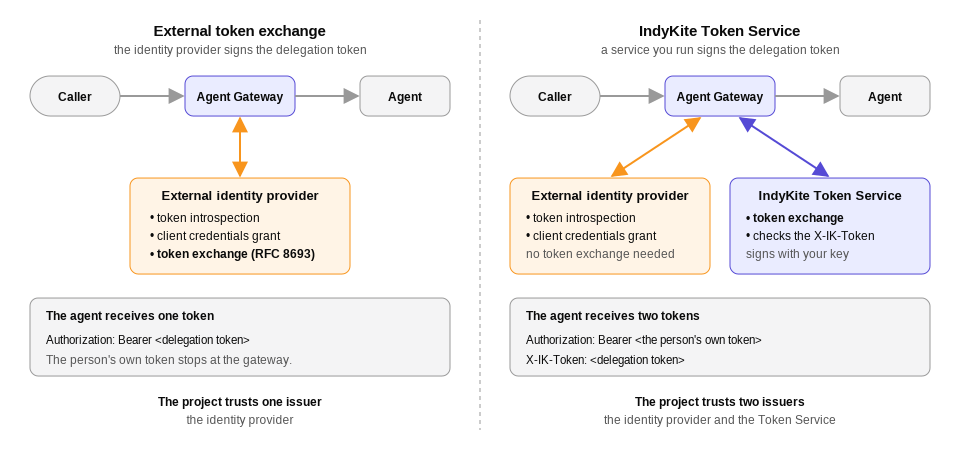
Two ways a gateway gets a delegation token: from the token exchange of the external identity provider, or from the IndyKite Token Service.
External token exchange IndyKite Token Service
Who signs the delegation token Your IdP, at its OAuth 2.0 token exchange endpoint (RFC 8693). The Token Service, a container you run next to the gateways, with a key you generate.
What the IdP still does Everything: login, introspection, the gateways' client credentials tokens, and the exchange. Login, introspection and the gateways' client credentials tokens. It never sees a delegation.
What the gateway forwards Authorization: the delegation token. The person's own token stops at the gateway. Authorization: the person's own token. X-IK-Token: the delegation token.
How the chain grows The next gateway receives the delegation token as the caller's token and exchanges it again at the IdP. The next gateway receives both headers, checks the X-IK-Token at the Token Service and asks it for a new one with itself added.
What the project must trust One issuer: the IdP. Two issuers: the IdP for the person's token, the Token Service for the delegation token.
Gateway settings The identity_provider section with its exchange endpoint. The identity_provider section and a token_service section.
Shown in Protect an MCP server with Agent Gateway and external token exchange This tutorial

When to choose the Token Service

  • Your IdP has no token exchange, or you cannot change how it nests the act claim. The Token Service asks nothing of the IdP beyond the tokens it already issues.
  • The agents need the person's own token as well as the chain, for example to call an API that only accepts tokens of your IdP.
  • You want the intent of the prompt inside the token. With intent-based access control on, the Token Service writes it into act.intent (chapter 8). The IdP exchange has no place for it.
  • You want the delegation keys in your hands. The service signs with a key you generate; the platform validates the tokens with the public half and never calls the service.

Stay with the external exchange when your IdP already offers it and one issuer for every token is what you want. The decisions the gateway takes - who the caller is, whether they may come this way, which tools they may use - are the same in both cases.

One rule: the same choice on the whole route

Every gateway of a route must work the same way. A gateway that uses the IdP exchange replaces Authorization and does not pass an X-IK-Token on, so the chain would stop there. In this demo all five gateways, A2A and MCP alike, share one settings block that points to the Token Service (chapter 5).

What the gateway does and does not do in this demo

  • It authenticates every caller: the person's token is introspected at the IdP, an incoming X-IK-Token at the Token Service.
  • It resolves the person to a node of the graph with ContX IQ whoami.
  • It asks AuthZEN one admission question per hop: may this person reach this agent through this chain (chapter 2).
  • In front of the MCP server it also limits the tools a caller sees and may call (chapter 6).
  • It does not check the intent of a prompt until you switch that on (chapter 8).
  • It does not decide what data a tool returns. That stays with the policies of the platform, which read the same chain (chapter 7).
2

Chapter 2

One prompt, three hops

Follow the prompt 'who am I' from the console through the orchestrator, the retriever and the MCP gateway: the tokens on each hop, the delegation chain as it grows, and the one admission question every gateway asks.

Chapter 2: One prompt, three hops

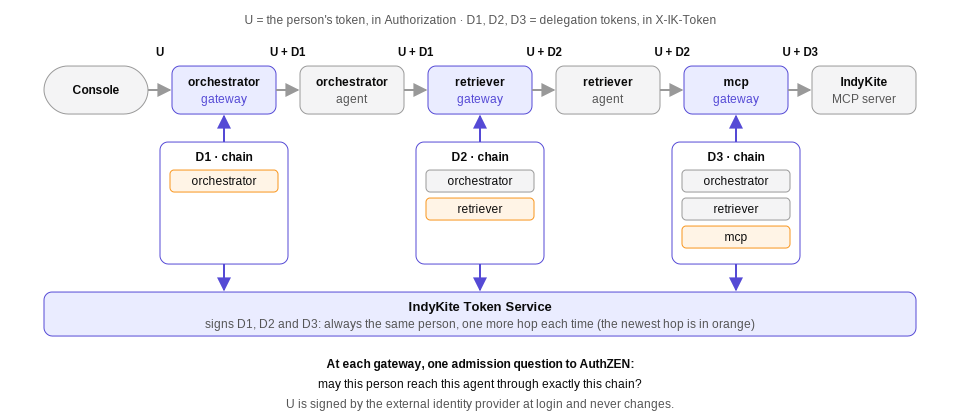
Millicent, a CanBank employee, logs in to the console and types "who am I". The answer comes from the graph, through the IndyKite MCP server. To get there the prompt crosses three gateways, and each one adds itself to the chain:

One prompt crosses three gateways. Each gateway keeps the person's token in Authorization and asks the Token Service for a delegation token with one more hop in X-IK-Token.

The tokens

Four tokens are involved. Only the first comes from the identity provider:

Token Signed by Says Travels in
U, the person's token The external IdP, at login "This is Millicent", for the audience ibac-console. Authorization, unchanged on every hop
D1 The Token Service "Millicent, through the orchestrator." Chain: [orchestrator] X-IK-Token, from the first gateway to the orchestrator and on to the second gateway
D2 The Token Service "Millicent, through the orchestrator, then the retriever." Chain: [orchestrator, retriever] X-IK-Token, from the second gateway to the retriever and on to the MCP gateway
D3 The Token Service "Millicent, through the orchestrator, the retriever, then the MCP gateway." Chain: [orchestrator, retriever, mcp] X-IK-Token, from the MCP gateway to the IndyKite MCP server

Each gateway also holds a token of its own, obtained from the IdP with the client credentials grant and reused until shortly before it expires. That token is what proves to the Token Service which gateway is asking, and its subject is the name the gateway has in the chain.

What every gateway does

The three gateways run the same steps. Only the length of the chain differs:

  1. Check the person's token. The gateway introspects U at the IdP. No token, or an inactive one, ends in 401.
  2. Check the incoming chain. When the request carries an X-IK-Token, the gateway introspects it at the Token Service. The first gateway of a route receives none.
  3. Ask the Token Service for the next token. The gateway sends two tokens: as the subject, the person's token on the first hop and the incoming delegation token on every later hop; as the actor, its own token. It gets a new delegation token back: the same person, the same chain, plus this gateway as the newest hop.
  4. Resolve the person. ContX IQ whoami turns U into a node of the graph: type Person, id the subject of the token.
  5. Ask the admission question. One AuthZEN evaluation, described below. false ends in 403.
  6. Write the audit record of the decision.
  7. Forward. Authorization still holds U; X-IK-Token holds the new delegation token.

The agents do no token work. The orchestrator and the retriever simply copy both headers onto their own outgoing call, and the next gateway takes it from there.

The same prompt, hop by hop

console          ── U ──────────▶ orchestrator-iag   chain asked: [orchestrator]                    → D1
orchestrator     ── U + D1 ─────▶ retriever-iag      chain asked: [orchestrator, retriever]         → D2
retriever        ── U + D2 ─────▶ mcp-iag            chain asked: [orchestrator, retriever, mcp]    → D3
mcp-iag          ── U + D3 ─────▶ IndyKite MCP       the knowledge query get-self runs → "You are Millicent…"

The one admission question

At every hop the gateway sends a single request to POST /access/v1/evaluation, with U in Authorization and the new delegation token in X-IK-Token:

{
  "subject":  { "type": "Person", "id": "<subject of the person's token>" },
  "action":   { "name": "CAN_TRIGGER" },
  "resource": { "type": "Agent", "id": "<subject of this gateway's own token>" }
}

In words: may this person reach this agent, coming the way they came? The gateway compares nothing itself. One KBAC policy of the project, person-can-reach-agent, answers for every gateway:

MATCH (subject:Person)-[:WORKS_IN|CAN_TRIGGER*..3]->(wf:Workflow)
MATCH (wf)-[rels:INVOKES*]->(resource:Agent)
WHERE ALL(r IN rels WHERE r.workflow_name = wf.external_id AND endNode(r):Agent)
  AND [r IN rels | endNode(r).external_id] = $ik_token.act_chain

Line by line:

  • Line 1 finds a workflow the person can trigger, either directly (Person -CAN_TRIGGER-> Workflow) or through their department (Person -WORKS_IN-> Department -CAN_TRIGGER-> Workflow).
  • Lines 2 and 3 walk that workflow's path of agents, relationship by relationship, up to the agent the gateway asks about.
  • Line 4 requires that path to be exactly the chain of the delegation token, in the same order.

The workflows in the graph

A workflow is a node, and its route is a path of INVOKES relationships that each carry the workflow's name. The route of this chapter is wf1:

(Department support) ─CAN_TRIGGER─▶ (Workflow wf1) ─INVOKES─▶ (Agent orchestrator) ─INVOKES─▶ (Agent retriever) ─INVOKES─▶ (Agent mcp)
                                                    workflow_name: wf1          workflow_name: wf1          workflow_name: wf1
Workflow Path of agents Who can trigger it
wf1 orchestrator → retriever → mcp The support and trading departments, and a few people directly.
wf2 orchestrator → weather → mcp The support department.
wf3 analyst → mcp Millicent only.

Because the policy compares the whole path at every hop, three things follow without any setting on the gateways:

  • A route cannot start in the middle. A person's token sent straight to retriever-iag gives the chain [retriever]. No workflow has that path, so the answer is 403.
  • A route cannot borrow an agent. The chain [orchestrator, weather, mcp] is fine for someone who can trigger wf2 and refused for someone who can only trigger wf1, although both workflows end at the same MCP gateway.
  • Access is data. Adding or removing one CAN_TRIGGER relationship changes who gets through. Nothing is restarted.

A gateway keeps each decision for a short time per person and chain, so the follow-up requests of a conversation do not each cost a platform call.

3

Chapter 3

Prepare the external identity provider

What the gateways and the Token Service need from your identity provider: three audiences, a login client for the console, one machine-to-machine client per gateway, and the users of the demo.

Chapter 3: Prepare the external identity provider

With the Token Service signing the delegations, the identity provider (IdP) has three plain jobs: log people in, give every gateway a token of its own, and say whether a token is valid. No token exchange is configured at the IdP. This chapter lists what to create; the names are the ones the dataset and the compose file expect, so keep them unless you change both.

1. Three audiences

An audience says what a token is for. Create three, as APIs or resource identifiers of your IdP:

Audience Carried by Checked by
ibac-console The person's token (the console asks for it at login) and every delegation token. The gateways, the Token Service and the project's two Token Introspect configurations.
ibac-agents The gateways' own tokens. The Token Service: it accepts a token as "the gateway that asks" only with this audience.
intent_agent The token the entry gateway presents to the Intent Agent. The Intent Agent. Only used when you switch intent checks on (chapter 8); creating it now saves a second visit.

Using one audience, ibac-console, for the person's token and for every delegation keeps the project simple: both tokens are validated for the same audience on every hop.

2. The clients

Client Kind Settings
console Web application: authorization code flow with PKCE Callback URL http://localhost:3300/auth/callback, logout URL http://localhost:3300/. Its id and secret go to CHATBOT_IDP_CLIENT_ID and CHATBOT_IDP_CLIENT_SECRET.
orchestrator, retriever, weather, analyst, mcp Machine-to-machine, one per gateway: client credentials grant Allowed to get tokens for ibac-agents and intent_agent. Ids and secrets go to <AGENT>_IDP_CLIENT_ID and <AGENT>_IDP_CLIENT_SECRET.
drive, erp, crm Machine-to-machine, one each Same settings. Only needed for the optional profiles of chapter 8.

3. Note the subject of every gateway client

This is the step that ties the IdP to the graph. A client credentials token has a subject, and that subject is the gateway's name everywhere:

  • in the delegation chain: it is the act.sub the Token Service writes for the hop;
  • in the graph: it is the external_id of the gateway's Agent node, which the admission policy compares with the chain;
  • in the audit records of the gateways.

Get one client credentials token per gateway client, read its sub claim and write the value down: chapter 4 gives each one to the dataset. With the demo's provider the subject is the client id followed by @clients. If the value in the graph and the value in the token differ by one character, every request ends in 403.

4. The people

Every login of the demo, staff and customer alike, is a Person node whose external_id is the subject of that user's token. The cast of the dataset is listed in the demo script (usecases/ibac/DEMO_SCRIPT.md). For your own tenant, create the users you want to log in as, read each user's subject, and use those values as the external_id of the matching Person nodes of the dataset before you provision it.

The person's token carries sub, aud and scope; no other claim is needed. It must be a JWT: the Token Service and the platform verify it offline against the IdP's published keys. If your IdP issues an opaque token when no audience is requested, the console's request for ibac-console is what makes it a JWT.

5. Introspection, and the demo's bridge

A gateway validates the person's token by token introspection (RFC 7662) and gets its own token from the client credentials endpoint, both under one base URL (identity_provider.base_url). An IdP that offers both needs nothing more: point the gateways at it.

The demo's provider publishes no introspection endpoint, so the stack includes a small adapter, auth0-bridge. It answers introspection by verifying the JWT against the provider's keys, and passes client credentials requests through to the provider. The gateways name the ibac-agents audience in that request themselves, with identity_provider.client_credential_audience, because the provider refuses a grant without one. It holds no client list and no secret of its own. With another provider, remove the bridge and set the gateways' identity provider base URL to your IdP.

What you should have now

  • The IdP's issuer, exactly as it appears in the iss claim of a token (a trailing slash counts).
  • The console client's id and secret.
  • For each gateway: client id, client secret, and the sub of its token.
  • The subject of each user you will log in as.
4

Chapter 4

Create the signing key and provision the project

Generate the Token Service's signing key, give its public half to the project, and provision the ibac dataset: people, agents, workflows, policies and the two Token Introspect configurations.

Chapter 4: Create the signing key and provision the project

The IndyKite project has to trust two kinds of token: the person's token from your IdP and the delegation token from your Token Service. It trusts the second through the public half of a key you generate. So the key comes first, the provisioning second.

1. Generate the Token Service's signing key

The Token Service signs with an RSA key in JWK format. Any tool that produces one works; this short script uses the PyJWT library (pip install "pyjwt[crypto]"):

import json, uuid
from cryptography.hazmat.primitives.asymmetric import rsa
from jwt.algorithms import RSAAlgorithm
key = rsa.generate_private_key(public_exponent=65537, key_size=2048)
names = {"alg": "RS256", "use": "sig", "kid": uuid.uuid4().hex}
private = {**json.loads(RSAAlgorithm.to_jwk(key)), **names}
private.pop("key_ops", None)
public = {k: private[k] for k in ("kty", "n", "e", "alg", "use", "kid")}
print("PRIVATE - for token-service.yaml only:")
print(json.dumps(private))
print("PUBLIC - TOKEN_SERVICE_PUBLIC_JWK:")
print(json.dumps(public))

It prints two lines of JSON:

Value Goes to Who reads it
The private JWK idp.signing_keys in token-service/token-service.yaml (chapter 5). Nowhere else. The Token Service, to sign.
The public JWK (kty, n, e, alg, use, kid) TOKEN_SERVICE_PUBLIC_JWK in instant-stack's .env (step 2). The IndyKite platform, to verify. It never calls your Token Service.

Treat the private JWK like any private key: keep it out of commits, images, logs and screenshots. If you generate a new key later, the project needs the new public half too.

2. Provision the project

The graph, the policies and the configurations are the ibac dataset of the instant-stack app. In instant-stack's own .env, beside the Service Account token and organization it needs for any dataset, set:

DATASET=ibac
# The issuer of your identity provider, exactly as in the iss claim of its tokens.
AUTH0_ISSUER=https://<your-idp-domain>/
# The token subject of each gateway's client (chapter 3, step 3).
AUTH0_SUB_ORCHESTRATOR=<client subject>
AUTH0_SUB_RETRIEVER=<client subject>
AUTH0_SUB_WEATHER=<client subject>
AUTH0_SUB_ANALYST=<client subject>
AUTH0_SUB_MCP=<client subject>
AUTH0_SUB_DRIVE=<client subject>
AUTH0_SUB_CRM=<client subject>
AUTH0_SUB_ERP=<client subject>
# The public JWK printed in step 1.
TOKEN_SERVICE_PUBLIC_JWK=<public JWK>

The variable names mention the demo's provider; the values are simply your IdP's issuer and subjects. The people of the dataset are identified by the subjects of the demo's own users. To log in with users of your IdP, replace those subjects with yours in the dataset's data/ibac/nodes.json and data/ibac/relationships.json before provisioning (chapter 3, step 4).

Then start instant-stack and run Provision everything. Keep three values of its output for chapter 5:

  • the AppAgent credential (APP_TOKEN);
  • the project id (gid:…): it is part of the MCP server's path;
  • the ids of the two explain queries, which let the console draw why a decision was taken.

What the provisioning creates

Each item is something a step of chapter 2 depends on:

In the project Needed by
An AppAgent and its credential The gateways, for whoami and the admission question; the console, for its explanations.
Token Introspect configuration auth0-person-introspect: your IdP's issuer, audience ibac-console, ikg_node_type Person The person's token in Authorization: whoami, AuthZEN, ContX IQ and the MCP server.
Token Introspect configuration token-service-https-ibac-console: the Token Service's issuer, audience ibac-console, validated offline with the public JWK The delegation token in X-IK-Token: it is what lets a policy read $ik_token.
The CanBank graph: 26 Person nodes with families, departments, customers, accounts, invoices and documents The answers to the prompts.
8 Agent nodes, 11 Workflow nodes, their INVOKES paths and the CAN_TRIGGER relationships, and the policy person-can-reach-agent Admission at every gateway (chapter 2).
Tool, McpResource and Skill nodes, attached to agents with HAS relationships that name a workflow, and the person-can-use-* policies The capability checks: which tools a caller sees at the MCP gateway (chapter 6).
Knowledge queries with their ContX IQ policies, KBAC policies over the bank's data, external data resolvers and the MCP server configuration The MCP server's tools, and the chain-guarded query of chapter 7.

The two Token Introspect configurations side by side

These two are the heart of the setup with a Token Service. Both are created with Service Account credentials and both map to the same node type, because both tokens are about the same person:

POST /configs/v1/token-introspects
Authorization: Bearer <service-account-token>
{
  "project_id": "<PROJECT_GID>",
  "name": "auth0-person-introspect",
  "jwt_matcher": {
    "issuer": "https://<your-idp-domain>/",
    "audience": "ibac-console"
  },
  "offline_validation": {},
  "ikg_node_type": "Person",
  "perform_upsert": true
}
POST /configs/v1/token-introspects
Authorization: Bearer <service-account-token>
{
  "project_id": "<PROJECT_GID>",
  "name": "token-service-https-ibac-console",
  "jwt_matcher": {
    "issuer": "https://token-service.ibac-demo.local",
    "audience": "ibac-console"
  },
  "offline_validation": {
    "public_jwks": [
      "<TOKEN_SERVICE_PUBLIC_JWK>"
    ]
  },
  "ikg_node_type": "Person",
  "perform_upsert": true
}
For the person's token For the delegation token
Issuer Your IdP. The Token Service's base_url. It is an identifier and does not have to resolve, but it must start with https://.
Keys Fetched from the IdP's published keys. Given inline: the public JWK of step 1.
Arrives in Authorization X-IK-Token

With external token exchange, no configuration names a Token Service: the delegation token is signed by the IdP, so every configuration of the project has the IdP as its issuer. See the Token Introspect guide for every field.

What comes next

Chapter 5 fills the two configuration files of the demo and starts the stack.

5

Chapter 5

Configure and start the stack

Fill the Token Service's file and the demo's env file, read the settings that point every gateway to the Token Service, build the local images and start the stack.

Chapter 5: Configure and start the stack

Two files hold everything you have to fill in: the Token Service's own file and the env file of the demo. A third, shared by all gateways, is worth reading because it is where "use the Token Service" is said. Work from the demo directory:

cd a2a/ibac-demo
cp .example.env .env
cp token-service/token-service.example.yaml token-service/token-service.yaml

Both copies are gitignored. They hold client secrets, the AppAgent credential and a private key: keep them out of commits, images and screenshots.

1. The Token Service's own file

Open token-service/token-service.yaml. It answers four questions: who am I, what do I sign, who may ask, and whose tokens do I accept.

service:
  name: token-service
  port: 8102
  # The iss claim of every token this service signs.
  base_url: https://token-service.ibac-demo.local
idp:
  # The aud values a delegation token may be issued for.
  audiences:
    - ibac-console
  # Delegation tokens are short-lived: nothing revokes them.
  token_ttl: 5m
  # Written as act.type; the platform finds the actor in the graph with it.
  actor_type: Agent
  # What a gateway presents when it asks for a token.
  client_auth:
    type: client_secret_basic
    client_id: agent-gateway
    client_secret: "<a secret you choose>"
  # The PRIVATE JWK of chapter 4. The first key signs.
  signing_keys:
    - '<private JWK>'
token_introspection:
  configurations:
    # The person's token.
    auth0-subject:
      token_types:
        - subject_token
      matcher:
        type: jwt
        issuer: https://<your-idp-domain>/
        audience: ibac-console
      validation:
        offline:
          jwks_uri: https://<your-idp-domain>/.well-known/jwks.json
    # The gateways' own tokens.
    auth0-actor:
      token_types:
        - actor_token
      matcher:
        type: jwt
        issuer: https://<your-idp-domain>/
        audience: ibac-agents
      validation:
        offline:
          jwks_uri: https://<your-idp-domain>/.well-known/jwks.json

What to change:

  1. idp.signing_keys: paste the private JWK of chapter 4.
  2. idp.client_auth.client_secret: choose a secret. The same value goes to TOKEN_SERVICE_CLIENT_SECRET in .env.
  3. The issuer and the keys URL of the two token_introspection entries: your IdP, with the issuer written exactly as in its tokens.

Two things to notice. The service never calls your IdP's token endpoint: it verifies the person's token and the gateway's token offline, against the IdP's published keys, and then signs. And a token of any other issuer or audience is refused: there is no fallback entry. The template also contains an audit section that sends every exchange to the console; leave it as it is. Every field is explained in the Token Service guide.

2. The env file

Where it comes from Variables
Your identity provider (chapter 3) AUTH0_DOMAIN (the provider's domain), CHATBOT_IDP_CLIENT_ID / _SECRET (the console), and one _IDP_CLIENT_ID / _SECRET pair per gateway: ORCHESTRATOR, RETRIEVER, WEATHER, ANALYST, MCP. The three audiences keep their defaults.
IndyKite (chapter 4) INDYKITE_BASE_URL (the API URL of your region), APP_AGENT_CREDENTIALS_TOKEN, EXPLAIN_STAFF_QUERY_ID and EXPLAIN_DIRECT_QUERY_ID.
The MCP server of your project MCP_SERVER_ORIGIN (the MCP host of your region), MCP_SERVER_PATH (/mcp/v1/gid:<PROJECT_GID>, written as is, not URL-encoded) and MCP_SERVER_URL (the two joined).
Step 1 above TOKEN_SERVICE_CLIENT_ID (agent-gateway) and TOKEN_SERVICE_CLIENT_SECRET.
The model GEMINI_API_KEY and GEMINI_ENABLED=true, or OLLAMA_HOST.
You FLASK_SECRET_KEY: a random value for the console's session.
Leave for chapter 8 COMPOSE_PROFILES empty and IBAC_ENABLED=false.

3. Name the images

The gateway and the Token Service are published by IndyKite on Docker Hub. This tutorial runs one platform release tag for both, as the Token Service guide requires. In .env:

AGENT_GATEWAY_IMAGE=indykite/agent-gateway:<version>
TOKEN_SERVICE_IMAGE=indykite/token-service:<version>

Both images are built for linux/amd64; on an arm64 host they run under emulation.

4. Read how a gateway is told to use the Token Service

All gateways inherit one block, in iag-base-docker.yaml. Nothing to fill in here; this is the part that differs from a setup with external token exchange. The lines that matter, with the defaults written out:

environment:
  # --- The Token Service: where delegation tokens come from. ---
  JARVIS_TOKEN_SERVICE_BASE_URL: http://token-service:8102
  JARVIS_TOKEN_SERVICE_EXCHANGE_ENDPOINT: "oauth2/token"
  JARVIS_TOKEN_SERVICE_INTROSPECT_ENDPOINT: "oauth2/introspect"
  JARVIS_TOKEN_SERVICE_CLIENT_AUTH_TYPE: client_secret_basic
  JARVIS_TOKEN_SERVICE_CLIENT_AUTH_CLIENT_ID: ${TOKEN_SERVICE_CLIENT_ID}
  JARVIS_TOKEN_SERVICE_CLIENT_AUTH_CLIENT_SECRET: ${TOKEN_SERVICE_CLIENT_SECRET}
  JARVIS_TOKEN_SERVICE_AUDIENCE: ibac-console
  # --- The identity provider: the person's token and the gateway's own token. ---
  JARVIS_IDENTITY_PROVIDER_BASE_URL: http://auth0-bridge:8090
  JARVIS_IDENTITY_PROVIDER_INTROSPECT_ENDPOINT: oauth/introspect
  JARVIS_IDENTITY_PROVIDER_CLIENT_CREDENTIAL_ENDPOINT: oauth/token
  JARVIS_IDENTITY_PROVIDER_ISSUER: https://${AUTH0_DOMAIN}/
  # --- Which tokens may start a request here. ---
  JARVIS_PROTECTED_AGENT_AUTHENTICATION_AUDIENCES: ibac-console
  # --- IndyKite: who the person is, and the admission question. ---
  JARVIS_CONTX_IQ_BASE_URL: ${INDYKITE_BASE_URL}/contx-iq/v1
  JARVIS_CONTX_IQ_APP_AGENT_CREDENTIALS_TOKEN: ${APP_AGENT_CREDENTIALS_TOKEN}
  JARVIS_AUTHZEN_BASE_URL: ${INDYKITE_BASE_URL}/access/v1
  JARVIS_AUTHZEN_ACTION: CAN_TRIGGER
  JARVIS_AUTHZEN_CAPABILITIES_ENABLED: "true"
  JARVIS_AUTHZEN_CACHE_TTL: 30s
Settings What they say
JARVIS_TOKEN_SERVICE_* The presence of this section is the switch. With it, the gateway asks the Token Service for the delegation token, keeps the person's token in Authorization and forwards the delegation in X-IK-Token. Without it, the gateway uses the exchange endpoint of the identity provider.
JARVIS_TOKEN_SERVICE_AUDIENCE The audience the gateway asks the delegation for. It must be in the Token Service's idp.audiences and in the project's Token Introspect configuration.
JARVIS_IDENTITY_PROVIDER_* Where the person's token is introspected and where the gateway gets its own token. In the demo that is the bridge; with an IdP that has an introspection endpoint, it is the IdP itself.
JARVIS_PROTECTED_AGENT_AUTHENTICATION_AUDIENCES A person's token must be issued for this audience to be accepted.
JARVIS_AUTHZEN_* The action of the admission question, the capability checks (on), and how long a decision is kept.

On top of that block, each gateway adds only what makes it itself. An A2A gateway and the MCP gateway, side by side:

orchestrator-iag:
  environment:
    JARVIS_SERVICE_NAME: orchestrator-iag
    JARVIS_SERVICE_BASE_URL: http://orchestrator-iag:9881
    JARVIS_PROTECTED_AGENT_BASE_URL: http://orchestrator:7001
    JARVIS_PROTECTED_AGENT_AUTHENTICATION_CLIENT_ID: ${ORCHESTRATOR_IDP_CLIENT_ID}
    JARVIS_PROTECTED_AGENT_AUTHENTICATION_CLIENT_SECRET: ${ORCHESTRATOR_IDP_CLIENT_SECRET}
mcp-iag:
  environment:
    JARVIS_SERVICE_NAME: mcp-iag
    JARVIS_PROTECTED_AGENT_PROTOCOL: mcp
    JARVIS_SERVICE_BASE_URL: http://mcp-iag:9886${MCP_SERVER_PATH}
    JARVIS_PROTECTED_AGENT_BASE_URL: ${MCP_SERVER_ORIGIN}${MCP_SERVER_PATH}
    JARVIS_PROTECTED_AGENT_AUTHENTICATION_CLIENT_ID: ${MCP_IDP_CLIENT_ID}
    JARVIS_PROTECTED_AGENT_AUTHENTICATION_CLIENT_SECRET: ${MCP_IDP_CLIENT_SECRET}

The client id and secret are the gateway's own client of chapter 3: they are what gives each gateway a different name in the chain. The MCP gateway has one more line, JARVIS_PROTECTED_AGENT_PROTOCOL: mcp, and serves exactly one endpoint: the path of the MCP server it protects.

5. Build and start

make
docker compose up -d
docker compose ps

make builds the demo's own images: the console, the four agents and the bridge. The gateway and Token Service images are pulled.

6. Check before you prompt

The Token Service publishes its public key. It must be the one the project holds:

curl -s http://localhost:9102/.well-known/jwks.json

Compare the kid and n of the answer with the TOKEN_SERVICE_PUBLIC_JWK you provisioned in chapter 4. If they differ, every delegation token will be refused by the platform with 401: provision again with the current public key.

Then open http://localhost:3300. Use localhost, not 127.0.0.1: the address must match the callback URL registered at the IdP.

What comes next

Chapter 6 logs in, sends prompts as different people and reads what every gateway decided.

6

Chapter 6

Run the prompts and read the decisions

Log in as different people, send prompts, and read on the console's audit terminal what each gateway decided: the token of every hop, the chain, the admission answer and the tools the MCP gateway let through.

Chapter 6: Run the prompts and read the decisions

Open http://localhost:3300 and log in. The console has two parts: the CanBank app with its prompt box, and the audit terminal, where every gateway and the Token Service report what they did. This chapter is about reading that terminal.

The cards on the terminal

Card Sent by What it tells you
TOKEN The Token Service A delegation token was issued: the person as subject, the agents in act. One per hop.
AUTHORIZED / NOT AUTHORIZED, tagged admission A gateway The answer to "may this person reach this agent through this chain", with the person, the agent and the reason.
Tagged discovery The MCP gateway A list was asked for (tools/list): the set the caller is permitted, and how many entries of the server's list were kept.
Tagged invocation The MCP gateway A tool was called: allowed, or refused because it is outside the permitted set.
Tagged refused early A gateway The request was refused before any question was asked, for example for a missing or inactive token.

Under every card a chain line shows the delegation chain of that request. That line is what this tutorial is about: watch it grow.

1. One prompt, three hops, on screen

Log in as a member of the support department (Vivienne in the demo's cast) and send:

who am I

Read the terminal from top to bottom. It is chapter 2, live:

Gateway Chain line What happened
orchestrator-iag orchestrator TOKEN card, then a green admission card. The policy found wf1 behind her department.
retriever-iag orchestrator → retriever A second TOKEN card with one more hop, and a second admission card.
mcp-iag orchestrator → retriever → mcp A third TOKEN card, discovery and invocation cards for the tool the retriever chose, and the answer from the graph.

The same person, three questions, each for a different agent and with a chain one hop longer. With the explain queries configured, the why? button on a green card draws the path the policy found, for example Vivienne → support → CAN_TRIGGER → wf1.

2. Two prompts, two routes

What's the weather in London?
What's the weather at CanBank HQ?

The first is answered from a public weather API: its chain ends at weather. The second reads a node of the graph, so the weather agent calls the MCP server and the chain ends one hop further, at mcp. A different chain is a different question to the policy, which is why the graph holds a workflow path for each route.

3. Same MCP server, different tools

Compare two discovery cards of mcp-iag: the one from step 1 and the one from the headquarters weather prompt.

Route Workflow Permitted set at the MCP gateway
orchestrator → retriever → mcp wf1 ciq_execute, the AuthZEN tools and the retriever's knowledge queries.
orchestrator → weather → mcp wf2 Two tools: ciq_execute and get-hq-weather.

Nothing on the gateway names these tools. This is the capability check: for a request that lists or calls a tool, the gateway asks AuthZEN which Tool nodes the person may CAN_USE, again with the delegation token. The policy person-can-use-tool walks the same chain as the admission policy and then one step more: the agent at the end of the chain must have the tool for that workflow.

(Agent mcp) ─HAS {workflow_name: wf1}─▶ (Tool ciq_execute)
(Agent mcp) ─HAS {workflow_name: wf2}─▶ (Tool get-hq-weather)

A tools/list comes back filtered to the set. A tools/call outside it is refused with 403 and the JSON-RPC error -31403 before the server is called, and shows as a red invocation card. So the chain decides twice: whether the request gets in, and what it may use once inside.

4. A decision about data is not a gateway decision

Log in as a member of the trading department (Millicent in the cast) and ask for a stock quote, then ask the same as someone from support only:

What is the price of META?
Am I allowed to retrieve a stock quote? Check with authzen.

For support the answer is false, yet every gateway card is green. That is correct, and worth understanding:

  • The gateways decided that this person may use this route and this tool. Both are true for support and for trading.
  • The platform decided about the data: the policy person-can-retrieve-quote requires the person's department to hold CAN_RETRIEVE on the quote, and only trading does.

A question asked through the console is always about the logged-in person: the platform ties an evaluation to the subject of the token it arrives with, so asking about somebody else returns false.

5. What the gateways tell a client without the console

A gateway with a Token Service announces that the agent behind it takes a delegation token. Ask the entry gateway for the agent card it serves:

curl -s http://localhost:9881/.well-known/agent-card.json | jq .capabilities.extensions

The list contains https://indykite.com/extensions/delegated-token/v1. It is the contract behind the chain: an agent that sees it knows that the delegation arrives in X-IK-Token and must be passed on. The MCP gateway says the same in its OAuth protected resource metadata, which also tells a client where to get a token:

curl -s "http://localhost:9886/.well-known/oauth-protected-resource/mcp/v1/gid:<PROJECT_GID>" | jq .

The answer needs no token: resource is the gateway's own endpoint, authorization_servers names your IdP, and mcp_extensions lists com.indykite/delegated-token.

What comes next

So far the chain decided at the gateways. Chapter 7 uses the same chain inside a data policy, and tests it with requests you send yourself.

7

Chapter 7

The chain as a rule in your data policies

Use the delegation chain inside a ContX IQ policy and a KBAC policy, then build the chain by hand at the Token Service and see the same query answer over the full chain and refuse a shorter one.

Chapter 7: The chain as a rule in your data policies

The gateways use the chain to decide who gets in. The same chain is available to every policy of the project, because the delegation token travels all the way to the platform in X-IK-Token. A policy can therefore say: this data is only served when the request came through these agents, in this order. This protects the data even from a caller that reaches the platform some other way.

What a policy can read

Reference Value
$token.sub The person: the subject of the token in Authorization.
$ik_token.act_chain The agents of the delegation token in X-IK-Token, as a list, oldest hop first: [orchestrator, retriever, mcp].
$ik_token.act.sub, $ik_token.act.act.sub, … One hop of the chain, counted from the newest: act.sub is the last gateway, act.act.sub the one before.

The values are the subjects of the gateways' clients, the same ones the Agent nodes carry (chapter 3).

A knowledge query that needs the full chain

The dataset contains the query get-internal-documents-chained. It returns the same documents as its plain sibling get-internal-documents, with one more condition. Its ContX IQ policy:

{
  "meta": {
    "policy_version": "1.0-ciq"
  },
  "subject": {
    "type": "Person"
  },
  "condition": {
    "cypher": "MATCH (subject:Person {external_id: $token.sub})-[:WORKS_IN|CAN_ACCESS|CONTAINS*..4]->(document:Document)-[:IS_TYPE]->(taxonomy:Taxonomy {external_id: $taxonomy_external_id}) WHERE $ik_token.act_chain = ['<orchestrator subject>', '<retriever subject>', '<mcp subject>']",
    "token_filter": {
      "attribute": "$ik_token.act.act.act.sub",
      "operator": "=",
      "value": "<orchestrator subject>",
      "advice": {
        "error": "invalid_delegation_chain",
        "error_description": "Expected the console->orchestrator->retriever->mcp delegation chain"
      }
    }
  },
  "allowed_reads": {
    "nodes": [
      "subject.*",
      "document.*",
      "taxonomy.*"
    ]
  }
}

Two parts work together:

  • The token_filter is checked first, before any data is read. It requires a chain of three hops whose oldest one is the orchestrator. When it fails, the caller gets 401 with the advice you wrote, so a client learns why.
  • The WHERE of the Cypher then requires the whole list to be exactly orchestrator, retriever, mcp. A chain of three other agents passes no data.

The same idea as a KBAC policy, for a yes or no decision: person-can-disclose-document-chained allows the action CAN_DISCLOSE on a Document only over the full chain.

{
  "meta": {
    "policy_version": "2.0-kbac"
  },
  "subject": {
    "type": "Person"
  },
  "actions": [
    "CAN_DISCLOSE"
  ],
  "resource": {
    "type": "Document"
  },
  "condition": {
    "cypher": "MATCH (subject:Person)-[:WORKS_IN|CAN_ACCESS|CONTAINS*..4]->(resource:Document) WHERE $ik_token.act_chain = ['<orchestrator subject>', '<retriever subject>', '<mcp subject>']"
  }
}

Try it through the agents

Log in as someone from support and send:

Use get-internal-documents-chained to list the policy documents

The request travels console → orchestrator → retriever → mcp, the chain is complete, and the documents come back.

Try it by hand: build the chain yourself

To see the rule refuse, build chains of different lengths without the agents. This is exactly what the gateways do, one request per hop. You need a person's token (from a console login) and the client credentials of the three gateways.

1. Get each gateway's own token from your IdP, for the audience ibac-agents:

curl -s -X POST "https://<your-idp-domain>/oauth/token" \
  -d "grant_type=client_credentials" \
  -d "client_id=$ORCHESTRATOR_IDP_CLIENT_ID" \
  -d "client_secret=$ORCHESTRATOR_IDP_CLIENT_SECRET" \
  -d "audience=ibac-agents"

Repeat for the retriever and the MCP gateway. The token path is your IdP's; the one shown is the demo provider's.

2. First hop: exchange the person's token and the orchestrator's token at the Token Service.

curl -s -u "agent-gateway:$TOKEN_SERVICE_CLIENT_SECRET" -X POST http://localhost:9102/oauth2/token \
  -d "grant_type=urn:ietf:params:oauth:grant-type:token-exchange" \
  -d "subject_token=$USER_TOKEN" \
  -d "subject_token_type=urn:ietf:params:oauth:token-type:access_token" \
  -d "actor_token=$ORCHESTRATOR_TOKEN" \
  -d "actor_token_type=urn:ietf:params:oauth:token-type:access_token" \
  -d "requested_token_type=urn:ietf:params:oauth:token-type:access_token" \
  -d "audience=ibac-console"

The access_token of the answer is D1, with the chain [orchestrator].

3. Second and third hop: send the same request with the previous delegation token as subject_token and the next gateway's token as actor_token. D1 with the retriever's token gives D2; D2 with the MCP gateway's token gives D3.

4. Run the query at the platform with each token, and without one:

curl -s -i -X POST "$INDYKITE_BASE_URL/contx-iq/v1/execute" \
  -H "Authorization: Bearer $USER_TOKEN" \
  -H "X-IK-ClientKey: $APP_AGENT_CREDENTIALS_TOKEN" \
  -H "X-IK-Token: $D3" \
  -H "Content-Type: application/json" \
  -d '{"id": "get-internal-documents-chained", "input_params": {"taxonomy_external_id": "policy"}}'
X-IK-Token Chain Answer
D3 [orchestrator, retriever, mcp] 200 with the documents.
D1 [orchestrator] 401; the WWW-Authenticate header carries invalid_delegation_chain.
none no chain 401, with the same advice.
not a token unreadable Refused.

The person is the same in all four requests and is allowed to read these documents. Only the route differs. The demo's Bruno collection contains these requests ready to run, in the folder bruno/ibac-demo/chain-guard.

When to write such a rule

  • Data that only one workflow should touch: a query that an agent may run for a person, but only inside the approved route.
  • A second line of defence: the gateway's admission protects the agents; the chain rule protects the data even when a request reaches the platform without passing a gateway.

Keep one thing in mind: the rule names the agents by the subjects of their clients. Recreate a client at the IdP and the policy must be updated, exactly like the Agent node.

What comes next

Chapter 8 switches on the optional parts and lists what to check when something does not work.

8

Chapter 8

Going further and troubleshooting

Switch on intent checks so the intent of a prompt travels in the delegation token, meet the optional Drive, ERP and CRM parts of the demo, and find the cause of the usual 401, 403 and 502 answers.

Chapter 8: Going further and troubleshooting

The base stack is complete. This chapter presents what the Compose profiles add, each in a few lines, and then lists what to check when a request does not get through.

1. The intent of the prompt, inside the token

This is the option that only exists with a Token Service. With intent-based access control on, the entry gateway asks the IndyKite Intent Agent what the prompt means before it forwards it, and the Token Service writes the answer into the delegation token.

# .env
COMPOSE_PROFILES=intent
IBAC_ENABLED=true
INTENT_AGENT_IMAGE=indykite/intent-agent:<version>
docker compose up -d

What changes for one prompt at orchestrator-iag:

  1. The gateway admits the request as before, on the first delegation token.
  2. It sends the prompt to the Intent Agent and gets a list of evaluations back: subject, action, resource, in the words of your project's policies.
  3. It asks the Token Service for a second token with those evaluations. The Token Service writes them into act.intent of the newest hop.
  4. The orchestrator receives that second token in X-IK-Token. The terminal shows an INTENT card and a second TOKEN card.
{
  "sub": "<the person>",
  "act": {
    "sub": "<the orchestrator gateway>",
    "intent": [
      {
        "subject":  { "type": "Person", "id": "<the person>" },
        "action":   { "name": "CAN_VIEW" },
        "resource": { "type": "Invoice" }
      }
    ]
  }
}

From then on, every later gateway and every policy can see not only who and through which agents, but also for what. Two consequences to expect:

  • A prompt the Intent Agent cannot map onto a policy never reaches the agent. The gateway answers in its place. Greetings and web searches are refused this way, by design: the policies have no words for them.
  • The Token Service must be able to write the intent. If it cannot, every prompt with an intent ends in 502.

Run the prompts of chapter 6 with the switch off, and switch it on to study intent. The full story - the Intent Agent, the comparison of an intent with what an agent declares, x-coaz-mappings - is the subject of the intent tutorial and of the Intent-Based Access Control guide.

2. More routes: Drive, ERP, CRM

Three profiles add a gateway each. They follow the recipe of this tutorial without exception: one more client at the IdP, one more Agent node, workflows whose paths end at it. Each needs its own external account and a local image build; the demo's README has the setup.

Profile Adds What it shows about the chain
drive A Google Drive MCP server behind drive-mcp-iag (9887) The gateway protects an MCP server that knows nothing about IndyKite. One workflow per route: direct, through the analyst, or through orchestrator and analyst.
erp An invoices database behind an MCP server and erp-mcp-iag (9889) The server reads the person from the delegation token and asks AuthZEN which invoices they may see before it queries. Same prompt, different rows per person.
crm A CRM agent behind crm-iag (9888) The agent reads the person and the chain from X-IK-Token and files a case in a third-party service on that person's behalf.

To protect a third-party MCP server with external token exchange instead, follow the MCP tutorial.

3. Troubleshooting

Start with the terminal: the first red card names the gateway and the reason. Then find the symptom here.

Symptom Cause and fix
Login fails with a redirect error The console client at the IdP must list http://localhost:3300/auth/callback as callback and http://localhost:3300/ as logout URL, and you must browse to localhost.
A freshly logged-in user is not active at the gateway The person's token is not a JWT for ibac-console: the audience does not exist at the IdP, or the console did not ask for it.
401 from a gateway: the access token is not issued for this agent The aud of the person's token does not contain ibac-console. Compare the audience at the IdP with AUTH0_CONSOLE_AUDIENCE.
The gateway cannot get its own token (invalid_client) A wrong client id or secret for that gateway, or the client is not allowed the ibac-agents audience.
The Token Service refuses the first exchange (invalid_grant) A token matched no entry of token_introspection: the issuer in token-service.yaml is not written exactly as in the tokens (mind the trailing slash), or the gateway's token has no ibac-agents audience.
401 with Invalid token in X-IK-Token header from AuthZEN, ContX IQ or the MCP server The project does not trust the Token Service: its Token Introspect configuration is missing, or holds another public key. Compare with http://localhost:9102/.well-known/jwks.json and provision again (chapter 5, step 6).
401 on MCP calls for a user who logs in fine The Token Introspect configuration for the IdP is missing or its issuer differs from the token's iss, or the project's MCP server configuration is disabled.
403: the subject may not reach the agent through the delegation chain The admission policy found no workflow with this path that the person can trigger. Check, in this order: the Agent nodes' ids against the subjects of the gateways' tokens (chapter 3, step 3); the person's CAN_TRIGGER path to the workflow; that the policy person-can-reach-agent is active.
A card says the admission could not be evaluated That is not a refusal: the call to the platform failed. Check INDYKITE_BASE_URL and the AppAgent credential.
Admission is green, but the tool list is empty or a call is refused with -31403 The capability check found no permitted tool: the Tool nodes, their HAS relationships or the person-can-use-* policies are missing, or a tool's name on the server differs from its node's id. Provision the dataset again. IAG_CAPABILITY_CHECKS=false lets the lists through unfiltered.
The chain-guarded query answers invalid_delegation_chain through the agents The subjects written in the policy differ from the gateways' current subjects, or the request took another route than orchestrator → retriever → mcp.
Every prompt is a 502 with IBAC_ENABLED=true The gateway cannot reach the Intent Agent (is the intent profile on?), or the Token Service did not write the intent into the token. A 504 is the Intent Agent taking longer than INTENT_AGENT_TIMEOUT.
The reply is "Unable to extract intent from prompt." The gateway answered in place of the agent: no policy has words for this prompt. Rephrase closer to an action of your policies, or switch intent checks off for such prompts.
A change in .env has no effect A restart does not read the file again. Recreate the service: docker compose up -d --force-recreate <service>.
pull access denied for a demo image That image is built locally: run make, or the profile's own target (make new-drive-mcp, make new-erp-mcp).

To follow the services that take the decisions:

docker compose logs -f token-service orchestrator-iag retriever-iag mcp-iag

4. Stop

docker compose down

What you built

  • An identity provider that only logs people in and names the gateways; a Token Service of your own that writes the delegation chain.
  • Three gateways in a row that each ask one question, with a chain one hop longer.
  • Routes, tool sets and data rules that all read the same chain and are all data in the graph.

For every setting and status code, continue with the Agent Gateway guide and the Token Service guide.