
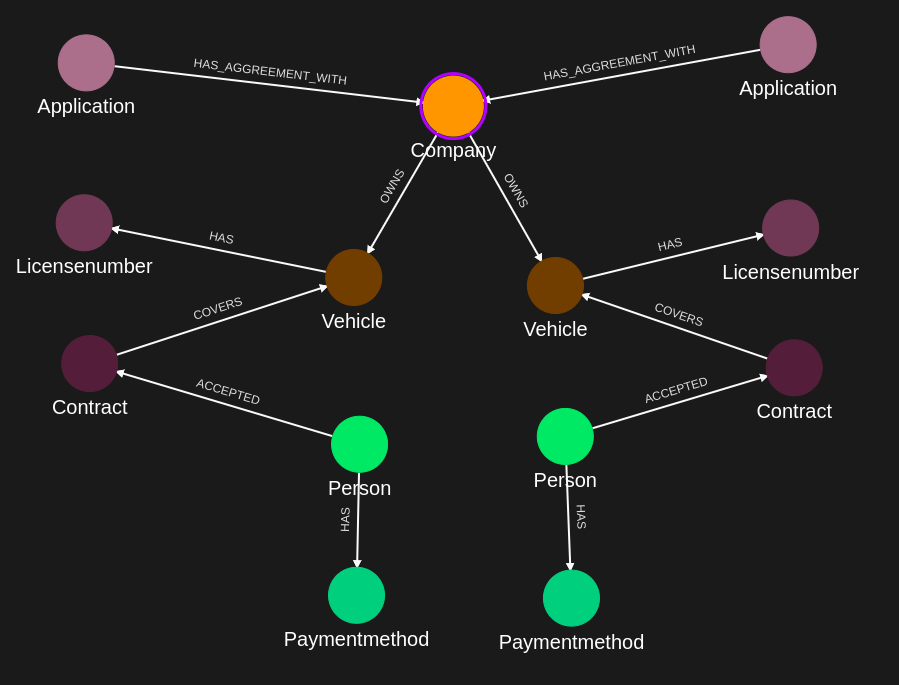
What is the IKG data schema?
The IndyKite Knowledge Graph (IKG) is a property graph. Everything you store is one of three things:
- Nodes: entities such as
Person,Car,Contract, orDevice. - Relationships: directed, typed connections between two nodes, such as
OWNSorCAN_DRIVE. - Properties: typed values attached to a node or a relationship, optionally carrying provenance metadata.
There is no schema definition step: you do not declare node types or property names up front. The schema emerges from the data you ingest. What the platform does enforce is the shape of that data - field structure, value types, and size limits - at every write, whether the data arrives through the Capture API or a ContX IQ upsert.
The platform keeps track of the schema that emerges - which node types exist, which properties they carry, how they are connected - and exposes it through the Data Schema API, so you can read your project's schema back at any time.
This guide covers the data shapes and rules, and the two APIs that work with them:
| API | What it does | In this guide |
Capture API, /capture/v1 |
Writes. Creates, updates and deletes nodes, relationships and properties, in batches. | How to send data, upserts, deletes, errors |
Data Schema API, /data-schema/v1 |
Reads. Returns the schema that emerged from what you wrote: types, properties and connections, never the data itself. | How to read the schema |
The next section shows how a Capture request is sent. The sections after it describe what a request is made of: node, relationship, property.
How do I send data with the Capture API?
The Capture API is how an application writes to the IKG. It has seven endpoints, all POST, all taking a batch of 1 to 250 entries in one JSON body:
| Endpoint | Body | What it does |
POST /capture/v1/nodes |
{"nodes": [...]} |
Creates or updates nodes and their properties. |
POST /capture/v1/relationships |
{"relationships": [...]} |
Creates or updates relationships between nodes, and their properties. |
POST /capture/v1/nodes/delete |
{"nodes": [...]} |
Deletes nodes. |
POST /capture/v1/nodes/properties/delete |
{"nodes": [...]} |
Deletes properties of nodes; the nodes stay. |
POST /capture/v1/nodes/properties/metadata/delete |
{"nodes": [...]} |
Deletes metadata of a property; the property stays. |
POST /capture/v1/relationships/delete |
{"relationships": [...]} |
Deletes relationships; the nodes stay. |
POST /capture/v1/relationships/properties/delete |
{"relationships": [...]} |
Deletes properties of relationships; the relationships stay. |
The two first endpoints are upserts; the five others are described under Capture deletes.
Who can call it
An application, with its AppAgent credential in the X-IK-ClientKey header, as is, without any prefix (see the Credentials guide). The Application Agent needs the Capture API permission. The project is derived from the credential: no project id is sent. Use the API URL of the project's region, https://eu.api.indykite.com or https://us.api.indykite.com.
A first request
One node, then one relationship that points to it. Nodes go first, because a relationship names its two nodes:
API_URL=https://eu.api.indykite.com
curl -X POST "$API_URL/capture/v1/nodes" \
  -H "X-IK-ClientKey: $CLIENT_KEY" -H "Content-Type: application/json" \
  -d '{
    "nodes": [
      { "external_id": "millicent", "type": "Person", "is_identity": true },
      { "external_id": "kitt", "type": "Car" }
    ]
  }'
curl -X POST "$API_URL/capture/v1/relationships" \
  -H "X-IK-ClientKey: $CLIENT_KEY" -H "Content-Type: application/json" \
  -d '{
    "relationships": [
      {
        "source": { "external_id": "millicent", "type": "Person" },
        "target": { "external_id": "kitt", "type": "Car" },
        "type": "CAN_DRIVE"
      }
    ]
  }'
The answer
A successful call answers 200 with the ids the platform gave to what was written, here two nodes:
{
  "results": [
    {
      "id": "gid:AAAAFezwD2VFdEHnhBmHdGqTDLU"
    },
    {
      "id": "gid:AAAAFezwD2VFdEHnhBmHdGqTDLV"
    }
  ]
}
A body that breaks a rule of this guide is refused with 400 and a list of what is wrong, see Capture errors.
Regular IKG or composite IKG
Everything in this guide applies to both. A composite IKG (data residency) adds two optional fields on a node, location and create_proxy, and answers a request that uses a location with the ids grouped per location instead of results. On a regular IKG, do not send them. The Data Residency guide has the two side by side.
What is a node?
A node represents one entity. Its JSON shape, as sent to POST /capture/v1/nodes:
{
  "external_id": "millicent",
  "type": "Person",
  "is_identity": true,
  "labels": [
    "Customer"
  ],
  "properties": [
    {
      "type": "email",
      "value": "millicent@email.com"
    }
  ]
}| Field | Required | Rules | Meaning |
external_id |
yes | 1–256 characters | Your identifier for the entity - a customer number, serial number, or any ID from your source system. |
type |
yes | 2–64 characters, PascalCase, letters only: each word is a capital letter followed by lowercase letters, as in PaymentMethod. A digit, an underscore or a run of capitals (Person2, payment_method, VIN) is refused. |
The node's kind, e.g. Person, Car. Becomes the graph label that policies and queries match on. |
is_identity |
no | boolean | true marks an identity node - a person or other actor that can appear as a subject in authorization decisions. Omit or false for plain resource nodes. |
labels |
no | array of strings, each PascalCase, letters only, by the same rule as type. A label that breaks it is refused. |
Additional labels beyond type for cross-cutting classification. |
properties |
no | array | Typed values - see properties below. |
location |
no | 2–32 characters; must be a key of the project's alias_mapping |
Composite IKG only: routes the node to a constituent database. See the Data Residency guide. |
create_proxy |
no | boolean, default false |
Composite IKG only: also writes a proxy of the node (external ID, type and location, no properties) to the global database. Ignored when no node of the request has a location. See the Data Residency guide. |
How is a node identified?
The pair (type, external_id) uniquely identifies a node. Writes are upserts: posting the same pair again updates the existing node instead of creating a duplicate. The same pair is how relationships, deletes, and policies reference a node.
The platform also assigns every node a read-only, globally unique id with a gid: prefix, returned in API responses:
{
  "results": [
    {
      "id": "gid:AAAAFezwD2VFdEHnhBmHdGqTDLU"
    }
  ]
}
You never set id yourself - your own reference is always the (type, external_id) pair.
Regular IKG or composite IKG. This results shape is the answer to every Capture request that carries no location, on any project. On a composite IKG, a request in which at least one node carries a location is answered with an object that lists the GIDs per location instead, for example {"east": ["gid:…"], "__default": ["gid:…"]}. The Data Residency guide has the two side by side.
Capture upserts: what changes and what stays
An upsert touches only what the request names. Posting a node with a subset of its properties adds or updates those properties and leaves every other property in place, so there is no need to resend the whole node to change one value. Adding a phone property to millicent, whose email and name stay as they are:
{
  "nodes": [
    {
      "external_id": "millicent",
      "type": "Person",
      "is_identity": true,
      "properties": [
        {
          "type": "phone",
          "value": "+47 900 00 000"
        }
      ]
    }
  ]
}
Changing a value: resend the property with the new value. The previous value of that property type is removed and replaced, so email ends up with one value, not two:
{
  "nodes": [
    {
      "external_id": "millicent",
      "type": "Person",
      "is_identity": true,
      "properties": [
        {
          "type": "email",
          "value": "millicent.contextsworth@email.com"
        }
      ]
    }
  ]
}
Relationships behave the same way on their (source, target, type) triple: posting the CAN_DRIVE relationship again with a since property adds it next to valid_until, posting it once more with a new valid_until value replaces the old one, and properties not mentioned stay. Property values are tracked per writing Application: an upsert from one application replaces the value that application wrote earlier, never a value written by another application. The response lists one results[].id per node or relationship in the request, whether it was created or updated.
Identity nodes vs. resource nodes
The is_identity flag splits the graph into two roles:
- Identity nodes (
is_identity: true): actors - people, service accounts, agents. These are the subjects of AuthZEN authorization decisions. - Resource nodes (default): everything else - the things being owned, accessed, or acted upon.
What is a relationship?
A relationship is a directed, typed link between two existing nodes, each referenced by its (type, external_id) pair. Its JSON shape, as sent to POST /capture/v1/relationships:
{
  "source": {
    "external_id": "millicent",
    "type": "Person"
  },
  "target": {
    "external_id": "kitt",
    "type": "Car"
  },
  "type": "OWNS",
  "properties": [
    {
      "type": "since",
      "value": "2024-01-15"
    }
  ]
}| Field | Required | Rules | Meaning |
source |
yes | external_id + type |
The node the relationship points from. |
target |
yes | external_id + type |
The node the relationship points to. |
type |
yes | max 128 characters, UPPER_SNAKE_CASE: uppercase letters, with words joined by single underscores, as in CAN_DRIVE. A lowercase letter or a digit (Owns, OWNS_2) is refused. By convention, an uppercase verb. |
The relationship's kind, e.g. OWNS, CAN_DRIVE, BELONGS_TO. |
properties |
no | array | Same type and value (or external_value) shape as on nodes, without metadata: relationship properties carry no provenance object. |
Composite IKG only. The source and target objects also take the optional location of the node. The two locations choose the database the relationship is written to: the same location on both, that location; different locations, the global database; none on either, the default database. A regular IKG needs neither field. See the Data Residency guide.
Direction matters
A relationship always runs from source to target. Person -[OWNS]→ Car and Car -[OWNS]→ Person are two different relationships. Model in the direction that reads naturally as a sentence - queries and policies can still traverse relationships in either direction, but the stored direction is part of the schema your Cypher patterns match against.
A relationship is addressed by its (source, target, type) triple: writes are upserts on that triple, and the delete endpoint identifies the relationship the same way. Like nodes, every relationship also receives a read-only platform-assigned gid: identifier, returned in the API response.
What is a property?
A property is a named, typed value on a node or relationship:
{
  "type": "email",
  "value": "millicent@email.com"
}
Property names (type) are 2 to 128 characters: letters, digits and underscores, not starting with a digit. A name with a hyphen, a space or a single character (given-name, e) is refused. The convention is snake_case or camelCase, e.g. given_name, startDate.
Which value types are supported?
| Type | JSON example |
| String | "value": "Millicent" |
| Integer | "value": 42 |
| Float | "value": 4.5 |
| Boolean | "value": true |
| Array | "value": ["red", "green"] |
Timestamps are stored as RFC 3339 strings, e.g. "2026-04-10T06:28:16Z". Keep each property a single value or a flat array; represent structured data as separate properties or - better - as separate nodes connected by relationships. If you find yourself nesting objects inside a property, that is usually a sign the object should be a node.
Value or external value?
A property carries either a stored value or an external_value - a string with the name of an External Data Resolver configuration that fetches the value from an external API at query time, so the data itself never lives in the IKG:
{
  "type": "current_value",
  "external_value": "vehicle-pricing-resolver"
}
What is property metadata?
Every node property can carry a metadata object recording where the value came from and how much to trust it (relationship properties cannot):
{
  "type": "name",
  "value": "Millicent Contextsworth",
  "metadata": {
    "assurance_level": 3,
    "source": "BRREG",
    "verified_time": "2026-04-10T06:28:16Z",
    "custom_metadata": {
      "verification_method": "passport"
    }
  }
}| Field | Rules | Meaning |
assurance_level |
1, 2, or 3 |
Confidence level of the value's verification - higher means stronger assurance. |
source |
string | The system or authority the value came from, e.g. "BRREG". |
verified_time |
RFC 3339 timestamp | When the value was last verified. |
custom_metadata |
object | Free-form key/value provenance of your own. |
Metadata is per-property, not per-node: two properties on the same node can come from different sources at different assurance levels. Trust Score profiles aggregate these fields into a queryable trustworthiness score.
Capture deletes: how do I delete data?
Each write endpoint has a delete counterpart taking the same identifiers. All are POST, take 1 to 250 entries, and answer 200 with results[].id for every entry that matched something. An entry that names a node, relationship, or property that does not exist is skipped silently: the call still succeeds and the entry simply has no result, so the length of results tells you how many entries had an effect.
| Endpoint | Entry shape | Effect |
POST /capture/v1/nodes/delete |
{"external_id", "type"} |
Removes the node, all its properties, and every relationship attached to it. The nodes at the other end of those relationships are untouched. |
POST /capture/v1/nodes/properties/delete |
{"external_id", "type", "property_types": [...]} |
Removes the named properties (1 to 250 names) from the node; the node survives. A node appears in results only when at least one named property was removed. |
POST /capture/v1/nodes/properties/metadata/delete |
{"external_id", "type", "property_type", "metadata_fields": [...]} |
Strips metadata from one property; the property and its value survive. metadata_fields takes the standard names assurance_level, source, verified_time, custom_metadata, and the keys of individual custom_metadata entries. Unknown names are ignored. |
POST /capture/v1/relationships/delete |
{"source", "target", "type"} |
Removes the relationship and its properties. Both nodes survive. |
POST /capture/v1/relationships/properties/delete |
{"source", "target", "type", "property_types": [...]} |
Removes the named properties from the relationship; the relationship survives. |
Example, removing the phone property added above and then the car itself, which also removes the CAN_DRIVE relationship pointing at it:
POST /capture/v1/nodes/properties/delete
{
  "nodes": [
    {
      "external_id": "millicent",
      "type": "Person",
      "property_types": [
        "phone"
      ]
    }
  ]
}
POST /capture/v1/nodes/delete
{
  "nodes": [
    {
      "external_id": "kitt",
      "type": "Car"
    }
  ]
}
Removing the provenance recorded on millicent's name in the complete example, while keeping the value:
POST /capture/v1/nodes/properties/metadata/delete
{
  "nodes": [
    {
      "external_id": "millicent",
      "type": "Person",
      "property_type": "name",
      "metadata_fields": [
        "assurance_level",
        "source",
        "verified_time"
      ]
    }
  ]
}
Two rules carry over from upserts. A property delete removes the value the calling Application wrote; a value the same property received from another application stays. On a composite IKG, node entries take the optional location, and so do the source and target nodes of a relationship entry: the locations choose the database, and the response lists the GIDs per location in place of results, as described in the Data Residency guide. The former use_global_db field is removed: a request that sets it to true is refused with 400. Platform-managed nodes and relationships (_TrustScore, _SAME_AS) cannot be deleted this way; they follow their profile or pipeline.
Naming rules and limits at a glance
| Element | Limit / convention | Examples |
Node type |
2–64 chars; PascalCase, letters only (enforced) | Person, PaymentMethod |
Node external_id |
1–256 chars | millicent, VIN-1982-KITT |
Node labels |
strings; PascalCase, letters only (enforced) | Customer, DigitalTwin |
Relationship type |
max 128 chars; uppercase letters and single underscores (enforced); a verb by convention | OWNS, CAN_DRIVE |
| Property name | 2–128 chars; letters, digits and underscores, not starting with a digit (enforced); snake_case or camelCase by convention | email, given_name |
Metadata assurance_level |
1, 2, or 3 |
- |
location |
2–32 chars; a key of the project's alias_mapping; composite IKG only |
east, eu-west |
| Nodes / relationships per Capture request | 1–250 | - |
A request that violates a rule or a limit of this table is refused, see Capture errors. The authoritative field reference is the public OpenAPI specification.
Capture errors
The seven Capture endpoints answer the same way:
| HTTP code | When | What to do |
200 OK |
The request was applied. A delete that names something that does not exist is also 200: the entry is skipped. |
Read the ids in the answer. |
400 Bad Request |
The body breaks a shape, naming or size rule: a missing external_id or type, a name that does not follow the naming rules, a batch outside 1–250, a field that is no longer accepted. The body carries a message and an errors[] list naming each offending field. |
Fix the body; sending it again unchanged fails the same way. |
401 Unauthorized |
The credential in X-IK-ClientKey is missing, malformed, expired or revoked, or the Application Agent lacks the Capture API permission (insufficient API access level for appAgent). |
Check the credential and the agent's api_permissions (Credentials guide). |
422 Unprocessable Entity |
The body is well formed but cannot be applied to this project: a location the project does not know, or any location on a project without a composite IKG. |
Remove the location, or use one of the project's locations (Data Residency guide). |
500 Internal Server Error |
Server-side issue. | Retry with backoff. Upserts and deletes can be sent again safely: sending the same body twice leaves the same data. |
A complete example
A minimal vehicle-rental schema: one identity node, one resource node, one directed relationship.
POST /capture/v1/nodes
{
  "nodes": [
    {
      "external_id": "millicent",
      "type": "Person",
      "is_identity": true,
      "properties": [
        {
          "type": "email",
          "value": "millicent@email.com"
        },
        {
          "type": "name",
          "value": "Millicent Contextsworth",
          "metadata": {
            "assurance_level": 2,
            "source": "id-verification",
            "verified_time": "2026-04-10T06:28:16Z"
          }
        }
      ]
    },
    {
      "external_id": "kitt",
      "type": "Car",
      "properties": [
        {
          "type": "manufacturer",
          "value": "Pontiac"
        },
        {
          "type": "seats",
          "value": 2
        }
      ]
    }
  ]
}
POST /capture/v1/relationships
{
  "relationships": [
    {
      "source": {
        "external_id": "millicent",
        "type": "Person"
      },
      "target": {
        "external_id": "kitt",
        "type": "Car"
      },
      "type": "CAN_DRIVE",
      "properties": [
        {
          "type": "valid_until",
          "value": "2027-01-01"
        }
      ]
    }
  ]
}
Resulting graph:
Person(millicent) -[CAN_DRIVE {valid_until}]-> Car(kitt)From here the data is immediately usable: a KBAC policy can grant Person the DRIVE action on Car where the CAN_DRIVE relationship exists, and a ContX IQ query can return every car a person can drive.
A ready-made sample dataset
For a slightly larger playground, two ready-to-post request bodies describe a car rental company: five Customer identity nodes (two sharing a family name, three with a driver_license carrying assurance_level and source metadata), two Car and one Motorcycle resource nodes, connected by RENT and LEASE relationships that carry a since property.
- simple-dataset-nodes.json: the body for
POST /capture/v1/nodes(8 nodes) - simple-dataset-relationships.json: the body for
POST /capture/v1/relationships(5 relationships)
API_URL=https://eu.api.indykite.com   # or https://us.api.indykite.com, matching the project's region
curl -X POST "$API_URL/capture/v1/nodes" \
  -H "X-IK-ClientKey: $CLIENT_KEY" -H "Content-Type: application/json" \
  --data @simple-dataset-nodes.json
curl -X POST "$API_URL/capture/v1/relationships" \
  -H "X-IK-ClientKey: $CLIENT_KEY" -H "Content-Type: application/json" \
  --data @simple-dataset-relationships.json
Post the nodes first, then the relationships, since a relationship references its two nodes by (type, external_id). Both calls are upserts, so the files can be re-posted without creating duplicates; re-posting restores the values they contain but does not remove properties or relationships added since, so a true reset needs the delete endpoints. Node and relationship types, property names, and metadata fields all follow the rules in this guide, so the files double as a worked example of the shapes above.
How do I read my project's data schema?
The Data Schema API returns the schema the IKG has observed for your project - every node type, its properties with their value types, its labels, and every relationship type between node types - as a JSON Graph Format (JGF) v2 document. It is a schema-level view: types and occurrence counts, not the data itself.
Endpoint:
- EU:
GET https://eu.api.indykite.com/data-schema/v1/ - US:
GET https://us.api.indykite.com/data-schema/v1/
The request authenticates the calling application: pass the AppAgent credential in the X-IK-ClientKey header, as is, without any prefix (see the Credentials guide). The project is derived from the credential - there are no parameters.
curl -H "X-IK-ClientKey: $CLIENT_KEY" https://eu.api.indykite.com/data-schema/v1/Response structure
The response is one graph object:
| Field | Meaning |
graph.directed |
Always a directed graph. |
graph.metadata |
created_at and updated_at timestamps of the schema. |
graph.nodes |
A map keyed by node type. Each entry's metadata holds node_count (how many nodes of the type exist), properties (a map keyed by property name - below), system_labels, and user_defined_labels (each a list of { name, count }). |
graph.edges |
One entry per (source type, relation, target type) combination: source and target node types, the relation (relationship type), directed, and metadata with the relationship count and its properties map. |
Each entry in a properties map describes one property: how many times it occurs (count), the observed value types with per-type counts (types), and - for node properties - a metadata map with the same statistics for the provenance fields attached to that property.
Example
After ingesting the vehicle-rental example above, the data schema describes it along these lines (illustrative response):
{
  "graph": {
    "directed": true,
    "metadata": {
      "created_at": "2026-08-01T10:00:00Z",
      "updated_at": "2026-08-15T08:30:00Z"
    },
    "nodes": {
      "Person": {
        "metadata": {
          "node_count": 1,
          "properties": {
            "email": {
              "count": 1,
              "types": [
                {
                  "type": "STRING NOT NULL",
                  "count": 1
                }
              ]
            },
            "name": {
              "count": 1,
              "types": [
                {
                  "type": "STRING NOT NULL",
                  "count": 1
                }
              ]
            }
          }
        }
      },
      "Car": {
        "metadata": {
          "node_count": 1,
          "properties": {
            "manufacturer": {
              "count": 1,
              "types": [
                {
                  "type": "STRING NOT NULL",
                  "count": 1
                }
              ]
            },
            "seats": {
              "count": 1,
              "types": [
                {
                  "type": "INTEGER NOT NULL",
                  "count": 1
                }
              ]
            }
          }
        }
      }
    },
    "edges": [
      {
        "source": "Person",
        "target": "Car",
        "relation": "CAN_DRIVE",
        "directed": true,
        "metadata": {
          "count": 1,
          "properties": {
            "valid_until": {
              "count": 1,
              "types": [
                {
                  "type": "STRING NOT NULL",
                  "count": 1
                }
              ]
            }
          }
        }
      }
    ]
  }
}
This endpoint is the only way to read the schema. The platform keeps it as nodes of its own in the graph, labelled _DataSchemaNode, _DataSchemaProperty, _DataSchemaRelationship and _DataSchemaMetadata, and a ContX IQ policy condition that matches any of them is refused when the policy is saved: invalid node type `_DataSchemaNode` in cypher for node `<var>` (see the ContX IQ guide).
How fresh is it?
The schema is maintained from the graph's change stream and persisted at most once a minute, and only when something happened: a change to the shape (a new type, property, value type or relationship combination) or data events since the last persist (counts). A Capture call is therefore reflected within about a minute, not instantly; read again after that if a count is short right after a large batch. updated_at advances with each persist, so it moves about once a minute while data flows even when the shape is unchanged, and stays put while the graph is idle.
What can I use it for?
The data schema is a description of what your graph actually contains - the exact type names, property names, observed value types, and counts - so its uses are all about knowing the graph's vocabulary and health without querying the data itself:
- Authoring policies and queries. KBAC policies and ContX IQ Knowledge Queries reference node types, relationship types, and property names literally in Cypher. The schema gives you the exact spelling that exists in your project - so you don't write a policy against
givenNamewhen the data was ingested asgiven_name, or a traversal over a relationship that does not exist between those two types. - Verifying ingests. After a Capture batch or a new pipeline goes live, one GET confirms the expected types and properties landed, and the counts sanity-check the volume. A typo such as
"type": "Perosn"shows up immediately as a surprise node type instead of hiding until a query returns nothing. - Detecting schema drift and data-quality issues. Each property lists its observed value types with counts: a property reporting
string: 4980, integer: 20is a red flag that an upstream source started sending the wrong type. Polling the endpoint and diffing the response (updated_attells you when the schema last changed) makes a cheap monitor for upstream changes. - Feeding tools and AI agents. Hand the JGF document to an LLM or agent before it writes ContX IQ queries or policies, and it knows the graph's vocabulary instead of guessing type names. The same applies to code generation - typed models, mapping configurations, or documentation built from the live schema.
- Visualization and onboarding. The response is already a graph (JGF v2), so it renders directly as a meta-model diagram - "here is what our IKG looks like" for docs or new team members, without exposing any actual data.
- Impact analysis. The per-property and per-relationship counts tell you how much data a cleanup would touch before you call the property or relationship delete endpoints.
What it is not for: it does not return the data itself (that is a ContX IQ read), and it does not enforce anything - the schema is descriptive, observed from what you have ingested, not a constraint definition you author.
Errors
| HTTP code | When |
400 Bad Request |
Malformed request; the body carries a message. |
404 Not Found |
Data schema not found for the specified Project - typically nothing has been ingested yet. The body carries message and errors[]. |
500 Internal Server Error |
Server-side issue; retry with backoff. |
Schema design tips
- Prefer relationships over foreign-key properties. Store
Person -[OWNS]-> Car, not aowner_idproperty on the car - relationships are what graph queries and KBAC policies traverse. - Promote important values to nodes. If a value is shared, matched on, or connected to more than one entity (a license number, an organization, an address), make it a node with its own relationships instead of a property.
- Keep
external_idstable. It is the upsert key - changing it creates a new node rather than renaming the old one. - Name for the sentence.
Person -[ACCEPTED]-> Contract -[COVERS]-> Vehiclereads as the business rule it encodes; policies written against it stay legible. - Attach provenance where decisions depend on it. Any property that feeds an authorization decision or a Trust Score should carry
metadata.
Next Steps
- Why a graph in the first place: Why use a Graph Database?
- Capture, step by step, with requests ready to run: Ingest Data into the IKG
- Capture on a composite IKG, with locations: Location-routed ingestion
- Query the schema you built: ContX IQ guide
- Authorize against it: AuthZEN guide
- Route nodes across regions: Data Residency & Composite Databases
- Resolve values from external APIs: External Data Resolver
- REST API reference: Capture API (OpenAPI) and the Data Schema API specification