
KBAC: Step-Up Authentication Advice in Authorization Responses
This example demonstrates authZEN "advice" responses for step-up authentication:
What is advice?
When authorization is denied, the response can include guidance on HOW to get access (not just "denied").
Example flow:
1. The application asks whether alice may service her laptop, without a user token
2. The graph condition holds (alice OWNS the laptop), but the policy's filter on the token's exp claim fails, so KBAC denies and returns the advice written in the policy: insufficient_user_authentication, "Authentication is missing or expired"
3. The application sends the user to authenticate
4. The same request is repeated with alice's fresh user token in the Authorization header
5. The filter now holds and the decision is true
This enables progressive authentication - users only need a valid, recent token for sensitive operations.
Policy version note: the policy in this example uses "policy_version": "2.0-kbac". The same policy JSON is also accepted with "policy_version": "3.0-kbac" (identical schema, raw-Cypher semantics; do not reference $subject_id or external properties). Only 3.0-kbac additionally accepts USE graph.byName() routing and CALL { } subqueries for composite / data-residency IKGs - see resources authz-7 and authz-8.
Use case
Scenario: A user wants to service their laptop (e.g., wipe data, change settings).
Policy conditions:
1. Person must OWN the Laptop (graph condition: MATCH (subject:Person)-[:OWNS]->(resource:Laptop))
2. The user token's exp claim must be greater than a timestamp fixed in the policy (condition.filter: $token.exp > <timestamp>), i.e. the token must not be expired
3. Because the policy is 2.0-kbac, a user token sent with the request must belong to the requested subject (alice); otherwise the decision is false
Without a user token:
- Request: "Can alice service airbook-xyz?" with X-IK-ClientKey only
- The graph condition holds, $token.exp is null, the filter fails
- Response: {"decision": false, "context": {"advice": [{"error": "insufficient_user_authentication", "error_description": "Authentication is missing or expired", "sub": "$token.exp"}]}}
With alice's valid user token (Authorization: Bearer):
- Request: the same body
- Response: {"decision": true}
The advice is the map written by the policy author on the failing filter leaf; the application decides what to do with it (here: send the user to authenticate).
Requirements
Prerequisites:
- ServiceAccount credentials: For creating policies (Bearer token)
- AppAgent credentials: For data ingestion and authorization queries (X-IK-ClientKey)
- Auth0 (or similar) user token: For the user requiring access
Required API access:
- POST /capture/v1/nodes/ and /capture/v1/relationships/ (graph data)
- POST /configs/v1/authorization-policies (create policy)
- POST /access/v1/evaluation (authorization check with advice)
Steps
Step 1: Ingest Graph Data
- Authentication: AppAgent credential (X-IK-ClientKey header)
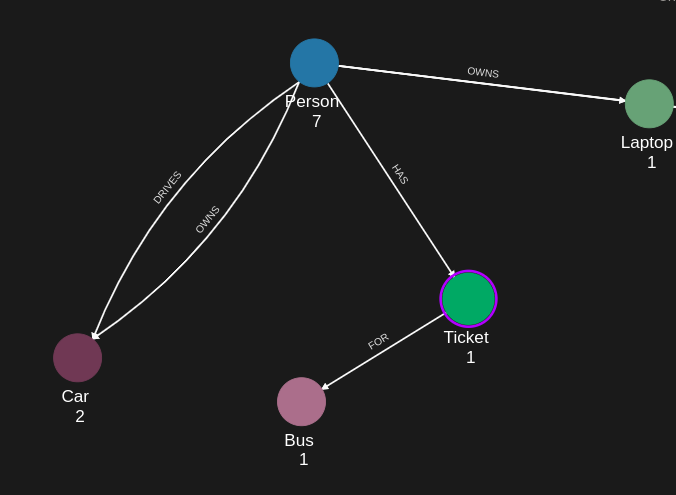
- Action: POST the shared AuthZEN dataset; the relevant part is Person(alice) -[OWNS]-> Laptop(airbook-xyz)
- Result: Graph ready for authorization queries
Step 2: Create Step-Up Policy
- Authentication: ServiceAccount credential (Bearer token)
- Action: POST a 2.0-kbac policy with subject type Person, action CAN_SERVICE, resource type Laptop, cypher MATCH (subject:Person)-[:OWNS]->(resource:Laptop), and a condition.filter $token.exp > <timestamp> carrying an advice map (error, error_description, sub)
- Result: Policy ID returned
Step 3: Evaluation Without a User Token (Returns Advice)
- Authentication: AppAgent credential (X-IK-ClientKey header) only
- Request: POST /access/v1/evaluation, subject Person alice, resource Laptop airbook-xyz, action CAN_SERVICE
- Response: {"decision": false} with context.advice containing the policy's advice map
- The graph condition matched but the filter failed, so the advice is returned
Step 4: Evaluation With alice's User Token (Grants Access)
- Authentication: AppAgent credential + alice's user token (Authorization: Bearer header)
- Request: the same evaluation request
- Response: {"decision": true}
- The token's exp claim satisfies the filter, and the token's subject is the requested subject
Step 5: Cleanup
- Action: DELETE policy configuration
Step 1
Capture the nodes needed for this use case.
{
  "nodes": [
    {
      "external_id": "alice",
      "is_identity": true,
      "type": "Person",
      "properties": [
        {
          "type": "email",
          "value": "alice@email.com"
        },
        {
          "type": "given_name",
          "value": "Alice"
        },
        {
          "type": "last_name",
          "value": "Smith"
        }
      ]
    },
    {
      "external_id": "knightrider",
      "type": "Person",
      "is_identity": true,
      "properties": [
        {
          "type": "email",
          "value": "knightrider@demo.com"
        },
        {
          "type": "name",
          "value": "Michael Knight"
        }
      ]
    },
    {
      "external_id": "satchmo",
      "type": "Person",
      "is_identity": true,
      "properties": [
        {
          "type": "email",
          "value": "satchmo@demo.com"
        },
        {
          "type": "name",
          "value": "Louis Armstrong"
        }
      ]
    },
    {
      "external_id": "karel",
      "type": "Person",
      "is_identity": true,
      "properties": [
        {
          "type": "email",
          "value": "karel@demo.com"
        },
        {
          "type": "name",
          "value": "Karel Plihal"
        }
      ]
    },
    {
      "external_id": "kitt",
      "type": "Car",
      "is_identity": false,
      "properties": [
        {
          "type": "manufacturer",
          "value": "pontiac"
        },
        {
          "type": "model",
          "value": "Firebird"
        }
      ]
    },
    {
      "external_id": "cadillacv16",
      "type": "Car",
      "is_identity": false,
      "properties": [
        {
          "type": "manufacturer",
          "value": "Cadillac"
        },
        {
          "type": "model",
          "value": "V-16"
        }
      ]
    },
    {
      "external_id": "harmonika",
      "type": "Bus",
      "is_identity": false,
      "properties": [
        {
          "type": "manufacturer",
          "value": "Ikarus"
        },
        {
          "type": "model",
          "value": "280"
        }
      ]
    },
    {
      "external_id": "listek",
      "type": "Ticket",
      "is_identity": false
    },
    {
      "external_id": "airbook-xyz",
      "type": "Laptop",
      "is_identity": false
    }
  ]
}
Capture the relationships needed for this use case.
{
  "relationships": [
    {
      "source": {
        "external_id": "knightrider",
        "type": "Person"
      },
      "target": {
        "external_id": "kitt",
        "type": "Car"
      },
      "type": "DRIVES"
    },
    {
      "source": {
        "external_id": "satchmo",
        "type": "Person"
      },
      "target": {
        "external_id": "cadillacv16",
        "type": "Car"
      },
      "type": "DRIVES"
    },
    {
      "source": {
        "external_id": "karel",
        "type": "Person"
      },
      "target": {
        "external_id": "listek",
        "type": "Ticket"
      },
      "type": "HAS"
    },
    {
      "source": {
        "external_id": "listek",
        "type": "Ticket"
      },
      "target": {
        "external_id": "harmonika",
        "type": "Bus"
      },
      "type": "FOR"
    },
    {
      "source": {
        "external_id": "karel",
        "type": "Person"
      },
      "target": {
        "external_id": "airbook-xyz",
        "type": "Laptop"
      },
      "type": "OWNS"
    },
    {
      "source": {
        "external_id": "alice",
        "type": "Person"
      },
      "target": {
        "external_id": "airbook-xyz",
        "type": "Laptop"
      },
      "type": "OWNS"
    },
    {
      "source": {
        "external_id": "knightrider",
        "type": "Person"
      },
      "target": {
        "external_id": "kitt",
        "type": "Car"
      },
      "type": "OWNS"
    },
    {
      "source": {
        "external_id": "alice",
        "type": "Person"
      },
      "target": {
        "external_id": "cadillacv16",
        "type": "Car"
      },
      "type": "DRIVES"
    }
  ]
}
Step 2
KBAC Policy: a Person can service a Laptop they OWN, provided the user token's exp claim is greater than the timestamp in the filter. The advice map on the filter leaf is returned when the filter fails.
{
  "meta": {
    "policy_version": "2.0-kbac"
  },
  "subject": {
    "type": "Person"
  },
  "actions": [
    "CAN_SERVICE"
  ],
  "resource": {
    "type": "Laptop"
  },
  "condition": {
    "cypher": "MATCH (subject:Person)-[:OWNS]->(resource:Laptop)",
    "filter": {
      "attribute": "$token.exp",
      "operator": ">",
      "value": 1790787312,
      "advice": {
        "error": "insufficient_user_authentication",
        "error_description": "Authentication is missing or expired",
        "sub": "$token.exp"
      }
    }
  }
}
Request to create the KBAC Policy configuration using REST.
{
  "project_id": "your_project_gid",
  "description": "description of policy",
  "display_name": "policy name",
  "name": "policy-name",
  "policy": "{\"meta\":{\"policy_version\":\"2.0-kbac\"},\"subject\":{\"type\":\"Person\"},\"actions\":[\"CAN_SERVICE\"],\"resource\":{\"type\":\"Laptop\"},\"condition\":{\"cypher\":\"MATCH (subject:Person)-[:OWNS]->(resource:Laptop)\",\"filter\":{\"attribute\":\"$token.exp\",\"operator\":\">\",\"value\":1790787312,\"advice\":{\"error\":\"insufficient_user_authentication\",\"error_description\":\"Authentication is missing or expired\",\"sub\":\"$token.exp\"}}}}",
  "status": "ACTIVE",
  "tags": []
}
Request to create the KBAC Policy configuration using REST.
import http.client

conn = http.client.HTTPSConnection("eu.api.indykite.com")

payload = "{"description": "",
  "display_name": "",
  "name": "",
  "policy": "",
  "project_id": "",
  "status": "ACTIVE",
  "tags": [
    ""
  ]}"
headers = {
    'Content-Type': "application/json",
    'Authorization': "YOUR_SECRET_TOKEN"
}

conn.request("POST", "/configs/v1/authorization-policies", payload, headers)
res = conn.getresponse()
data = res.read()
Request to read the KBAC Policy configuration using REST.
{
  "id": "your_policy_configuration_gid"
}
Request to read the KBAC Policy configuration using REST.
import http.client

conn = http.client.HTTPSConnection("eu.api.indykite.com")
headers = { 'Authorization': "YOUR_SECRET_TOKEN" }
conn.request("GET", "/configs/v1/authorization-policies/{{id}}", headers=headers)
res = conn.getresponse()
data = res.read()
Step 3
Run a KBAC authZEN Evaluation without a user token: the graph condition holds, the filter on $token.exp fails, and the advice is returned.
{
  "subject": {
    "type": "Person",
    "id": "alice"
  },
  "resource": {
    "type": "Laptop",
    "id": "airbook-xyz"
  },
  "action": {
    "name": "CAN_SERVICE"
  }
}
Response to the KBAC authZEN Evaluation request without a user token: denied, with the policy's advice.
{
  "context": {
    "advice": [
      {
        "error": "insufficient_user_authentication",
        "error_description": "Authentication is missing or expired",
        "sub": "$token.exp"
      }
    ]
  },
  "decision": false
}
Step 4
Add the Person node access token in the headers:
key:Authorization value: Bearer access_token_value
Then run the same KBAC authZEN Evaluation.
{
  "subject": {
    "type": "Person",
    "id": "alice"
  },
  "resource": {
    "type": "Laptop",
    "id": "airbook-xyz"
  },
  "action": {
    "name": "CAN_SERVICE"
  }
}
The same evaluation using Python, with alice's user token in the Authorization header.
import http.client

conn = http.client.HTTPSConnection("eu.api.indykite.com")

payload = "{
  	"subject": {"type": "Person",
        "id": "alice"},
    "resource": {"type": "Laptop",
        "id": "airbook-xyz"},
    "action": {"name": "CAN_SERVICE"}
}"

headers = {
    'Content-Type': "application/json",
    'Authorization': "Bearer eyJh....",
    'X-IK-ClientKey': "eyJh...."
}

conn.request("POST", "/access/v1/evaluation", payload, headers)

res = conn.getresponse()
data = res.read()
Response to the KBAC authZEN Evaluation request with a valid user token: authorized.
{
  "decision": true
}
Step 5
Delete the KBAC Policies.
{
  "id": "your_policy_configuration_gid"
}
Request to delete the KBAC Policies.
import http.client

conn = http.client.HTTPSConnection("eu.api.indykite.com")

headers = { 'Authorization': "Bearer ...", 'Content-Type': "application/json" }

conn.request("DELETE", "/configs/v1/authorization-policies/{id}", headers=headers)

res = conn.getresponse()
data = res.read()
API Endpoints
/capture/v1/nodes/capture/v1/relationships/configs/v1/authorization-policies/access/v1/evaluation