
Token Introspect: Bind Bearer Token Claims to a Person Subject for CIQ Queries
Three pieces line up to authorize a bearer-token request and return that user's own data:
1. Capture pipeline ingests a Person node with the external_id and properties your application controls (here, external_id = "alice", property email = "alice@email.com", property name = "Alice Smith").
2. Token Introspect configuration declares the issuer + audience that produces the JWT, plus claims_mapping that says which claims to project onto the Token node. The sub_claim setting names the JWT claim used as the Token node's external_id.
3. CIQ policy says subject is Person, with a filter subject.external_id = $token.sub. At /contx-iq/v1/execute time, Token Introspect resolves the bearer token, $token.sub is set to "alice", the policy matches Person(alice), and the Knowledge Query returns alice's profile.
This is the simplest end-to-end pattern for "let an authenticated user query their own data." The same binding (token claim <-> captured property) generalizes to any claim you choose.
Use case
Scenario: A web app issues an OIDC bearer token after the user signs in. The app calls IndyKite to fetch the signed-in user's profile from the IKG without telling IndyKite who the user is - the bearer token does that.
What flows through the system:
Token payload (sub claim is the IdP's user identifier):
{
"sub": "alice",
"email": "alice@email.com",
"aud": ["client_id-of-your-app"],
...
}
Captured Person node (created by your ingest pipeline, ahead of time):
{
"external_id": "alice",
"type": "Person",
"properties": [
{ "type": "email", "value": "alice@email.com" },
{ "type": "name", "value": "Alice Smith" }
]
}
CIQ policy filter:
subject.external_id = $token.sub
The 'alice' string appears in three places:
- as the JWT 'sub' claim
- as the Person node's external_id
- via the policy filter, which couples them.
This is the contract. If you choose to bind by email instead, set the filter to subject.property.email = $token.email and ensure the Capture pipeline writes the email property to match.
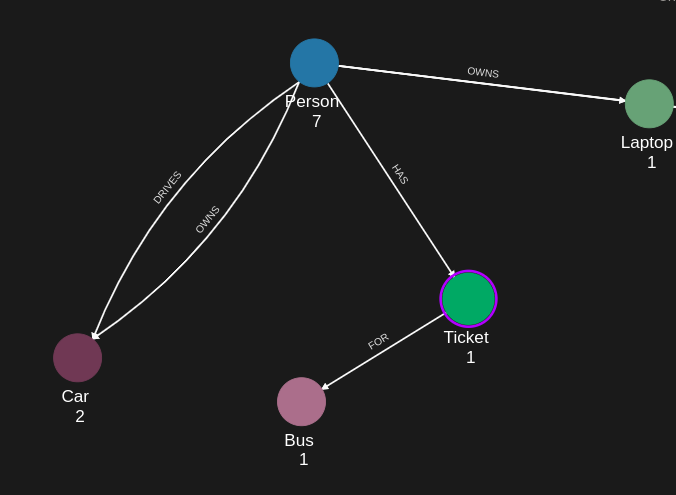
Requirements
Prerequisites:
- ServiceAccount credentials: For creating the Token Introspect configuration, the policy, and the Knowledge Query (Bearer token in Authorization header).
- AppAgent credentials: For ingesting Person nodes and for executing the CIQ query (X-IK-ClientKey header).
- External IdP: an OIDC provider (Auth0, Okta, Keycloak, your own) capable of issuing JWTs that include at minimum 'iss', 'aud', and 'sub' claims.
- A JWT for the test user. The sub claim must equal the Person.external_id you ingest.
Required API access:
- POST /capture/v1/nodes (ingest Person)
- POST /configs/v1/token-introspects (Token Introspect config - also possible via Terraform)
- POST /configs/v1/authorization-policies (CIQ policy)
- POST /configs/v1/knowledge-queries (CIQ Knowledge Query)
- POST /contx-iq/v1/execute (run the query with the bearer token)
Steps
Step 1: Capture the Person Node
- Authentication: AppAgent credential (X-IK-ClientKey).
- Action: POST a Person node whose external_id is the value your IdP will put in the JWT sub claim ("alice"). Include the email property and any other identity attributes you want CIQ to be able to return.
- Result: Person(alice) is in the IKG, ready to be selected as the CIQ subject at execute time.
Step 2: Create the Token Introspect Configuration
- Authentication: ServiceAccount credential. Recommended: Terraform.
- Action: Configure jwt_matcher.issuer + jwt_matcher.audience to match the JWTs your IdP issues. Set sub_claim = "sub" (binds JWT.sub to the Token node's external_id). Use claims_mapping to project additional claims (e.g., email) onto the Token node so they are available as $token.<claim> in CIQ.
- Result: IndyKite knows how to validate incoming bearer tokens for this issuer/audience and what to expose to CIQ.
Step 3: Create the CIQ Policy
- Authentication: ServiceAccount credential.
- Action: POST a CIQ policy whose condition filter is subject.external_id = $token.sub. Allow reads on subject and the subject properties you want callers to see.
- Result: Policy ID - references the user-identity binding.
Step 4: Create the Knowledge Query
- Authentication: ServiceAccount credential.
- Action: POST a Knowledge Query that returns subject.external_id, subject.property.email, and subject.property.name. No input_params needed - the binding comes from the token, not from the request body.
- Result: Knowledge Query ID.
Step 5: Execute as the Authenticated User
- Authentication: AppAgent credential in X-IK-ClientKey + the user's bearer token in Authorization: Bearer <token>.
- Action: POST /contx-iq/v1/execute with the Knowledge Query id and an empty input_params object.
- Result: A single record describing Alice. If you call the same endpoint with a different user's bearer token, the same query returns that other user's record. The query body is identical; the token decides the answer.
Step 1
Capture the Person node whose external_id will match the JWT sub claim. The Capture pipeline is where the link between identity-provider claims and graph data is established - the external_id you choose here is the contract.
{
  "nodes": [
    {
      "external_id": "alice",
      "is_identity": true,
      "type": "Person",
      "properties": [
        {
          "type": "email",
          "value": "alice@email.com"
        },
        {
          "type": "given_name",
          "value": "Alice"
        },
        {
          "type": "last_name",
          "value": "Smith"
        }
      ]
    },
    {
      "external_id": "knightrider",
      "type": "Person",
      "is_identity": true,
      "properties": [
        {
          "type": "email",
          "value": "knightrider@demo.com"
        },
        {
          "type": "name",
          "value": "Michael Knight"
        }
      ]
    },
    {
      "external_id": "satchmo",
      "type": "Person",
      "is_identity": true,
      "properties": [
        {
          "type": "email",
          "value": "satchmo@demo.com"
        },
        {
          "type": "name",
          "value": "Louis Armstrong"
        }
      ]
    },
    {
      "external_id": "karel",
      "type": "Person",
      "is_identity": true,
      "properties": [
        {
          "type": "email",
          "value": "karel@demo.com"
        },
        {
          "type": "name",
          "value": "Karel Plihal"
        }
      ]
    },
    {
      "external_id": "kitt",
      "type": "Car",
      "is_identity": false,
      "properties": [
        {
          "type": "manufacturer",
          "value": "pontiac"
        },
        {
          "type": "model",
          "value": "Firebird"
        }
      ]
    },
    {
      "external_id": "cadillacv16",
      "type": "Car",
      "is_identity": false,
      "properties": [
        {
          "type": "manufacturer",
          "value": "Cadillac"
        },
        {
          "type": "model",
          "value": "V-16"
        }
      ]
    },
    {
      "external_id": "harmonika",
      "type": "Bus",
      "is_identity": false,
      "properties": [
        {
          "type": "manufacturer",
          "value": "Ikarus"
        },
        {
          "type": "model",
          "value": "280"
        }
      ]
    },
    {
      "external_id": "listek",
      "type": "Ticket",
      "is_identity": false
    },
    {
      "external_id": "airbook-xyz",
      "type": "Laptop",
      "is_identity": false
    }
  ]
}
Step 2 (input)
An OIDC access token your IdP issues to Alice after sign-in. Note that sub = "alice" and email = "alice@email.com" - both line up with the captured Person node above.
{
  "iss": "https://your-idp.example.com/",
  "sub": "alice",
  "email": "alice@email.com",
  "aud": [
    "client_id-of-your-app"
  ],
  "iat": 1749319876,
  "exp": 1749406276,
  "scope": "openid profile email"
}
Step 2
Token Introspect configuration. Two settings carry the entire identity contract:
- sub_claim = "sub": the JWT claim used as the Token node's external_id. Combined with the CIQ filter subject.external_id = $token.sub, this is what binds the bearer token to a specific Person node.
- claims_mapping: each entry copies a JWT claim onto the Token node as a property. Mapped claims also become available as $token.<claim> in CIQ filters, so you can author policies like subject.property.email = $token.email if you prefer to bind by a different field.
resource "indykite_token_introspect" "person_subject" {
  name         = "person-subject-introspect"
  display_name = "Person subject - introspect"
  description  = "Validates bearer tokens for Person subjects in CIQ queries."
  location     = "ProjectGID"

  jwt_matcher {
    issuer   = "https://your-idp.example.com/"
    audience = "client_id-of-your-app"
  }

  offline_validation {}

  # External-id-of-token-node is taken from the 'sub' claim by default.
  # Setting sub_claim explicitly is the most common way to bind a JWT to an
  # existing Person node: the value of this claim becomes the Token node's
  # external_id, and the policy filter (subject.external_id = $token.sub)
  # then resolves the subject to the matching Person.
  sub_claim = "sub"

  # claims_mapping copies token claims onto the Token node as properties.
  # Below, the 'email' claim becomes a property of type 'email' on the Token
  # node, which lets you cross-reference the authenticated identity in
  # Knowledge Queries (e.g., subject.property.email = $token.email).
  claims_mapping = {
    "email" = "email"
  }

  ikg_node_type  = "Token"
  perform_upsert = true
}
Step 3
CIQ Policy with the simplest possible Person subject:
- subject.type = Person.
- condition.cypher matches every Person and the filter narrows it to the one whose external_id equals $token.sub.
- allowed_reads exposes subject and two of its properties so the Knowledge Query can return them.
{
  "meta": {
    "policy_version": "1.0-ciq"
  },
  "subject": {
    "type": "Person"
  },
  "condition": {
    "cypher": "MATCH (subject:Person)",
    "filter": [
      {
        "operator": "=",
        "attribute": "subject.external_id",
        "value": "$token.sub"
      }
    ]
  },
  "allowed_reads": {
    "nodes": [
      "subject",
      "subject.property.email",
      "subject.property.name"
    ]
  }
}
Request to create the policy.
{
  "project_id": "your_project_gid",
  "description": "CIQ policy authorizing the Person subject whose external_id matches the bearer token's sub claim. The binding relies on Token Introspect resolving the JWT and exposing sub via $token.sub.",
  "display_name": "policy - person from token",
  "name": "policy-person-from-token",
  "policy": "{\"meta\":{\"policy_version\":\"1.0-ciq\"},\"subject\":{\"type\":\"Person\"},\"condition\":{\"cypher\":\"MATCH (subject:Person)\",\"filter\":[{\"operator\":\"=\",\"attribute\":\"subject.external_id\",\"value\":\"$token.sub\"}]},\"allowed_reads\":{\"nodes\":[\"subject\",\"subject.property.email\",\"subject.property.name\"]}}",
  "status": "ACTIVE",
  "tags": []
}
Step 4
Knowledge Query - returns the authenticated user's own external_id, email, and name. No input params: the policy already selects the subject from the token.
{
  "nodes": [
    "subject.external_id",
    "subject.property.email",
    "subject.property.name"
  ]
}
Request to create the Knowledge Query.
{
  "project_id": "your_project_gid",
  "description": "Return the authenticated Person's own profile. The subject is selected by matching subject.external_id against $token.sub (resolved by Token Introspect).",
  "display_name": "knowledge query - my profile",
  "name": "kq-my-profile",
  "policy_id": "your_policy_gid",
  "query": "{\"nodes\":[\"subject.external_id\",\"subject.property.email\",\"subject.property.name\"]}",
  "status": "ACTIVE"
}
Step 5
Execute the query as Alice. Authentication = AppAgent credential in X-IK-ClientKey + Alice's bearer token in Authorization: Bearer <token>. input_params is empty because the identity binding comes from the JWT.
{
  "id": "your_query_gid_or_name",
  "input_params": {}
}
Response - exactly Alice's record. Sending the same request with Bob's bearer token would return Bob's record instead. The query body is unchanged; the token decides.
{
  "data": [
    {
      "nodes": {
        "subject.external_id": "alice",
        "subject.property.email": "alice@email.com",
        "subject.property.name": "Alice Smith"
      }
    }
  ]
}API Endpoints
/capture/v1/nodes/configs/v1/token-introspects/configs/v1/authorization-policies/configs/v1/knowledge-queries/contx-iq/v1/executeRelated Guides
Tags
Related Resources
No related resources found.