
MCP Server: Initialize Sessions and Execute Tools via HTTP
This example demonstrates the IndyKite MCP Server for AI/LLM integration:
What is MCP?
Model Context Protocol - a standard for exposing tools and resources to AI models (Claude, GPT, etc.).
IndyKite MCP Server provides:
1. Resources - List and read knowledge queries available in your project
2. Tools - Execute authorization operations:
- authzen_evaluate: Check if subject can perform action on resource
- ciq_execute: Run ContX IQ queries with parameters
Protocol used here:
Session-based MCP protocol, revision 2025-11-25 - an initialize handshake starts the session, the server returns an Mcp-Session-Id header, and every follow-up request sends it back. (The MCP server also supports the stateless protocol, revision 2026-07-28 - see the companion resource.)
Workflow:
1. Initialize session with MCP server
2. List available resources (knowledge queries)
3. List available tools (authzen_evaluate, ciq_execute)
4. Execute tools with parameters
This enables AI agents to make authorization decisions using IndyKite.
Use case
Scenario: An AI assistant needs to check user permissions and retrieve authorized data.
MCP Integration flow:
1. AI agent connects to IndyKite MCP Server
2. Initializes session -> receives capabilities and session ID
3. Lists tools -> discovers authzen_evaluate and ciq_execute
4. User asks: "Can I drive the company car?"
5. AI calls authzen_evaluate tool with:
- subject: {type: "Person", id: "user-123"}
- action: {name: "drive"}
- resource: {type: "Car", id: "car-456"}
6. MCP evaluates against KBAC policy
7. Returns: {decision: true} -> AI responds "Yes, you can drive the car"
For data retrieval:
1. User asks: "What payment methods do I have?"
2. AI calls ciq_execute tool with knowledge query ID
3. MCP runs ContX IQ query with user's authorization context
4. Returns payment method data
5. AI presents results to user
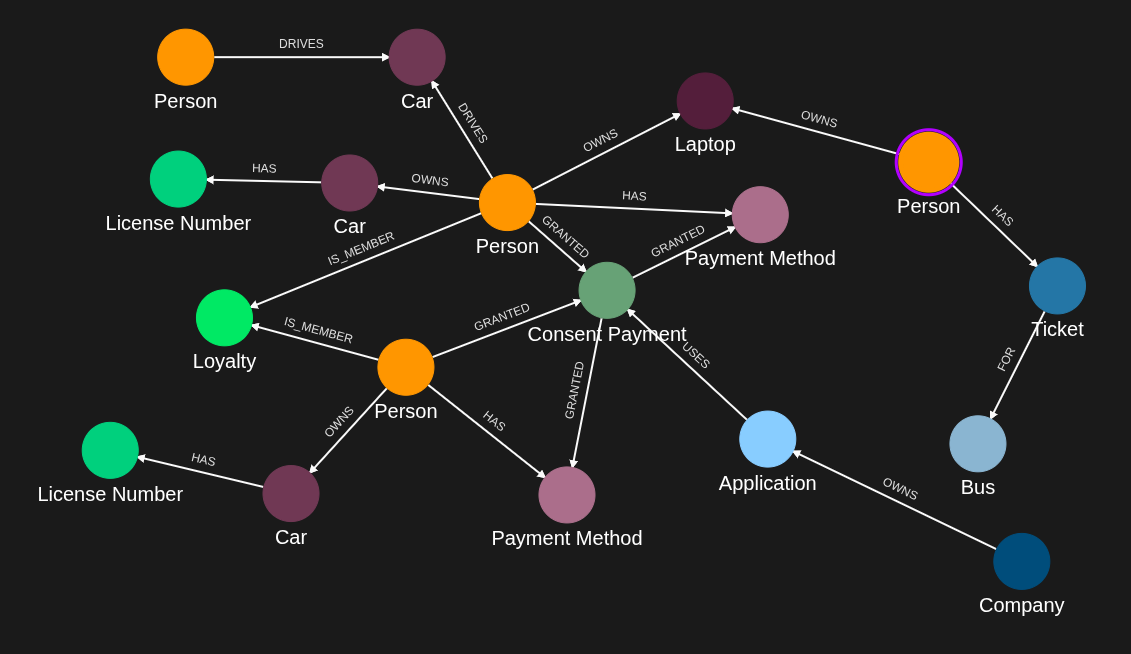
Requirements
Prerequisites:
- ServiceAccount credentials: For creating policies, queries, and the MCP Server configuration (Bearer token)
- AppAgent: Referenced by the MCP Server config as the identity the server uses to call IndyKite APIs at runtime (resolved server-side)
- User access token: JWT for the subject performing authorization checks
- Token Introspect configuration: Required to validate user access tokens (referenced by the MCP Server config)
MCP Server endpoint:
- URL: https://eu.mcp.indykite.com/mcp/v1/{project_gid}
- Protocol: JSON-RPC 2.0 over HTTP POST - session-based MCP protocol, revision 2025-11-25 (initialize handshake + Mcp-Session-Id header on every follow-up request)
Required configurations:
- MCP Server: Binds the runtime MCP endpoint to an AppAgent + Token Introspect, declares supported OAuth scopes
- KBAC Policy: Defines authorization rules (e.g., who can drive cars)
- ContX IQ Policy and Query: Defines data access rules and queries
Steps
Step 1: Create the MCP Server configuration
- Authentication: ServiceAccount credential (Bearer token)
- Action: POST to /configs/v1/mcp-servers
- Input: AppAgent ID, Token Introspect ID, project ID, supported OAuth scopes
- Result: MCP Server config ID returned; the runtime MCP endpoint will use this binding
Step 2: Ingest Graph Data
- Authentication: AppAgent credential (X-IK-ClientKey header)
- Action: POST nodes (Person, Car) and relationships (DRIVES)
- Note: Replace bearer-token-sub with actual user's token subject claim
- Result: Graph ready for authorization queries
Step 3: Create ContX IQ Policy
- Authentication: ServiceAccount credential (Bearer token)
- Action: POST policy for data access through MCP
- Result: Policy ID returned
Step 4: Create ContX IQ Knowledge Query
- Authentication: ServiceAccount credential (Bearer token)
- Action: POST query with descriptive name and parameters
- Important: Include detailed description for AI agent understanding
- Result: Query ID available via MCP resources
Step 5: Create KBAC Policy
- Authentication: ServiceAccount credential (Bearer token)
- Action: POST authZEN policy (e.g., Person can DRIVE Car if DRIVES relationship exists)
- Result: Policy ID returned, available via authzen_evaluate tool
Step 6: Use MCP Server
- Initialize session: Send "initialize" JSON-RPC request
- List resources: "resources/list" returns available knowledge queries
- List tools: "tools/list" returns authzen_evaluate and ciq_execute
- Execute authzen_evaluate: Check authorization with subject/action/resource
- Execute ciq_execute: Run knowledge query with parameters
Step 1
Create the MCP Server configuration. This binds the runtime MCP endpoint (https://<region>.mcp.indykite.com/mcp/v1/<project_gid>) to an AppAgent (the identity the server uses to call IndyKite APIs at runtime, resolved server-side) and a Token Introspect config (used to validate Bearer tokens), and declares the OAuth scopes the server advertises in its .well-known/oauth-protected-resource metadata. Replace gid-of-app-agent and gid-of-token-introspect with the IDs returned in the environment-setup steps.
{
  "app_agent_id": "gid-of-app-agent",
  "token_introspect_id": "gid-of-token-introspect",
  "project_id": "gid-of-project",
  "name": "mcp-server-name",
  "display_name": "MCP Server name",
  "description": "MCP Server configuration description",
  "enabled": true,
  "scopes_supported": [
    "name",
    "email"
  ]
}
Step 2
Capture the nodes needed for this use case (replace bearer-token-sub with actual Bearer token sub).
{
  "nodes": [
    {
      "external_id": "bearer-token-sub",
      "is_identity": true,
      "type": "Person",
      "properties": [
        {
          "type": "email",
          "value": "alice@email.com"
        },
        {
          "type": "given_name",
          "value": "Alice"
        },
        {
          "type": "last_name",
          "value": "Smith"
        }
      ]
    },
    {
      "external_id": "knightrider",
      "type": "Person",
      "is_identity": true,
      "properties": [
        {
          "type": "email",
          "value": "knightrider@demo.com"
        },
        {
          "type": "name",
          "value": "Michael Knight"
        }
      ]
    },
    {
      "external_id": "satchmo",
      "type": "Person",
      "is_identity": true,
      "properties": [
        {
          "type": "email",
          "value": "satchmo@demo.com"
        },
        {
          "type": "name",
          "value": "Louis Armstrong"
        }
      ]
    },
    {
      "external_id": "karel",
      "type": "Person",
      "is_identity": true,
      "properties": [
        {
          "type": "email",
          "value": "karel@demo.com"
        },
        {
          "type": "name",
          "value": "Karel Plihal"
        }
      ]
    },
    {
      "external_id": "kitt",
      "type": "Car",
      "is_identity": false,
      "properties": [
        {
          "type": "manufacturer",
          "value": "pontiac"
        },
        {
          "type": "model",
          "value": "Firebird"
        }
      ]
    },
    {
      "external_id": "cadillacv16",
      "type": "Car",
      "is_identity": false,
      "properties": [
        {
          "type": "manufacturer",
          "value": "Cadillac"
        },
        {
          "type": "model",
          "value": "V-16"
        }
      ]
    },
    {
      "external_id": "harmonika",
      "type": "Bus",
      "is_identity": false,
      "properties": [
        {
          "type": "manufacturer",
          "value": "Ikarus"
        },
        {
          "type": "model",
          "value": "280"
        }
      ]
    },
    {
      "external_id": "listek",
      "type": "Ticket",
      "is_identity": false
    },
    {
      "external_id": "airbook-xyz",
      "type": "Laptop",
      "is_identity": false
    },
    {
      "external_id": "ole",
      "is_identity": true,
      "type": "Person",
      "properties": [
        {
          "type": "email",
          "value": "ole@yahoo.co.uk"
        },
        {
          "type": "given_name",
          "value": "ole"
        },
        {
          "type": "last_name",
          "value": "einar"
        }
      ]
    },
    {
      "external_id": "cb2563",
      "type": "PaymentMethod",
      "properties": [
        {
          "type": "payment_name",
          "value": "Credit Card Parking"
        },
        {
          "type": "preference",
          "value": "Pay as you go"
        }
      ]
    },
    {
      "external_id": "carOle",
      "type": "Vehicle",
      "properties": [
        {
          "type": "category",
          "value": "Car"
        },
        {
          "type": "is_active",
          "value": true
        },
        {
          "type": "vin",
          "value": "pcfjnm78"
        }
      ]
    },
    {
      "external_id": "licenseOle",
      "type": "LicenseNumber",
      "properties": [
        {
          "type": "status",
          "value": "Active"
        },
        {
          "type": "number",
          "value": "AL98745",
          "metadata": {
            "assurance_level": 3,
            "source": "BRREG"
          }
        }
      ]
    },
    {
      "external_id": "licenseAlice",
      "type": "LicenseNumber",
      "properties": [
        {
          "type": "status",
          "value": "Active"
        },
        {
          "type": "number",
          "value": "BTYUMN",
          "metadata": {
            "assurance_level": 3,
            "source": "BRREG"
          }
        }
      ]
    },
    {
      "external_id": "loyalty1",
      "type": "Loyalty",
      "properties": [
        {
          "type": "name",
          "value": "Parking Loyalty Plan"
        }
      ]
    },
    {
      "external_id": "consent1",
      "type": "ConsentPayment",
      "properties": [
        {
          "type": "name",
          "value": "Consent Parking"
        }
      ]
    },
    {
      "external_id": "companyParking",
      "type": "Company",
      "properties": [
        {
          "type": "name",
          "value": "City Parking Inc"
        }
      ]
    },
    {
      "external_id": "applicationParking",
      "type": "Application",
      "properties": [
        {
          "type": "name",
          "value": "City Mall Parking"
        }
      ]
    }
  ]
}
Step 2
Capture the relationships needed for this use case (replace bearer-token-sub with actual Bearer token sub).
{
  "relationships": [
    {
      "source": {
        "external_id": "knightrider",
        "type": "Person"
      },
      "target": {
        "external_id": "kitt",
        "type": "Car"
      },
      "type": "DRIVES"
    },
    {
      "source": {
        "external_id": "satchmo",
        "type": "Person"
      },
      "target": {
        "external_id": "cadillacv16",
        "type": "Car"
      },
      "type": "DRIVES"
    },
    {
      "source": {
        "external_id": "karel",
        "type": "Person"
      },
      "target": {
        "external_id": "listek",
        "type": "Ticket"
      },
      "type": "HAS"
    },
    {
      "source": {
        "external_id": "listek",
        "type": "Ticket"
      },
      "target": {
        "external_id": "harmonika",
        "type": "Bus"
      },
      "type": "FOR"
    },
    {
      "source": {
        "external_id": "karel",
        "type": "Person"
      },
      "target": {
        "external_id": "airbook-xyz",
        "type": "Laptop"
      },
      "type": "OWNS"
    },
    {
      "source": {
        "external_id": "bearer-token-sub",
        "type": "Person"
      },
      "target": {
        "external_id": "airbook-xyz",
        "type": "Laptop"
      },
      "type": "OWNS"
    },
    {
      "source": {
        "external_id": "knightrider",
        "type": "Person"
      },
      "target": {
        "external_id": "kitt",
        "type": "Car"
      },
      "type": "OWNS"
    },
    {
      "source": {
        "external_id": "bearer-token-sub",
        "type": "Person"
      },
      "target": {
        "external_id": "cadillacv16",
        "type": "Car"
      },
      "type": "DRIVES"
    },
    {
      "source": {
        "external_id": "ole",
        "type": "Person"
      },
      "target": {
        "external_id": "cb2563",
        "type": "PaymentMethod"
      },
      "type": "HAS"
    },
    {
      "source": {
        "external_id": "ole",
        "type": "Person"
      },
      "target": {
        "external_id": "carOle",
        "type": "Car"
      },
      "type": "OWNS"
    },
    {
      "source": {
        "external_id": "ole",
        "type": "Person"
      },
      "target": {
        "external_id": "loyalty1",
        "type": "Loyalty"
      },
      "type": "IS_MEMBER"
    },
    {
      "source": {
        "external_id": "bearer-token-sub",
        "type": "Person"
      },
      "target": {
        "external_id": "loyalty1",
        "type": "Loyalty"
      },
      "type": "IS_MEMBER"
    },
    {
      "source": {
        "external_id": "ole",
        "type": "Person"
      },
      "target": {
        "external_id": "consent1",
        "type": "ConsentPayment"
      },
      "type": "GRANTED"
    },
    {
      "source": {
        "external_id": "carOle",
        "type": "Car"
      },
      "target": {
        "external_id": "licenseOle",
        "type": "LicenseNumber"
      },
      "type": "HAS"
    },
    {
      "source": {
        "external_id": "consent1",
        "type": "ConsentPayment"
      },
      "target": {
        "external_id": "cb2563",
        "type": "PaymentMethod"
      },
      "type": "GRANTED"
    },
    {
      "source": {
        "external_id": "companyParking",
        "type": "Company"
      },
      "target": {
        "external_id": "applicationParking",
        "type": "Application"
      },
      "type": "OWNS"
    },
    {
      "source": {
        "external_id": "applicationParking",
        "type": "Application"
      },
      "target": {
        "external_id": "consent1",
        "type": "ConsentPayment"
      },
      "type": "USES"
    },
    {
      "source": {
        "external_id": "bearer-token-sub",
        "type": "Person"
      },
      "target": {
        "external_id": "cb8521",
        "type": "PaymentMethod"
      },
      "type": "HAS"
    },
    {
      "source": {
        "external_id": "bearer-token-sub",
        "type": "Person"
      },
      "target": {
        "external_id": "carAlice",
        "type": "Car"
      },
      "type": "OWNS"
    },
    {
      "source": {
        "external_id": "bearer-token-sub",
        "type": "Person"
      },
      "target": {
        "external_id": "consent1",
        "type": "ConsentPayment"
      },
      "type": "GRANTED"
    },
    {
      "source": {
        "external_id": "carAlice",
        "type": "Car"
      },
      "target": {
        "external_id": "licenseAlice",
        "type": "LicenseNumber"
      },
      "type": "HAS"
    },
    {
      "source": {
        "external_id": "consent1",
        "type": "ConsentPayment"
      },
      "target": {
        "external_id": "cb8521",
        "type": "PaymentMethod"
      },
      "type": "GRANTED"
    }
  ]
}
Step 3
Create a CIQ Policy which designates the Subject node, the cypher and the nodes allowed to be read.
{
  "project_id": "your_project_gid",
  "description": "description of policy",
  "display_name": "policy name",
  "name": "policy-name",
  "policy": "{\"meta\":{\"policy_version\":\"1.0-ciq\"},\"subject\":{\"type\":\"Person\"},\"condition\":{\"cypher\":\"MATCH (subject:Person) MATCH (app:Application)-[:USES]->(consentpayment:ConsentPayment)<-[:GRANTED]-(subject)-[:HAS]->(paymentmethod:PaymentMethod) MATCH (subject)-[:IS_MEMBER]->(loyalty:Loyalty) MATCH (subject)-[:OWNS]->(car:Car)-[:HAS]->(ln:LicenseNumber)\",\"filter\":[{\"operator\":\"AND\",\"operands\":[{\"attribute\":\"subject.external_id\",\"operator\":\"=\",\"value\":\"$token.sub\"},{\"attribute\":\"subject.property.email\",\"operator\":\"=\",\"value\":\"$subject_email\"}]}]},\"allowed_reads\":{\"nodes\":[\"ln.*\",\"app.*\",\"paymentmethod.external_id\"]}}",
  "status": "ACTIVE",
  "tags": []
}
Step 4
Create a CIQ Query in the context of the policy. In the description, give all the necessary information an agent would need to know to call the ciq_execute tool.
{
  "project_id": "your_project_gid",
  "description": "Call tool 'ciq_execute' with arguments : id: \"<this query's id>\", input_params: {subject_email: (required) the caller's email, license: (required) car license plate}. Auth: Bearer token required; the policy binds the subject to the token 'sub' claim. Returns: payment_method_external_id",
  "display_name": "knowledge query name",
  "name": "knowledge-query-name",
  "policy_id": "your_policy_gid",
  "query": "{\"nodes\":[\"paymentmethod.external_id\"],\"filter\":{\"attribute\":\"ln.property.number\",\"operator\":\"=\",\"value\":\"$license\"}}",
  "status": "ACTIVE"
}
Step 5
Create a KBAC Policy which designates the conditions to drive a car.
{
  "project_id": "your_project_gid",
  "description": "description of policy",
  "display_name": "policy name",
  "name": "policy-name",
  "policy": "{\"meta\":{\"policy_version\":\"2.0-kbac\"},\"subject\":{\"type\":\"Person\"},\"actions\":[\"CAN_DRIVE\"],\"resource\":{\"type\":\"Car\"},\"condition\":{\"cypher\":\"MATCH (subject:Person)-[:DRIVES]->(resource:Car)\"}}",
  "status": "ACTIVE",
  "tags": []
}
Step 6
Initialize a session with the MCP server. Returns capabilities and session id.
curl -v -i -X POST https://eu.mcp.indykite.com/mcp/v1/<project_gid>   -H "Content-Type: application/json"   -H "Authorization: Bearer $BEARER_TOKEN"   -d '{
    "jsonrpc": "2.0",
    "id": 1,
    "method": "initialize",
    "params": {
      "protocolVersion": "2025-11-25",
      "capabilities": {},
      "clientInfo": {
        "name": "curl",
        "version": "1.0"
      }
    }
  }'
Check if session is initialized with the MCP server.
curl -v -i -X POST https://eu.mcp.indykite.com/mcp/v1/<project_gid>   -H "Content-Type: application/json"   -H "Authorization: Bearer $BEARER_TOKEN"   -H "Mcp-Session-Id: $SESSION_ID"   -d '{
    "jsonrpc": "2.0",
    "id": 1,
    "method": "notifications/initialized",
    "params": {
      "protocolVersion": "2025-11-25",
      "capabilities": {},
      "clientInfo": {
        "name": "curl",
        "version": "1.0"
      }
    }
  }'1
List resources available in the MCP server.
curl -v -i -X POST https://eu.mcp.indykite.com/mcp/v1/<project_gid> -H "Content-Type: application/json"  -H "Authorization: Bearer $BEARER_TOKEN" -H "Mcp-Session-Id: $SESSION_ID" -d '{
      "jsonrpc": "2.0",
      "id": 2,
      "method": "resources/list",
      "params": {}
    }'
List tools available in the MCP server.
curl -v -i -X POST https://eu.mcp.indykite.com/mcp/v1/<project_gid> -H "Content-Type: application/json" -H "Authorization: Bearer $BEARER_TOKEN" -H "Mcp-Session-Id: $SESSION_ID" -d '{
      "jsonrpc": "2.0",
      "id": 3,
      "method": "tools/list",
      "params": {}
    }'
List tools response.
{
  "jsonrpc": "2.0",
  "id": 3,
  "result": {
    "tools": [
      {
        "name": "authzen_evaluate",
        "description": "Evaluate access with AuthZEN evaluation endpoint",
        "inputSchema": {
          "type": "object",
          "required": [
            "subject_type",
            "subject_id",
            "resource_type",
            "resource_id",
            "action_name"
          ],
          "properties": {
            "subject_type": {
              "type": "string",
              "description": "required, description: Type of subject"
            },
            "subject_id": {
              "type": "string",
              "description": "required, description: ID of subject"
            },
            "resource_type": {
              "type": "string",
              "description": "required, description: Type of resource"
            },
            "resource_id": {
              "type": "string",
              "description": "required, description: ID of resource"
            },
            "action_name": {
              "type": "string",
              "description": "required, description: Action name"
            },
            "context": {
              "type": "object",
              "description": "Optional context",
              "additionalProperties": true
            }
          },
          "additionalProperties": false
        }
      },
      {
        "name": "authzen_evaluations",
        "description": "Execute multiple access evaluations in a single request",
        "inputSchema": {
          "type": "object",
          "required": ["evaluations"],
          "properties": {
            "evaluations": {
              "type": "array",
              "description": "required, description: Evaluations",
              "items": {
                "type": "object",
                "additionalProperties": true
              }
            },
            "action_name": {
              "type": ["null", "string"],
              "description": "Default action name"
            },
            "resource_type": {
              "type": ["null", "string"],
              "description": "Default resource type"
            },
            "resource_id": {
              "type": ["null", "string"],
              "description": "Default resource ID"
            },
            "subject_type": {
              "type": ["null", "string"],
              "description": "Default subject type"
            },
            "subject_id": {
              "type": ["null", "string"],
              "description": "Default subject ID"
            },
            "context": {
              "type": "object",
              "description": "Optional context",
              "additionalProperties": true
            }
          },
          "additionalProperties": false
        }
      },
      {
        "name": "authzen_search_action",
        "description": "Search for all actions a subject can perform on a resource",
        "inputSchema": {
          "type": "object",
          "required": [
            "subject_type",
            "subject_id",
            "resource_type",
            "resource_id"
          ],
          "properties": {
            "subject_type": {
              "type": "string",
              "description": "required, description: Type of subject"
            },
            "subject_id": {
              "type": "string",
              "description": "required, description: ID of subject"
            },
            "resource_type": {
              "type": "string",
              "description": "required, description: Type of resource"
            },
            "resource_id": {
              "type": "string",
              "description": "required, description: ID of resource"
            },
            "context": {
              "type": "object",
              "description": "Optional context",
              "additionalProperties": true
            },
            "page": {
              "type": "object",
              "description": "Pagination parameters",
              "additionalProperties": true
            }
          },
          "additionalProperties": false
        }
      },
      {
        "name": "authzen_search_resource",
        "description": "Search for resources a subject can access with a specified action",
        "inputSchema": {
          "type": "object",
          "required": [
            "subject_type",
            "subject_id",
            "resource_type",
            "action_name"
          ],
          "properties": {
            "subject_type": {
              "type": "string",
              "description": "required, description: Type of subject"
            },
            "subject_id": {
              "type": "string",
              "description": "required, description: ID of subject"
            },
            "resource_type": {
              "type": "string",
              "description": "required, description: Type of resource"
            },
            "action_name": {
              "type": "string",
              "description": "required, description: Action name"
            },
            "context": {
              "type": "object",
              "description": "Optional context",
              "additionalProperties": true
            },
            "page": {
              "type": "object",
              "description": "Pagination parameters",
              "additionalProperties": true
            }
          },
          "additionalProperties": false
        }
      },
      {
        "name": "ciq_execute",
        "description": "Execute a ContX IQ (CIQ) query by id (knowledge_query id)",
        "inputSchema": {
          "type": "object",
          "required": ["id"],
          "properties": {
            "id": {
              "type": "string",
              "description": "required, description: Knowledge query ID"
            },
            "input_params": {
              "type": "object",
              "description": "Optional input parameters",
              "additionalProperties": true
            },
            "page_size": {
              "type": ["null", "integer"],
              "description": "Optional page size (default 100)"
            },
            "page_token": {
              "type": ["null", "integer"],
              "description": "Optional pagination token"
            }
          },
          "additionalProperties": false
        }
      }
    ]
  }
}
Call the knowledge-queries resource.
curl -v -i -X POST https://eu.mcp.indykite.com/mcp/v1/<project_gid> -H "Content-Type: application/json" -H "Authorization: Bearer $BEARER_TOKEN" -H "Mcp-Session-Id: $SESSION_ID" -d '{
      "jsonrpc": "2.0",
      "id": 4,
      "method": "resources/read",
      "params": {
        "uri": "indykite://knowledge-queries/"
      }
    }'
Call the knowledge-queries resource.
    {
        "jsonrpc":"2.0",
        "id":4,
        "result":{
            "contents":[
            {
                "uri":"indykite://knowledge-queries/",
                "mimeType":"application/json",
                "text":{
                    "knowledge_queries": [
                        {
                            "id": "<knowledge_queries_id>",
                            "description": "Call tool 'ciq_execute' with arguments : id: "<this query's id>", input_params: {subject_email: (required) the caller's email, license: (required) car license plate}. Auth: Bearer token required; the policy binds the subject to the token 'sub' claim. Returns: payment_method_external_id",
                            "status": "STATUS_ACTIVE"
                        }
                    ],
                    "mcp_url": "https://eu.mcp.indykite.com/mcp/v1/<project_id>>",
                    "total_count": 1
                }
            }
            ]
        }
    }
Call the authzen_evaluate tool to check if according to the KBAC policy, the subject authorized by the Bearer access token can drive the car.
curl -v -i -X POST https://eu.mcp.indykite.com/mcp/v1/<project_gid> -H "Content-Type: application/json" -H "Authorization: Bearer $BEARER_TOKEN" -H "Mcp-Session-Id: $SESSION_ID" -d '{
      "jsonrpc": "2.0",
      "id": 5,
      "method": "tools/call",
      "params": {
        "name": "authzen_evaluate",
        "arguments": {
          "subject_type": "Person",
          "subject_id": <bearer-token-sub>,
          "resource_type": "Car",
          "resource_id": "cadillacv16",
          "action_name": "CAN_DRIVE"
        }
      }
    }'
Authzen_evaluate tool response.
    {
        "jsonrpc":"2.0",
        "id":5,
        "result":{
            "content":[
            {
            "type":"text",
            "text": {"decision":true}
            }
            ]
        }
    }
Call the ciq execute tool to get the payment method designated by the CIQ policy for the subject authorized by the Bearer access token.
curl -v -i -X POST https://eu.mcp.indykite.com/mcp/v1/<project_gid> -H "Content-Type: application/json" -H "Authorization: Bearer $BEARER_TOKEN" -H "Mcp-Session-Id: $SESSION_ID" -d '{
      "jsonrpc": "2.0",
      "id": 9,
      "method": "tools/call",
      "params": {
        "name": "ciq_execute",
        "arguments": {
          "id": "<knowledge_query_id>",
          "input_params": {"license": "BTYUMN","subject_email": "alice@email.com"},
           "page_token": 1
        }
      }
   }'
Ciq Execute tool response.
    {
        "jsonrpc":"2.0",
        "id":9,
        "result":{
            "content":[{
                "type":"text",
                "text":{
                    "data":[{
                        "nodes":{
                            "paymentmethod.external_id":"cb8521"
                        }
                    }]
                }
            }]
        }
    }
API Endpoints
/configs/v1/mcp-servers/capture/v1/nodes/capture/v1/relationships/configs/v1/authorization-policies/configs/v1/knowledge-queries