
This guide explains the architecture behind the IndyKite Agent Gateway (IAG) without the plumbing. It uses the architecture of a working demo, the iag-mcp-demo reference application, and reads its diagram from left to right. The configuration keys, the HTTP contract and the audit record format are in the Agent Gateway guide; this page is about what the pieces are and why they are arranged this way.
What is the Agent Gateway?
The IndyKite Agent Gateway is a checkpoint you place in front of an AI agent, or in front of a data service that agents call. It is a small piece of software that runs next to the thing it protects, and nothing reaches that thing except through it.
It exists because agents change the security question. Classic applications ask "is this user allowed to do this?". An agent-based system has to ask something longer: "is this person allowed to have this chain of agents do this, on their behalf?". Each agent in the chain is a separate program, often built by a different team or bought from a different vendor, and each one would otherwise have to implement the check itself, in its own way, or not at all.
The gateway takes that job away from the agents. Whatever the agent is written in, whatever model it uses, the gateway in front of it applies the same policy: it identifies the person behind the call, it asks the IndyKite Knowledge Graph whether that person may trigger this particular chain, it hands the next hop a token that carries the person and the chain so far, and it records the decision. The agent behind it can be as simple as its task requires, because it is no longer trusted with authorization.
It works with the two ways agents talk today: agent-to-agent (A2A) calls, and the Model Context Protocol (MCP) that agents use to reach tools and data. And it plugs into what a company already runs, the identity provider that authenticates its people and the systems that hold its data, rather than replacing them.
The question every board will ask
Picture a support agent at an insurer. A customer calls about a claim. The agent types one sentence into an assistant: "Open a case for James Mitchell about his water-backup claim." Behind that sentence, four different pieces of software wake up. One decides what the sentence means. One reads the policy from the company's records. One files the case in Salesforce. Each of them is acting for the support agent, and each of them touches data that not everyone in the company is allowed to see.
That is the new shape of enterprise software. AI agents do not replace your applications; they call them, on behalf of a person, in chains. And the question every board will eventually ask is a simple one: at each step of that chain, who checked that this was allowed?
The reference architecture
The diagram below is the architecture of the demo. Every hop between containers goes through an Agent Gateway, drawn in orange: the caller's token is introspected, the call is authorized against the knowledge graph, a fresh delegation token is minted for the next hop, and an audit event is emitted. The numbered markers are the request flow described further down.
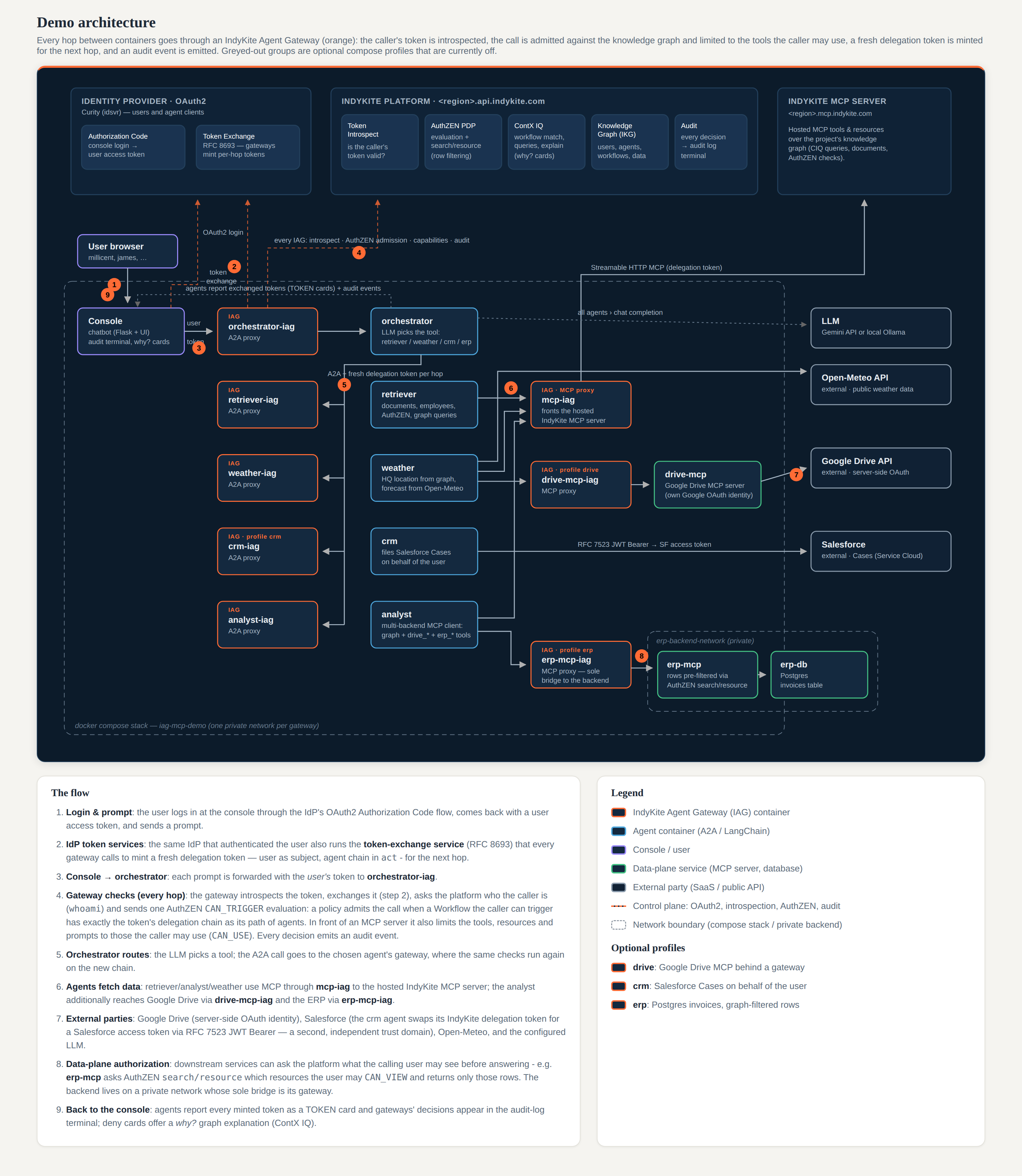
Download the diagram as a PDF: iag-architecture.pdf. Open the image in a new tab to read the labels at full size.
One idea: a checkpoint at every hop
Look at the diagram and you will see a lot of orange boxes. Each orange box is an Agent Gateway, and there is one in front of every agent and every data service. Nothing talks to anything without passing through one.
A gateway does four things, every single time a call goes through it:
- It checks who is calling. Not just which program, but which person the program is acting for. The gateway validates the caller's token with the identity provider your company already uses.
- It asks whether this is allowed. The gateway looks at the chain of agents behind the call and asks the platform one question: may this person trigger this workflow? The answer comes from the knowledge graph, more on that below.
- It issues a fresh token for the next hop. The new token names the person as the subject and adds the current agent to the list of actors. By the time a call reaches Salesforce, the token reads like a chain of custody: this person, through this agent, through that agent.
- It writes an audit event. Every decision, allowed or denied, is recorded with who, which agent, and why.
The agents themselves never check a permission. They do not have to, and they are not trusted to. That is the point. Authorization moves out of the code of each agent and into the path between them, where it is applied the same way everywhere and cannot be forgotten.
The cast, left to right
| Where on the diagram | What it is | In the demo |
|---|---|---|
| The people and their application, left | A web application that people log in to through the company's identity provider, the same login they use for everything else. | A console with an insurer's pages: policies, documents, claims, billing. It also shows an audit terminal and the "why?" cards that explain a denial. |
| The agents, middle | An orchestrator receives the person's request and decides which specialist should handle it. Each specialist is a separate, replaceable component with its own gateway in front of it. | A retriever that answers from the company's own data, a weather agent, a CRM agent that files cases in Salesforce, and an analyst that reaches documents in Google Drive and invoices in a billing database. |
| The outside world, right | The systems the agents reach with their own credentials, but only after the gateways have let the request through. | Google Drive, Salesforce, a public weather service, and the language model itself. |
| The identity provider, top left | Authenticates the people and the agent clients, and runs the token exchange that every gateway uses to mint the per-hop delegation tokens. If your provider cannot nest the actor chain, the self-hosted IndyKite Token Service does the exchange instead. | One OAuth 2.0 server with an authorization code flow for the console login and an RFC 8693 token exchange endpoint for the gateways. |
| The IndyKite platform, top right | Validates tokens (Token Introspect), makes the authorization decisions (AuthZEN), resolves users and runs the explanation queries (ContX IQ), records every decision (Audit), and hosts the knowledge graph. The hosted MCP server exposes the same graph to agents as MCP tools and resources. | One project in your region, holding the users, agents, workflows and business data of the insurer. |
The graph is the part worth pausing on.
Why a graph, and why it matters to the business
Most authorization systems are lists: this role may do that, this group may see this folder. Lists are easy to start and hard to keep true. Six months in, nobody can say why a permission exists, and nobody dares remove it.
The knowledge graph holds something different: relationships. Millicent works in Customer Support. Customer Support serves the Mitchell household. James holds an invoice. The Mitchells' policy lists Sarah as the primary policyholder. Customer Support may trigger the Drive workflow. These are facts about the business, and the same facts drive the decisions.
When the gateway asks "may Millicent trigger this workflow?", the answer is found by following relationships: she works in a department that may trigger it. When the billing service asks "which invoices may James see?", the answer is the invoices connected to him. There is no separate permission table to keep in sync with reality, because the permission is the relationship.
Three consequences follow, and each one is visible in the demo:
- The same question gets different answers for different people, without different code. Millicent sees three policy documents; James, a customer, sees the one the company publishes. The application did not branch on a role. It asked the graph.
- Denials are explained, not just enforced. When James is refused the product guides, a click on "why?" draws the graph: James and the Drive workflow, with nothing between them. Nothing was configured to deny him. The relationship is simply not there.
- Changing access is changing data. When James requests access and Millicent grants it, one relationship is written into the graph. No deployment, no ticket to an administrator, no configuration file. Half a minute later, the same request goes through. Revoking it is deleting the same relationship.
How the workflow, the agents and the trigger relationship are modelled, and the admission policy the gateway relies on, are in the Agent Gateway guide.
Follow one request through the diagram
The numbered markers on the diagram trace a single request end to end:
- Login and prompt. The person logs in at the console through the identity provider's authorization code flow, comes back with a user access token, and types a request.
- Token services. The same identity provider runs the token exchange that every gateway calls to mint a fresh delegation token for the next hop: the person as subject, the agent chain in the
actclaim. - Console to orchestrator. The request travels, with the person's token, to the orchestrator's gateway.
- Gateway checks, at every hop. The gateway introspects the token, exchanges it for a delegation token that carries the actor chain, asks AuthZEN one
CAN_TRIGGERquestion whose policy matches that chain against a workflow in the knowledge graph (or, for an MCP tool call or a tool list, aCAN_USEsearch for the tools the person may use), emits an audit event, and forwards. - The orchestrator routes. The language model picks the right specialist, and the A2A call goes to that specialist's gateway, where the same checks run again on the new chain.
- Agents fetch data. The specialists reach the knowledge graph through the hosted MCP server, behind a gateway of its own; the analyst also reaches Google Drive and the billing database, each behind its own gateway.
- External parties. Google Drive, Salesforce, the weather service and the language model are reached with their own credentials, only after the gateways have let the request through. The CRM agent swaps its IndyKite delegation token for a Salesforce access token, so the chain of custody continues into a second, independent trust domain.
- Authorization inside the data service. A data service can ask the platform what the person may see before answering. The billing service asks which invoices this person may view (AuthZEN search by resource) and returns only those rows; the database itself sits on a private network whose only door is its gateway.
- Back to the console. Every minted token and every decision appears in the audit column, and a denied step offers a "why?" that draws the answer from the graph.
In the demo you can watch this happen. Each hop appears as a card: who asked, which agent acted, allowed or denied, and why. A second card under each hop shows the token that was minted. When the CRM agent files a case, a third card appears: the Salesforce token it obtained, because the chain of custody continues into the third-party system. The case description in Salesforce records who acted for whom.
What this means for a company adopting agents
- You can add agents without adding risk in the same proportion. Every new agent or data source gets a gateway, and the gateway applies the policy you already have. The agent's own code stays simple, and simple code is easier to buy, build, replace, and review.
- You can answer the auditor. Every decision is recorded with its reason, and the reason is a path in the graph you can show on a screen.
- You can change your mind quickly. Access follows the business relationships you already maintain: org charts, customer assignments, policy holders. When those change, access changes with them. When someone needs an exception, it is one relationship, granted by someone entitled to grant it, and visible to everyone who looks.
- You keep the vendors you have. The identity provider is yours. Google Drive, Salesforce and the database are what they were. The language model is whichever one you choose. The gateway sits between them, and the graph holds what connects them.
The demo runs on a laptop, as a handful of containers. The architecture does not change when the agents are real, the data is real, and the people are your customers. That is the argument for getting it right now, while the first agents are still few.
Related
- Configure, run and test one gateway, with the full configuration and HTTP reference: Agent Gateway guide
- Mint the per-hop delegation tokens yourself when your identity provider cannot: Token Service guide
- Protect an MCP server step by step on the demo in this diagram: Agent Gateway MCP tutorial
- The hosted MCP server the agents call for graph data: MCP server guide
- How the platform validates the tokens the gateways forward: Token Introspect guide
- The decisions and the explanations behind them: AuthZEN guide and ContX IQ guide
- The working stack: iag-mcp-demo in the developer-hub repository