
The Audit Log API serves a signed, hash-chained trail of the audit events of a project that its Event Sinks delivered, once the project has an Audit Signing configuration. On the shared IndyKite platform the infrastructure behind it is IndyKite's concern. When the platform runs as a dedicated deployment in your own GCP project or AWS account, part of that infrastructure lives in your account, is often owned by your key-management or security team, and has decisions only you can take. This guide is the contract for that case: what must exist, what the deployment creates, which choices cannot be undone, what to hand over, and what to watch once it runs. It says nothing about how the service works internally; the Audit Log guide and the audit trail tutorial cover the chain and its verification.
What runs, and what it needs
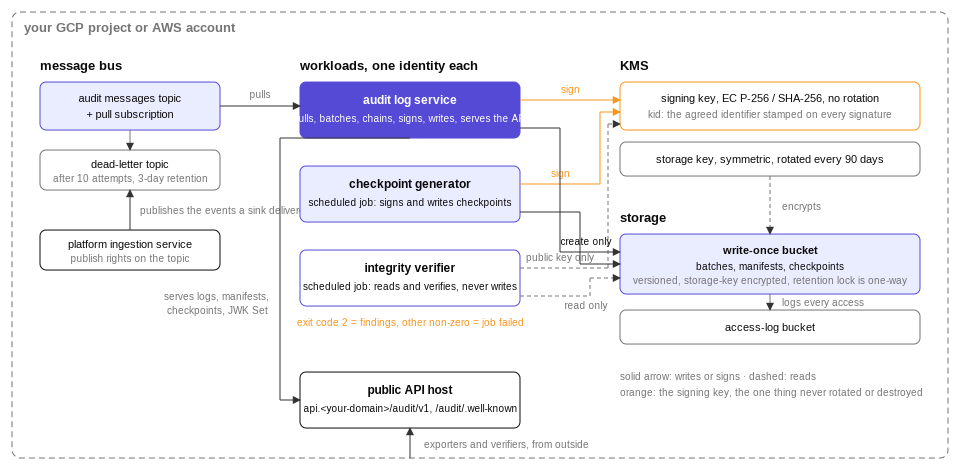
Three workloads make up the audit log, all deployed with the platform in your Kubernetes cluster:
| Workload | What it does | Signs | Writes |
| Audit log service | Consumes the audit events the platform publishes on the message bus, cuts them into batches, chains and signs them, stores them, and serves the Audit Log API and its JWK Set. | Yes: batches and manifests | Yes |
| Checkpoint generator | A scheduled job that signs a checkpoint of each chain's current head at intervals, so a truncated chain can be detected later. | Yes: checkpoints | Yes |
| Integrity verifier | A scheduled job that re-reads the stored chains, recomputes every hash and link and checks every signature, with no write access at all. Its exit code is your tamper alarm. | No | No |
Around them, in your account:
- An asymmetric signing key in Cloud KMS or AWS KMS. Its public half is what the JWK Set publishes and what every verifier trusts.
- A symmetric storage key that encrypts the buckets.
- A write-once bucket holding the batches, manifests and checkpoints, plus an access-log bucket recording who read or wrote it.
- A message bus carrying audit events from the platform's ingestion service to the audit log service, with a dead-letter destination.
- Three identities, one per workload, with the permissions below and nothing more.
- A public API host exposing
/audit/v1and/audit/.well-known, so exporters and verifiers outside the cluster can reach the trail and the keys. - A cache instance, provided by the deployment itself. It is never a source of truth: the checkpoint generator falls back to the stored manifests when a cache entry is missing.
Keys
| GCP (Cloud KMS) | AWS (KMS) | |
| Signing key | Purpose ASYMMETRIC_SIGN, algorithm EC_SIGN_P256_SHA256, protection level HSM recommended. | Usage SIGN_VERIFY, key spec ECC_NIST_P256. |
| Storage key | Symmetric encryption, HSM, rotated every 90 days. Used as the customer-managed encryption key of both buckets, so it must be in the same location as the buckets; a key ring in another location (for example a global one) cannot hold it. | Symmetric, automatic rotation every 90 days. Used as the SSE-KMS key of the write-once bucket. The access-log bucket uses SSE-S3, since S3 log delivery does not write to an SSE-KMS destination. |
| Who creates them | Either the deployment, inside an existing key ring you name (when that ring is not in the bucket's region, the deployment creates one regional key ring for the storage key, and nothing else), or your own team, in which case you hand over the two key resource IDs instead. | The deployment creates both, with an alias each, and a key policy that grants the account root full access; you set the deletion window (7 to 30 days). |
| Rotation of the signing key | Manual: Cloud KMS does not rotate asymmetric keys on its own. Create a new key version and point the deployment at it. Every signature names its key through its kid, and the JWK Set keeps publishing the earlier keys, so records signed before the rotation stay verifiable. The key is protected against destruction. | Manual: AWS KMS does not rotate asymmetric keys on its own. Create a new asymmetric key with the same spec and point the deployment at its ARN. Records signed before the rotation stay verifiable, as on GCP. |
Key identifier (kid) | A string you agree at hand-over, which the deployment stamps on every batch, manifest and checkpoint and publishes in the JWK Set. It is not derived from the key: it may be set to the key version or ARN, or to a name of your own, but it must be unique per key, since a verifier selects the public key by it. | |
Which key signs is also visible to API consumers: every batch, manifest and checkpoint carries the kid, and the Audit Signing guide explains how a project's configuration relates to it.
Storage
| Setting | Write-once bucket | Access-log bucket |
| Contents | Chain batches, chain manifests, project and platform checkpoints. | Access logs of the write-once bucket, delivered by the cloud provider's log-delivery service. |
| Location | The deployment's region, the same as the storage key. | Same. |
| Versioning | Enabled (required by object lock on AWS). | Enabled. |
| Encryption | The storage key. | GCP: the storage key. AWS: SSE-S3. |
| Public access | Blocked at the bucket level; uniform bucket-level access on GCP. | Blocked. |
| Retention | One year by default. GCP: a retention policy, unlocked until you decide otherwise. AWS: Object Lock with a default retention in GOVERNANCE mode until you decide otherwise. | None; the logs are kept as long as the bucket they describe. |
| Lifecycle rules | None. A rule that expires objects would defeat the purpose. | None. |
| Deletion protection | GCP: protected against destruction, and a 7-day soft-delete window. AWS: none, so that a disposable environment can be torn down; see the one-way decisions below. | Same as the write-once bucket. |
Two properties together make the bucket write-once. The writers may only create objects, never delete them; and the retention policy, once locked, forbids anyone, the cloud provider included, from shortening it. Until it is locked, a project owner can still remove the policy, which is why locking is a decision rather than a default.
Message bus
Audit events reach the audit log service through a queue, never through a direct call, so a slow or restarting service loses nothing. The ingestion service publishes an event to that queue only after an Event Sink of the project delivered it to at least one destination, and only for projects with an Audit Signing configuration; the chain therefore holds exactly what the customer's sinks received.
| GCP (Pub/Sub) | AWS (Kafka) | |
| Main path | One topic for audit messages and one pull subscription on it, encrypted with a customer-managed key: acknowledgement deadline 120 s, exponential retry between 10 s and 600 s, at most 10 delivery attempts, message retention 3 hours, acknowledged messages not retained, no ordering, no exactly-once. | One audit messages topic on your Kafka cluster, with the broker list and credentials provided to the deployment as a secret. |
| Dead letter | A dead-letter topic with its own pull subscription: 120 s acknowledgement deadline, 3-day retention, acknowledged messages retained so they can be inspected after the fact. | A dead-letter topic. It is required: the deployment refuses to start without one. |
| Publisher | The platform's ingestion service needs publish rights on the audit topic; the audit log service only subscribes and never publishes. | Produce rights for the ingestion service on the audit topic; for the audit log service, consume rights on the audit topic and produce rights on the dead-letter topic, where it parks what it cannot write. |
| Retention rule | Keep the defaults. For four hours the service remembers every event it has written, so a redelivery inside that time is acknowledged without a second write; the subscription's retention (three hours) must stay shorter than that window. Lengthening the retention without lengthening the window lets a late redelivery be written twice. | Same rule for the topic's retention. |
Names of the topics and subscriptions are agreed at deployment and appear in the deployment values below.
Identities and permissions
Each workload runs under its own identity (a GCP service account bound through Workload Identity, an IAM role bound through IRSA on AWS). The split is the security property of the design: the verifier can prove tampering precisely because it cannot write, and no single identity can both sign and read everything.
| Identity | On the signing key | On the write-once bucket | Elsewhere |
| Audit log service | GCP: roles/cloudkms.signer and roles/cloudkms.publicKeyViewer (it serves the JWK Set). AWS: kms:Sign, kms:GetPublicKey, kms:DescribeKey. | GCP: roles/storage.objectCreator, roles/storage.bucketViewer, roles/storage.objectViewer. AWS: s3:ListBucket, s3:GetBucketVersioning, s3:GetObject, s3:GetObjectRetention, s3:PutObject. | GCP: roles/pubsub.subscriber and roles/pubsub.viewer on the project; log, metric and trace writer. AWS: kms:Decrypt, kms:Encrypt, kms:GenerateDataKey, kms:DescribeKey on the storage key. |
| Checkpoint generator | Signer and public key viewer, as above. | Object creator, bucket viewer, object viewer, as above (it reads manifests when its cache is empty). | Log, metric and trace writer. |
| Integrity verifier | Public key viewer only. | Bucket viewer and object viewer only. No write permission of any kind. | Log, metric and trace writer. |
| Cloud Storage service agent (GCP) | roles/cloudkms.cryptoKeyEncrypterDecrypter on the storage key, so the bucket can use it. Google's log-delivery group gets roles/storage.objectCreator on the access-log bucket. |
- Create the identities first. The infrastructure grants roles to them by name; applying it before they exist fails on the first grant. On GCP, service account IDs are 6 to 30 characters.
- Object creator is not object admin. A writer can add objects and new generations under an existing name, but cannot delete; the locked retention policy and unique object names do the rest.
- Never grant
s3:PutObjectRetentionto a workload: with it, any pod could move objects toCOMPLIANCEmode, which nobody can undo. - If your IAM is managed centrally, the deployment can be told not to touch IAM at all; the grants in the table are then yours to make, exactly as listed.
- AWS without per-pod identities (no IRSA or Pod Identity) means the node role carries all of the above, and every pod on the node shares it. Treat that as a stopgap, not a design.
Values to hand over
The deployment is configured with the following values from your side. They are typically outputs of the infrastructure apply.
| Value | GCP | AWS |
| Cloud provider | Set explicitly. The service does not detect it; without the setting, start-up probes the cloud metadata service for about 15 seconds and then fails. | |
| Signing key | The full key version resource name, ending in /cryptoKeyVersions/<n>, not the key. | The key ARN, never an alias. |
| Key identifier | The kid to stamp on every signature and publish in the JWK Set, unique per key. | |
| Write-once bucket | gs://<bucket> | s3://<bucket>?region=<region>, and the AWS region in the service's environment. |
| Message bus | Topic and subscription names. | The Kafka driver with the audit topic to receive from and the dead-letter topic, and the broker secret. |
| Identities | The three service account emails, one annotation per workload. | The three IRSA role ARNs, one annotation per workload. |
| Public API host | The host name under your domain that serves the platform API, for example api.example.com. The deployment exposes /audit/v1 and /audit/.well-known on it. Clients then call it exactly as they would call https://us.api.indykite.com on the shared platform. | |
| Scheduled jobs | Whether the checkpoint generator and the integrity verifier are enabled (both should be, outside a throwaway environment), each with its own identity. | |
Decisions you cannot undo
| Decision | Why it is one-way | When to take it |
Locking the retention (GCP retention lock, AWS COMPLIANCE mode) | Once locked, the retention period can never be shortened or removed by anyone, the cloud provider and the account root included. Objects already under COMPLIANCE stay until they expire. | After the pipeline has run in that environment and the acceptance tutorial passes. Never in an environment that is torn down on a schedule. |
| Enabling the audit log on GCP | The signing key, the storage key and the write-once bucket are protected against destruction. Disabling the module later plans their destruction, which the protection blocks; the apply errors instead of disabling anything. | When the environment is meant to keep its trail. Decide the storage split at the same time: a disaster-recovery project can run the service against another project's keys and bucket, but switching that later hits the same protection. |
| Naming the key ring (GCP) | A key ring cannot be deleted or renamed, so its name is permanent. | Before the first apply. |
| Destroying the signing key | Every batch, manifest and checkpoint signed with it becomes unverifiable, forever. | Never. There is no rotation path; a new key would start a new, separately verifiable history. |
Operations
- Alert on the integrity verifier's exit code. Exit code
2means findings: a hash, link or signature that does not verify, tampering or corruption. Any other non-zero code means the job itself failed (could not read the bucket or the key) and must be investigated before the next run. Page on both; only0is good news. A verifier that cannot ask the platform which projects still exist fails the same way as one that cannot read the bucket. - A deleted project keeps its chain, but the jobs pass it over. Deleting a project removes nothing from the bucket. On every run, both jobs ask the platform which of the projects in the bucket still exist and skip the rest: the checkpoint generator writes no further checkpoint or key record for a deleted project, and the integrity verifier neither checks its chain nor counts it among the chains checked; it counts such chains separately in its run log. Export a project's trail before deleting it if you need it verified afterwards, since the recorded checkpoints and keys stay valid for an independent verification but no new ones are added.
- Alert on dead-letter depth. A message in the dead-letter topic is an audit event that was not written to the chain after all attempts. The three-day retention of the dead-letter subscription is the time you have to look at it.
- Keep Cloud KMS data-access audit logs on (admin read, data read, data write) so every signing operation is itself logged by the provider. Storage and Pub/Sub data-access logs are not required for the design to hold, but the access-log bucket already records bucket access.
- Watch the subscription backlog against its three-hour retention: a backlog older than that is lost input.
- Export regularly. The trail in the bucket is yours, but an export taken from the API and kept elsewhere, with the JWK Set of the time, is what lets an outside party verify independently; the audit trail tutorial shows how.
Acceptance
Before locking the retention, prove the deployment end to end: produce events, read them back through the public host, fetch the JWK Set and verify a page offline. The acceptance tutorial does this in five chapters with a single-file verifier.
Related
- The chain and its API: Audit Log guide
- Who manages the signing key, as seen from a project: Audit Signing guide
- Export and verify a whole trail: Audit trail tutorial, export and verification scripts
- Where your graph data lives, the other half of data residency: Data Residency guide