Keep a tamper-proof audit trail: sign, export and verify a project's audit log
From an empty project to an independently verified export: grant the Audit permission, declare who holds the signing key, produce audit events, page the signed batches, manifests and checkpoints out of the Audit Log API, and check every hash and signature offline, against keys you fetched and kept yourself.
Every call your applications make to IndyKite leaves an audit event: a node captured, a configuration changed, a token introspected, an authorization decided, a query executed. This tutorial is about what the platform does with those events afterwards, and what you can do with them. Once a project has an Audit Signing configuration and an Event Sink that delivers its events, the platform collects them into batches, hashes and signs each batch, links the batches into a chain with signed manifests, and fixes the chain's head at intervals with signed checkpoints. The Audit Log API pages all of that out, and publishes the public keys that signed it. An export taken with it can be handed to an auditor who has no IndyKite account and checked line by line.
The tutorial uses nothing but curl, jq and a short Python script, against the regional REST API. Terraform is shown where it applies. Nothing here needs the Hub beyond the credentials you download from it.
What you will have at the end
A working mental model of the chain: what a batch, a manifest, a checkpoint and a kid are, and what "tamper-proof" does and does not promise.
An Application Agent holding the Audit and Capture API permissions, with a credential.
An Audit Signing configuration declaring who holds the signing key, created with the Config API and declared again in Terraform, and the knowledge of what a customer-managed key in Google Cloud KMS, AWS KMS or Azure Key Vault must look like.
A handful of real audit events in the project's chain: Capture upserts and the configuration changes you made.
A self-contained export on disk: jwks.json, manifests.jsonl, logs.jsonl and checkpoints.jsonl.
A verifier you ran yourself, which recomputed every hash, followed every link and checked every signature against the published keys.
The operating habits: when to rotate a key, how to archive, how to feed a SIEM, and what each error means.
Prerequisites
An IndyKite project in the EU or US region and its GID, with a Service Account credential for the Config API. The Environment guide and the environment resource cover creating them; chapter 2 adds what this tutorial needs on top.
curl, jq, and Python 3 with the cryptography package for chapter 6.
Optional: Terraform with the IndyKite provider 0.43.0 or later for chapter 3 (0.46.0 or later for the Audit value of api_permissions in chapter 2), and a signing key in your own cloud KMS if you want to try a customer-managed key.
Who this tutorial is for
Platform and security engineers who have to answer "can we prove this log was not altered?", compliance teams preparing an evidence package, and developers wiring IndyKite audit data into an archive or a SIEM. If you only need the API reference, the Audit Log API guide and the Audit Signing guide are the shorter read; this tutorial walks the same ground end to end on a real project.
1
Chapter 1
What a tamper-proof audit trail is
The chain model behind the Audit Log API: events, batches, manifests, checkpoints and signing keys, and what tamper-evidence promises.
Chapter 1: What a tamper-proof audit trail is
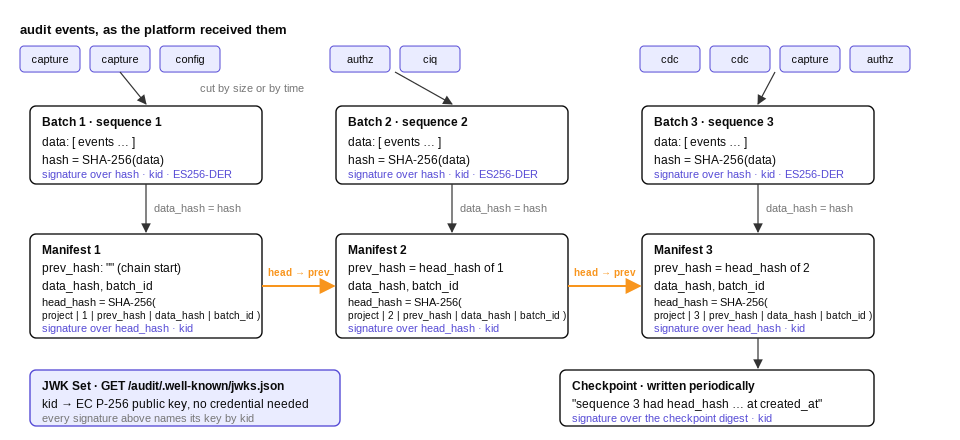
A plain log can be edited after the fact: a line removed, a timestamp changed, a record inserted. An audit trail meant as evidence has to make such changes detectable, by someone who does not run the system and does not trust it. The IndyKite audit trail does this with three well-known ingredients: hashing, a hash chain, and digital signatures with keys whose public halves are published.
The pieces, in the order they are built
Piece
What it is
What it protects against
Event
One thing that happened in your project, as a JSON object with an eventType such as indykite.audit.capture.upsert.node, a time, who caused it, and a typed data payload.
Nothing on its own. It is the raw material.
Batch
A JSON array of events of one project, in the order the platform received them, cut by size or by time. Its SHA-256 is the batch hash, and that digest is signed.
Any change inside the batch: the hash no longer matches and the signature no longer verifies.
Manifest
One small record per batch: the batch's sequence (1, 2, 3, …), its data_hash, the previous manifest's head as prev_hash, and the new head_hash computed from all of them. The head is signed.
A batch removed, inserted, reordered or replaced: the chain of prev_hash to head_hash links breaks at that point.
Checkpoint
A signed statement, written at intervals: "at this time the chain had reached this sequence with this head_hash".
The chain being quietly truncated and regrown from an earlier point: the old checkpoint still names the head that existed.
Key id (kid)
The identifier of the key that made a signature, stamped on every batch, manifest and checkpoint. The public keys are served as a JWK Set.
A forged signature: without the private key nobody can produce one that the published public key accepts.
Read as a picture, the chain of one project looks like this. The orange links are the mechanism: each manifest carries the previous head as its prev_hash, so no batch can be removed, inserted or reordered without breaking a link.
What "tamper-proof" promises
Detection, not prevention. Nothing stops a privileged actor from changing stored bytes. What the chain guarantees is that a change inside the exported chain shows up when it is verified: a hash mismatch, a broken link, or a signature that fails. What a valid chain does not prove is that it is complete: a chain whose tail was removed is still a valid prefix. Detecting that needs something you kept independently, such as the newest sequence and head of your previous export, or a checkpoint fetched at another time, to compare against.
Offline verification. Verification needs the export, the public keys, and the rules in chapter 6. It does not need a connection to the platform or an IndyKite account. It does need keys you trust: a party that hands you an export and the keys together could have signed both, so authenticate the JWKS independently, for example by fetching it from the API yourself and keeping it, rather than taking it from whoever supplied the export.
Lossless, for what the chain covers. The chain holds the events an Event Sink of the project delivered, in a project with an Audit Signing configuration (chapters 3 and 4 set both up); an event no sink received is not chained. Within that scope an accepted event is never dropped, and it is written to the chain once. A duplicate is possible only when a delivery is replayed long after the original, and it is then byte for byte the same; chapter 7 shows how to deduplicate.
Not a chronological guarantee. Batches are ordered by sequence, and the events inside a batch are in the order the platform received them, which is not always the order in which they happened. Every event carries its own time, and that timestamp is what you sort by when it matters.
What it is not
If you want to…
Use
Receive the same events as they happen, in your own Kafka, Pub/Sub, Event Grid or Service Bus
Outbound Events. Same indykite.audit.* events, pushed, unsigned, as a stream.
Read the decisions of a self-hosted Agent Gateway or Token Service
Their own audit records, written to a file or webhook you configure; see the Agent Gateway guide.
Keep, export and prove the project's trail
The Audit Log API and the Audit Signing configuration. This tutorial.
The two APIs you will use
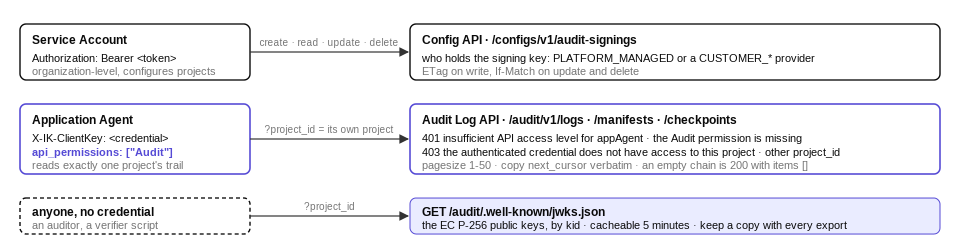
Config API, /configs/v1/audit-signings, with a Service Account token: declares who manages the signing key (chapter 3).
Audit Log API, /audit/v1/logs, /audit/v1/manifests, /audit/v1/checkpoints and /audit/.well-known/jwks.json, with an Application Agent credential holding the Audit permission: reads the trail (chapter 5).
Both live on the regional base URL of your project, https://eu.api.indykite.com or https://us.api.indykite.com.
2
Chapter 2
Set up the agent that reads the trail
Create an Application Agent with the Audit and Capture permissions, mint its credential, and keep the three values every later chapter uses.
Chapter 2: Set up the agent that reads the trail
Reading the trail is an Application Agent operation, gated by its own API permission. Writing the Audit Signing configuration is a Service Account operation. You need both credentials; this chapter makes sure you have them and records the values the rest of the tutorial reuses.
Step 1: Three values for the whole tutorial
API_URL=https://eu.api.indykite.com        # or https://us.api.indykite.com, the project's region
PROJECT_ID="gid:YOUR_PROJECT_GID"
SA_TOKEN="<service account bearer token>"   # Config API calls
The project GID and the Service Account token come from the environment you already have (the Environment guide, or the environment resource if you are starting from nothing). A Service Account credential file carries a ready-to-use token only when it was created with an expiry of at most two years; otherwise you sign the token yourself, as the Credentials guide describes.
Step 2: Create an agent with the Audit permission
Audit is a separate API permission. It is not part of any existing agent until you add it. The agent below also gets Capture, so chapter 4 can produce events with the same credential:
To add the permission to an agent you already have, PUT /configs/v1/application-agents/{id} with the full api_permissions list, including Audit. In Terraform it is the api_permissions argument of indykite_application_agent.
Step 3: Mint a credential
umask 077                                 # the file created below holds the agent's credential
curl -sS -X POST "$API_URL/configs/v1/application-agent-credentials" \
  -H "Authorization: Bearer $SA_TOKEN" -H "Content-Type: application/json" \
  -d '{
    "application_agent_id": "gid:YOUR_APP_AGENT_GID",
    "display_name": "audit tutorial",
    "expire_time": "2027-10-07T00:00:00Z"
  }' | jq -r '.application_agent_config.token' > client.key
CLIENT_KEY=$(cat client.key)
export API_URL PROJECT_ID CLIENT_KEY      # chapter 5 runs a script that reads these
With an expire_time within two years the response carries the token in application_agent_config.token, ready for the X-IK-ClientKey header. Treat the file like a password: the umask makes it readable by you alone. The three values are exported because the export script in chapter 5 runs as a separate process and reads them from the environment.
Keep API_URL, PROJECT_ID, SA_TOKEN and CLIENT_KEY in your shell; every command from here on uses them.
3
Chapter 3
Declare who holds the signing key
Create the one Audit Signing configuration a project holds with the Config API, platform-managed first, then switch it to your own KMS key, read it back, declare it in Terraform, and understand what the kid on every record tells you.
Chapter 3: Declare who holds the signing key
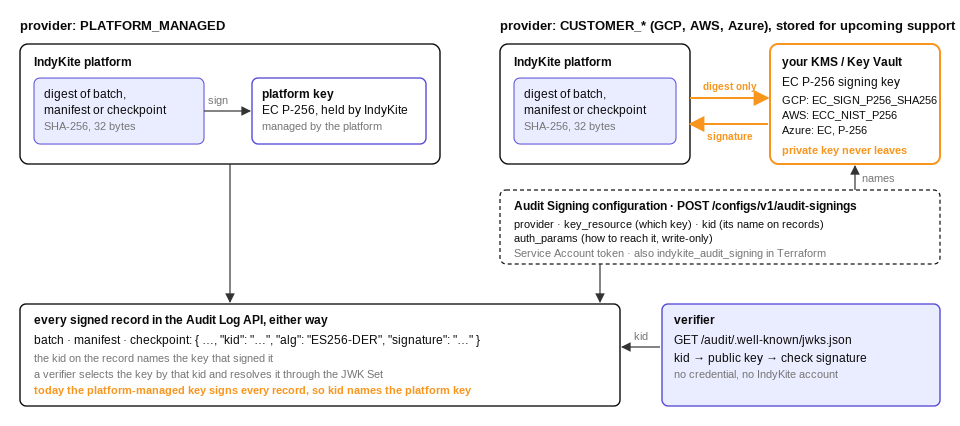
The Audit Signing configuration answers one question for a project: who manages the key that signs its audit records? Either the platform does, or you do, with a key that never leaves your Google Cloud KMS, AWS KMS or Azure Key Vault. It is a Config API object like Token Introspect or an event sink, so it is written with the Service Account token and can be declared in Terraform.
One thing to know before you start: today the platform-managed key signs every record. A customer-managed configuration is stored and validated for the upcoming customer-managed key support, and records will carry its kid once it is used for signing. The records you export later in this tutorial therefore carry the platform key's kid, whichever configuration you create here.
Three fields are enough: name (lowercase letters, digits and hyphens, starting with a letter, immutable), project_id and provider. There is no default provider, so provider is required on every create and update. Save the etag response header: updates and deletes send it back in If-Match so that two people editing the same configuration cannot overwrite each other.
This create is itself an audit event, indykite.audit.config.create, and will be the first thing you find in the chain in chapter 5.
A read by name needs project_id; a read by GID does not. For a platform-managed configuration key_resource and kid are empty and there is no auth_params. Listing with GET /configs/v1/audit-signings?project_id=…&full_fetch=true returns the same objects in a data array; without full_fetch only the metadata comes back.
Step 3: A customer-managed key
Audit records are signed with ECDSA on the P-256 curve over SHA-256 digests. A key of your own therefore has to be an asymmetric EC P-256 signing key, and the platform needs permission to sign with it and read its public key. The private half never leaves your key store. Creating the configuration stores it for the upcoming support; it does not change which key signs today.
Provider
Create the key as
key_resource
CUSTOMER_GCP_KMS
Asymmetric sign, EC_SIGN_P256_SHA256; grant cloudkms.cryptoKeyVersions.useToSign and cloudkms.cryptoKeyVersions.viewPublicKey
The crypto key version name: projects/my-project/locations/europe-west1/keyRings/audit/cryptoKeys/signing/cryptoKeyVersions/1
CUSTOMER_AWS_KMS
Asymmetric, ECC_NIST_P256, sign and verify, ECDSA_SHA_256; grant kms:Sign and kms:GetPublicKey, preferably to an IAM role with an external ID rather than long-term access keys
The key ARN, whose region segment names the KMS region: arn:aws:kms:eu-west-1:123456789012:key/1234abcd-…. Prefer the ARN to an alias.
CUSTOMER_AZURE_KEY_VAULT
EC, curve P-256, sign permitted for a service principal in the vault's tenant
The key identifier URI: https://my-vault.vault.azure.net/keys/audit-signing (latest version when no version segment)
With the key in place, the configuration gains key_resource, a kid of your choosing, and the access material in auth_params. Both key_resource and kid are required for every customer-managed provider. A project holds exactly one Audit Signing configuration: a second POST in the same project, whatever its name, answers 409 with audit signing config already exists in project. Moving to your own key is therefore an update of the configuration from step 1, guarded by the ETag you saved there. The AWS form:
The update replaces the whole configuration, so provider is sent again, and the response carries a new ETag that the line above saves for step 5. Leave key_resource out and the answer is 422 with key_resource is required for customer-managed providers in the errors array; the same for kid. auth_params is write-only: read the configuration back and every value is an empty string, while the keys are preserved so you can see what was set. The key names themselves are not prescribed by the platform: this tutorial uses the IAM role pattern AWS recommends for third-party access, and the Audit Signing guide lists the equivalents for Google Cloud and Azure. Choose the kid deliberately. It is the name a record signed with this key carries, and what a verifier will look for in the JWK Set, so a name that encodes the key's purpose and period, like audit-2026-q4, pays off at rotation time.
Step 4: The same declaration in Terraform
The indykite_audit_signing resource (provider 0.43.0 or later) takes the same fields, with the provider enum in key_provider and the project GID in project_id:
# the project's single configuration, as it stands after step 3;
# before step 3 the same block held only name, display_name, project_id
# and key_provider = "PLATFORM_MANAGED"
resource "indykite_audit_signing" "tutorial" {
  name         = "audit-signing-tutorial"
  display_name = "Audit signing with our AWS KMS key"
  project_id   = "gid:YOUR_PROJECT_GID"
  key_provider = "CUSTOMER_AWS_KMS"
  key_resource = "arn:aws:kms:eu-west-1:123456789012:key/1234abcd-12ab-34cd-56ef-1234567890ab"
  kid          = "audit-2026-q4"
  auth_params = {
    role_arn    = var.audit_signer_role_arn
    external_id = var.audit_signer_external_id
  }
}
Because the API never returns auth_params values, Terraform keeps the configured values in state and reconciles only the set of keys; keep them in sensitive variables. The full file, with the Google Cloud KMS form and the indykite_audit_signings data source, is the Audit Signing Terraform example. If you created the configuration with curl in step 1 and want Terraform to own it from now on, import it by GID rather than creating it twice: a project holds one configuration and a second create answers 409 with audit signing config already exists in project. Switching providers later is an edit of this one block, never a second resource in the same project.
Step 5: Rotating, and what the trail tells you
The JWK Set keeps a retired key next to the new one, so records signed before a rotation stay checkable from the API. Still keep the set that names the current key before any rotation, so your exports verify without the API. The export in chapter 5 does this for you; if you have not run it yet, fetch the set now and keep the file with your exports:
Once customer-managed keys are in use, rotating one is an update: point key_resource at the new key version and change the kid, guarded by the configuration's current ETag. If the one saved in step 3 is gone, read the configuration again first:
A stale ETag answers 412 Precondition Failed: re-read, take the new ETag, retry. The update replaces the whole configuration, so provider and the auth_params values have to be sent again.
One principle to carry into the next chapters: a verifier selects the key by the kid each record carries. Every batch, manifest and checkpoint names the key that signed it, and the JWKS endpoint publishes the public keys for those kid values; chapter 5 reads them from the trail and chapter 6 resolves them.
4
Chapter 4
Put some events into the chain
Produce real audit events with the Capture API and the configuration changes already made, and learn to read an event's shape before exporting hundreds of them.
Chapter 4: Put some events into the chain
A chain with nothing in it cannot be verified, so this chapter produces a few events with calls you would make anyway. Chapter 3 already contributed configuration events; here the agent from chapter 2 captures a small graph.
Before you start: an Event Sink
The chain holds exactly the events your Event Sinks received: an event is chained only after an Event Sink of the project delivered it to at least one destination, and only in a project with the Audit Signing configuration of chapter 3. Without a sink the calls below leave nothing on the trail. If the project has none yet, create one with a route on every audit event, to any destination you own; the example uses Kafka, the Outbound Events guide shows the Pub/Sub, Event Grid and Service Bus forms.
The destination must accept the deliveries: a sink whose provider fails (see last_error in the Outbound Events guide) stops feeding the chain as well as the sink. Events produced before the sink existed are not chained after the fact.
Step 1: Capture a small dataset
The two files below describe a car rental company: five Customer identity nodes, three Car nodes, and the RENT relationships between them. They are the request bodies the Data Schema guide uses as its playground.
Nodes first, then relationships, since a relationship names its two ends by type and external_id. Both calls are upserts: re-posting the files is harmless to the graph, and each re-post adds another round of audit events, which is useful if you want a longer chain to page through later.
Step 2: What each call left behind
Each captured node becomes one indykite.audit.capture.upsert.node event, each relationship one indykite.audit.capture.upsert.relationship event. Since the project's graph is observed by change data capture, the same writes also show up as indykite.audit.cdc.node.create and indykite.audit.cdc.relationship.create events. And chapter 3 left indykite.audit.config.create events for the Audit Signing configurations, plus indykite.audit.config.update if you rotated. The families you can expect in a project's trail:
A configuration object is created, read, updated, deleted or listed, or a permission assigned. A delete carries the object's state right before deletion as before; a list carries the IDs it returned
The complete list, with the fields of each payload, is in the Outbound Events guide; the trail carries exactly the same events.
Step 3: Read one event before reading hundreds
Events reach the chain in batches, which are cut by size or by time, so give the platform a short while after the captures. Then look at the first batch:
Every event has the same top-level shape, whatever its type, with its top-level keys in alphabetical order:
eventType and time: what happened and when, RFC 3339 with nanoseconds, UTC.
customerId and appSpaceId: the organization and the project. appSpaceId equals the project_id you queried.
initiator: who caused it, as a flat object of identifiers. A Service Account shows serviceAccountId and serviceAccountCredentialsId, as above; an Application Agent shows applicationId, appAgentId and appAgentCredentialsId, which is what the capture events of step 1 carry; an end user shows digitalTwinId, viaApplicationId and sessionId.
requestId: the identifier of the API request, the same value that request returned to its caller.
data: the typed payload, named by its @type, in camelCase. For a capture upsert it holds the node with its properties; for a configuration change, the object's identifiers.
context: string pairs attached to some events, for example soft_delete on a configuration delete, present only when there are any.
Two things that matter later. First, the content of data is whatever the caller sent, property values included, so an export is evidence to store and index, never input to execute. Second, an accepted event is written to the chain once; a duplicate is possible only when a delivery is replayed long after the original, and such a copy is byte-for-byte identical, same time, same requestId, so deduplicating on the whole event object is safe, while two distinct actions always differ in at least time.
5
Chapter 5
Export the trail
Page the keys, manifests, batches and checkpoints out of the Audit Log API into a self-contained folder, byte for byte, with curl and jq.
Chapter 5: Export the trail
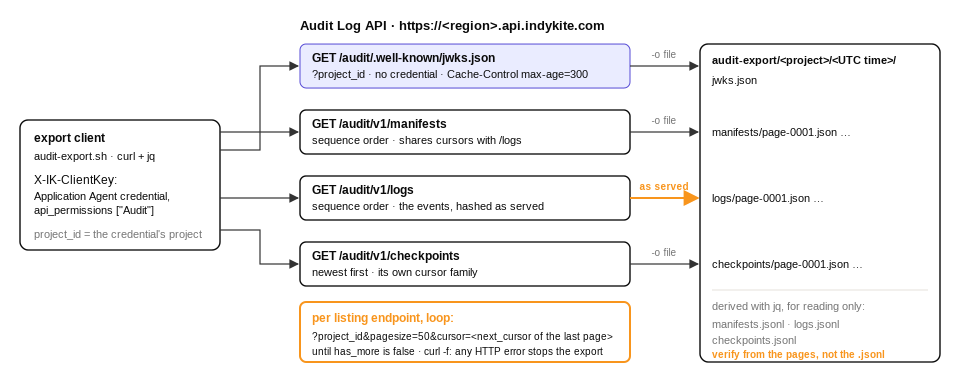
An export is four things fetched for one project: the JWK Set, every manifest, every batch, and every checkpoint. This chapter fetches them by hand first, so the envelope and the cursors are familiar, then with a script you can run nightly. One rule shapes the whole chapter: the batch hash covers the data array exactly as served, so the export keeps the response pages as they arrived rather than a pretty-printed or re-encoded copy.
No credential, and no alg member on the keys: the algorithm label travels with each signed record instead, because the signatures are DER-encoded rather than the fixed-size R||S form that JWS defines for ES256. The response is cacheable for 60 seconds and lists every key that has signed for the project, current and retired; a new key can take up to 2 minutes to be listed. The file is saved with the export so that the export verifies on its own, without the API.
Every listing endpoint answers with the same envelope: items, has_more, and next_cursor, which is "" on the last page. pagesize defaults to 50 and is capped at 50. The cursor is opaque: it is copied back as it is, never built by hand. Manifests and logs page in lockstep, so a manifest cursor is valid on the logs endpoint and the other way round; checkpoint cursors are their own family.
Read the first manifest once, field by field: sequence 1 has an empty prev_hash; data_hash is the SHA-256 of the batch's events; head_hash is derived from the project, the sequence, the previous head, the data hash and the batch id; and signature, under the key kid names, covers that head. The second manifest will carry this head_hash as its prev_hash. That is the chain.
The batch repeats what the manifest said about it (hash equals data_hash, chain_hash equals head_hash) and adds the events in data. The hash is the SHA-256 of that array's bytes as the server wrote them: compact JSON, top-level keys in alphabetical order, the server's own escaping. Pass it through jq -c or a JSON library and back, and an escaped character or a number may be written differently, and the hash no longer matches. So the raw response is what goes into the archive, and jq is used to look at it. Saved with -o, as above, the page is byte for byte what the API sent.
Step 4: The whole trail, with a script
Download audit-export.sh. It fetches the JWKS, then pages the manifests, the logs and the checkpoints to has_more: false, keeping every page as it arrived and writing one-item-per-line .jsonl files next to them for convenience. It stops on the first HTTP error, so an incomplete export is reported rather than mistaken for a short one:
cd ..
chmod +x audit-export.sh
./audit-export.sh
# keys: … (1 JWK Set(s) kept with the export)
# checkpoints: 1 page(s), 0 item(s)
# manifests: 1 page(s), 2 item(s)
# logs: 1 page(s), 2 item(s)
# keys: … (1 JWK Set(s) kept with the export)
# newest sequence: 2
# export written to audit-export/YOUR_PROJECT_GID/2026-10-07T10-00-00Z
audit-export/YOUR_PROJECT_GID/
  jwks-archive/jwks-….json     # every JWK Set ever fetched for this project
  2026-10-07T10-00-00Z/
    jwks.json  jwks-….json     # the current set, and a copy of every archived set
    checkpoints/page-0001.json   manifests/page-0001.json   logs/page-0001.json
    checkpoints.jsonl            manifests.jsonl            logs.jsonl
Two details of the script are worth knowing. It reads the checkpoints first, then the manifests and the logs, and if the chain grew in between it reads again whichever of the two is behind; an export is only reported complete when manifests and logs end at the same sequence. And it keeps every JWK Set it has ever fetched for the project in jwks-archive and copies all of them into each export, so every export folder verifies on its own, also against a set from before a rotation. After the pages it fetches the set once more, in case the key rotated during the export, and fails if any kid in the exported records is in none of the saved sets: a key added within the last 2 minutes may not be listed yet, so rerun a little later.
The heart of the script is one loop per endpoint; this is all a client has to get right:
cursor=""
n=0
while :; do
    n=$((n + 1))
    page="logs/page-$(printf '%04d' "${n}").json"
    curl -fsS "${API_URL}/audit/v1/logs?project_id=${PROJECT_ID}&pagesize=50&cursor=${cursor}" \
        -H "X-IK-ClientKey: ${CLIENT_KEY}" -o "${page}" ||
        {
            echo "export of logs failed on page ${n}; the export is incomplete" >&2
            exit 1
        }
    has_more="$(jq -r '.has_more' "${page}")"
    [[ "${has_more}" == "true" ]] || break
    cursor="$(jq -r '.next_cursor' "${page}")"
done
curl -f is what makes a 401 or 500 body fail the loop instead of being written down as a page; without it the export would end early and look complete.
Step 5: Checkpoints, and a first look at the numbers
Your fresh project most likely has no checkpoint yet: they are written periodically, and only for chains that have grown since the last one, so the newest checkpoint normally trails the newest manifest. On a project with history the file holds items like this, newest first:
A checkpoint is a dated, signed claim about where the chain stood. Its value shows in chapter 6: if someone truncated the chain and let it regrow, the old checkpoint would still name a head that the regrown chain does not have at that sequence.
The .jsonl files are the right place for this kind of question. They are derived from the raw pages and are not what gets verified; the next chapter reads the pages.
6
Chapter 6
Verify the export
Recompute every hash, follow every link and check every signature of the export with a short Python script, then break the export on purpose and watch the checks fail.
Chapter 6: Verify the export
Verification is where the trail earns its name. It needs the export folder from chapter 5 and nothing else: no credential, no network, no IndyKite. The rules are few and exact; the script below applies them, and the second half of the chapter breaks the export on purpose so you see what a finding looks like.
The rules
Check
Rule
Batch content
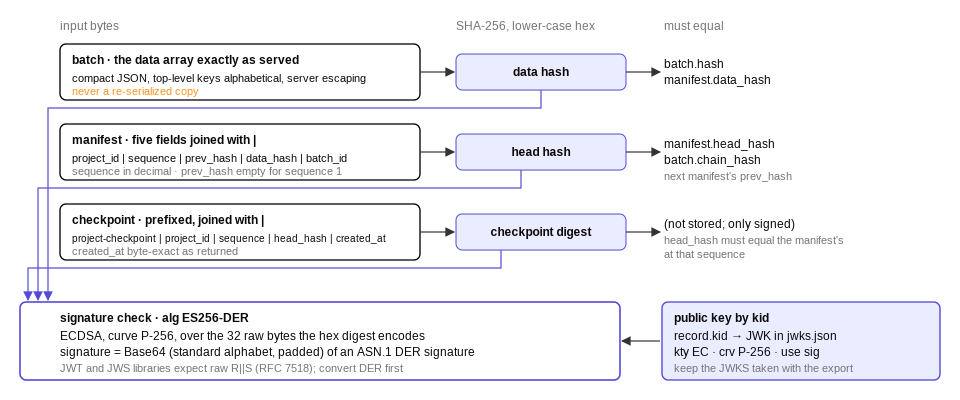
SHA-256 of the data array, bytes exactly as served, as lower-case hex, equals the batch hash and the manifest data_hash.
Chain head
SHA-256 of the string <project_id>|<sequence>|<prev_hash>|<data_hash>|<batch_id> (five fields joined with |, sequence in decimal, prev_hash empty for sequence 1) equals the manifest head_hash and the batch chain_hash.
Links
Sequences run 1, 2, 3, … without a gap, and each prev_hash equals the previous head_hash.
Cross-references
The batch and the manifest at one sequence carry the same batch_id, manifest_id and project_id.
Batch and manifest signatures
ECDSA on P-256 over the 32-byte digest the hex hash (batch) or head_hash (manifest) encodes; the signature is ASN.1 DER, Base64 with the standard alphabet and padding; alg is ES256-DER; the key is the JWK whose kid matches.
Checkpoint
Signature over SHA-256 of project-checkpoint|<project_id>|<sequence>|<head_hash>|<created_at>, created_at exactly as returned, and the manifest at that sequence carries the same head_hash.
Two details trip up hand-written verifiers. The signatures are DER-encoded, as a KMS produces them, not the fixed-size R||S form that JWS ES256 (RFC 7518) defines, so a JWT or JWS library rejects them unless converted. And the platform signs digests, never documents: the digest is the raw 32 bytes the hex string encodes, so a verifier that hashes the hex string again, or hashes the whole JSON record, fails on every record.
Step 1: Run the verifier
Download audit-verify.py. It needs Python 3.8 or later and the cryptography package:
manifests: 2  batches: 2  events: 19  checkpoints: 0
sequences: 1..2  keys used: …
newest head: sequence 2 = …  (compare with the value you kept)
OK: every hash, link and signature verified
Before the chain checks, the script checks the export itself: every endpoint has its pages, numbered without gaps, each page a valid envelope, has_more true on every page but the last and the last cursor empty. A folder whose last saved page still says has_more: true is reported as truncated rather than verified. The last line prints the newest sequence and head; write them down with the date, since a later export that verifies but ends earlier than this one is the sign of a chain whose tail was removed, and only a value you kept can reveal that.
The exit code is 0 when every check passes and 1 otherwise, with one FAIL line per failed check on standard error, so the script slots into a nightly job. It reads the raw pages, manifests/page-*.json, logs/page-*.json and checkpoints/page-*.json, and every jwks*.json in the folder, so an export that holds two JWKS snapshots across a rotation verifies as one.
How the script does it
The whole script is in the Audit Log resource; these are the three pieces that matter.
Loading a key from the JWK Set, and verifying a signature over a digest:
from cryptography.hazmat.primitives import hashes
from cryptography.hazmat.primitives.asymmetric import ec, utils
# a JWK's x and y are base64url integers
def b64url_int(s):
    return int.from_bytes(base64.urlsafe_b64decode(s + "=" * (-len(s) % 4)), "big")
# the public key named by the record's kid
key = ec.EllipticCurvePublicNumbers(b64url_int(jwk["x"]), b64url_int(jwk["y"]), ec.SECP256R1()).public_key()
# verify a signature over a digest the record carries in hex
key.verify(
    base64.b64decode(record["signature"]),        # DER, standard Base64
    bytes.fromhex(hex_digest),                     # the 32 bytes the hex encodes
    ec.ECDSA(utils.Prehashed(hashes.SHA256())),    # the digest is given, not recomputed
)
Recomputing the two hashes of a manifest and batch pair:
data_hash = hashlib.sha256(raw_data_bytes).hexdigest()          # bytes sliced out of the page as served
head = hashlib.sha256(
    f"{m['project_id']}|{m['sequence']}|{m['prev_hash']}|{m['data_hash']}|{m['batch_id']}".encode()
).hexdigest()
assert data_hash == b["hash"] == m["data_hash"]
assert head == m["head_hash"] == b["chain_hash"]
The one piece that is not a cryptographic rule is getting raw_data_bytes: the script scans the page text for each item's "data" value and takes that slice, instead of parsing and re-serializing, so the bytes hashed are the bytes the server hashed.
Step 2: Cross-check one signature with OpenSSL
A second tool that agrees is worth having when the verifier is new to your team. Convert the JWK with the right kid to a PEM public key, here with the same cryptography package the verifier uses, then let OpenSSL check the signature:
KID=$(head -n 1 manifests.jsonl | jq -r '.kid')          # the key the first exported manifest names
python3 - "$KID" <<'EOF' > key.pem
import json, base64, sys, glob
from cryptography.hazmat.primitives import serialization
from cryptography.hazmat.primitives.asymmetric import ec
keys = {}
for path in sorted(glob.glob("jwks*.json")):          # the current set and every archived snapshot
    with open(path, encoding="utf-8") as f:
        doc = json.load(f)
        for key in doc["keys"]:
            keys[key["kid"]] = key
k = keys[sys.argv[1]]
n = lambda s: int.from_bytes(base64.urlsafe_b64decode(s + "=" * (-len(s) % 4)), "big")
pub = ec.EllipticCurvePublicNumbers(n(k["x"]), n(k["y"]), ec.SECP256R1()).public_key()
print(pub.public_bytes(serialization.Encoding.PEM, serialization.PublicFormat.SubjectPublicKeyInfo).decode(), end="")
EOF
FAIL batch 1: SHA-256 of data as served differs from hash / data_hash
1 check(s) failed
Now remove a whole manifest from the middle of a longer export, or edit a sequence:
FAIL manifest 5: expected sequence 4, gap or duplicate in the export
FAIL batch 4: no manifest in manifests/ for this batch
And replace jwks.json with keys that did not sign the trail:
FAIL manifest 1: signature does not verify under kid '…' (InvalidSignature)
FAIL batch 1: signature does not verify under kid '…' (InvalidSignature)
…
Each finding names the record and the rule, which is what a report needs. Three readings to keep in mind:
A content or link failure at one sequence on an otherwise intact chain means the stored record differs from what was signed. Keep the export and the JWKS exactly as fetched and report the project, the sequence and the time.
A gap is most often an export problem: a page lost to an error that was not treated as fatal. Re-export; a gap that persists at the same sequence is a finding.
Every signature failing under one kid means the key in your JWKS is not the key that signed: usually the snapshot was taken after a rotation. Verify with the JWKS kept with the export, which is the reason it is kept.
A checkpoint failure deserves its own line: the manifest at the checkpoint's sequence showing a different head_hash is the model's strongest signal, because it means the chain reached that sequence with a different history than the one that was signed at checkpoint time.
7
Chapter 7
Run it day to day
Archiving exports, key rotation, feeding a SIEM, deduplication, and the errors you will meet and what each one means.
Chapter 7: Run it day to day
The previous chapters produced one verified export. This one is about turning that into a routine: what to keep, how often, how to react to a key change, how to feed the events into the tools your security team already uses, and what each error means when something goes wrong.
Archive by project, keep the keys with the data
An export is self-contained when, for one project_id, it holds the manifests, the logs and the checkpoints each fetched to has_more: false, together with JWKS snapshots that between them contain every kid those records reference. A layout that keeps this straight:
audit-archive/
  <project_id>/
    2026-10-07T10-00-00Z/
      jwks.json              # the keys as published at export time
      jwks-<digest>.json     # every JWK Set ever fetched for this project, copied in by the script
      manifests/page-*.json  # the raw pages: what audit-verify.py reads
      logs/page-*.json
      checkpoints/page-*.json
      manifests.jsonl        # derived with jq, for reading only
      logs.jsonl
      checkpoints.jsonl
      verify.log             # output of audit-verify.py, with the date and the newest head
The raw page directories are the evidence: the batch hash covers the bytes as served, so a folder that kept only the .jsonl files can no longer be verified. The JWKS is served with a 60-second cache lifetime and contains every key that has signed for the project, current and retired; a new key can take up to 2 minutes to appear. Keeping the sets with the exports makes each export verifiable without the API. The export script therefore keeps every JWK Set it has fetched in a jwks-archive folder next to the exports and copies all of them into each new export, so a folder taken after a rotation still verifies on its own. If you export with your own tooling, keep the previous jwks.json next to the new one. Never delete an older export because a newer one exists.
Exports are incremental by nature: the chain only grows at the end, and sequences are contiguous. A nightly job can store the newest sequence it has, fetch everything, and keep the full set; or diff on sequence and append. Verify after every export, not only when an auditor asks, so that a problem is found while the context is fresh.
Key rotation
Keep the JWK Set that names the current key before anything changes: run an export, or fetch GET /audit/.well-known/jwks.json into a dated file in your archive. The API keeps serving the old public key after the rotation; the copy in your archive is what lets an export verify without the API. Keep the JWK Set with each export for the platform-managed key as well.
Create the new key version in your KMS, same algorithm (EC P-256, ECDSA with SHA-256).
For a customer-managed key, update the Audit Signing configuration: new key_resource, new kid, If-Match with the current ETag. In Terraform, change the two arguments and apply.
Whatever changed the key, new records carry a new kid and the JWK Set changes with it. Take an export soon after, so that your archive holds a JWKS snapshot for each kid that appears in the trail; the export script keeps every set it has fetched and copies them all into each new export.
Keep the old key version readable, or at least its public key, for as long as records signed with it must be verifiable. Destroying a key version in the KMS does not alter the trail, but it removes your ability to re-derive the public key later should a JWKS snapshot be lost.
A verifier handles rotation without special cases: each record names its kid, and the key is looked up by that name. What breaks verification is a kid that is in no JWKS you kept.
Feeding a SIEM or a data warehouse
Need
Source
Why
Alerts and dashboards on events as they happen
Outbound Events to Kafka, Pub/Sub, Event Grid or Service Bus
Pushed within moments of the action, routed and filtered by event type, labels and properties. Unsigned.
Evidence that stands on its own
The Audit Log API export from chapter 5
Signed, chained, verifiable offline. Pulled, in batches.
Both
Both
They carry the same indykite.audit.* events. Use the stream for operations and the export for retention and proof; reconcile the two on requestId and time when a question arises.
For loading into a warehouse, one event per line is the convenient shape; the batch fields can travel with each event so the provenance is kept:
jq -c '. as $b | .data[] | . + {_sequence: $b.sequence, _batch_id: $b.batch_id, _kid: $b.kid}' logs.jsonl > events.jsonl
jq -sc 'unique_by(del(._sequence, ._batch_id, ._kid))[]' events.jsonl > events.dedup.jsonl   # one record per distinct event
Deduplicate on the original event fields, as above, so that a redelivery that landed in a later batch still collapses onto the first copy and keeps that copy's provenance. Never strip time or requestId first: two real actions can have identical content and differ only there.
Errors, and what each one means
Symptom
Meaning and fix
200 with "items": [] on every endpoint
The chain is empty: no event recorded for the project yet. Not an error. A new project also has no checkpoint until its chain has grown and the next checkpoint has been written.
401insufficient API access level for appAgent
The agent lacks the Audit permission, or received it moments ago. Grants apply asynchronously; retry before changing anything.
401Missing or malformed AppAgent credential token in X-IK-ClientKey header
No credential, or a Service Account token where an agent credential belongs. The JWKS endpoint takes none.
403the authenticated credential does not have access to this project
project_id is another project, even one of the same organization. Each project is exported with its own agent.
400invalid cursor
The cursor was edited, truncated, or taken from the other endpoint family. Manifests and logs share cursors; checkpoints have their own. Copy next_cursor verbatim.
400pagesize must be a positive integer
pagesize is zero, negative or not a number. Values above 50 are capped silently, not refused.
406
An Accept header that is absent or allows neither application/json nor */*.
422 on /configs/v1/audit-signings
Validation: missing field provider, key_resource is required for customer-managed providers, kid is required for customer-managed providers, auth_params limits (32 pairs, 1-256 characters each, no empty values), or a name that does not match [a-z][-a-z0-9]*[a-z0-9]. The errors array names the field.
412 on update or delete
Stale If-Match. Re-read the configuration, take the new ETag, retry.
409 on create
audit signing config already exists in project: a project holds exactly one configuration. Update the existing one, or import it into Terraform rather than declaring a second resource.
Verifier: a signature fails on one record
First check the kid is in the JWKS you used, and that you converted the Base64 DER signature correctly. A real failure on an otherwise intact chain means the record was altered after signing. Keep the export and the JWKS exactly as fetched and report the project, the sequence and the time.
Verifier: a prev_hash does not match the previous head_hash
Either a page was lost during export (a 401 or 500 body taken for a page; use curl -f and stop on error) or the chain was altered. Re-export; if the break persists at the same sequence, treat it as a finding.
Verifier: a checkpoint's head_hash differs from the manifest at the same sequence
The chain reached that sequence with a different head than the one signed at checkpoint time: the strongest signal of tampering the model offers. Report it.