
Download this guide as a PDF: guide-audit-signing.pdf.
What is Audit Signing?
An Audit Signing configuration declares who manages the cryptographic key used to sign your project's audit records, making them tamper-evident. You can choose to have the platform manage the signing key for you; with a customer-managed provider, the configuration names a key that lives in your own cloud key store - Google Cloud KMS, AWS KMS, or Azure Key Vault - so key custody, rotation, and revocation stay under your control.
Today the platform-managed key signs every record. A customer-managed configuration is stored and validated for the upcoming customer-managed key support, and records will carry its kid once it is used for signing; until then every record carries the platform key's kid.
The configuration also switches the chain on. A project without an Audit Signing configuration has no tamper-proof trail: its audit events are delivered to its Event Sinks but never chained, and the Audit Log API returns an empty chain for it. With one, every event that an Event Sink of the project delivered is chained; an event no sink route matched, or that the destination rejected, is not. Create the Audit Signing configuration and an Event Sink before the events you want on the trail.
The configuration is a project-scoped Config API object, managed with Service Account credentials like other configurations (Token Introspect, MCP Server, Outbound Events). It can also be declared in Terraform with the indykite_audit_signing resource (see the Terraform example).
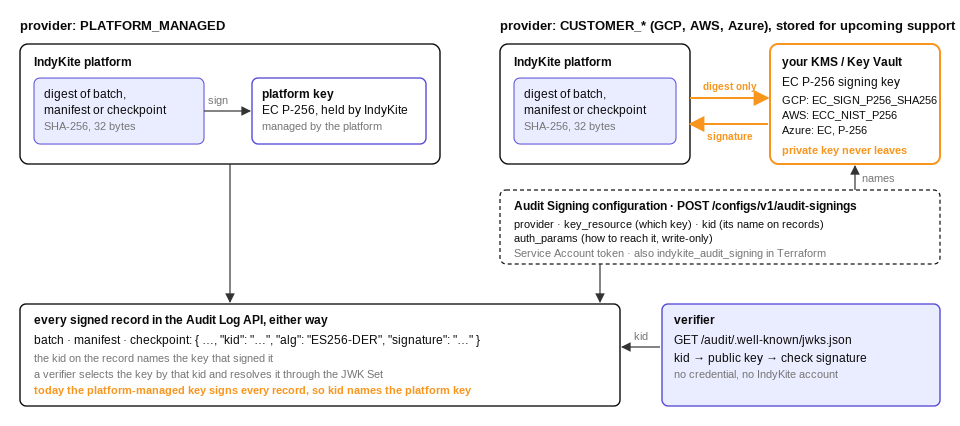
Every batch, manifest and checkpoint the Audit Log API serves carries the kid of the key that signed it, and GET /audit/.well-known/jwks.json publishes the public keys those kid values refer to. A verifier selects the key by the kid each record carries and resolves it through that JWK Set.
Which key providers are supported?
| Provider | Who holds the key | Requires |
|---|---|---|
PLATFORM_MANAGED |
IndyKite manages the signing key; nothing else has to be supplied. | Nothing beyond name and project_id. |
CUSTOMER_GCP_KMS |
Your key in Google Cloud KMS. | key_resource + kid, plus provider access material in auth_params. Stored for the upcoming customer-managed key support; not used for signing yet. |
CUSTOMER_AWS_KMS |
Your key in AWS KMS. | key_resource + kid, plus provider access material in auth_params (e.g. role_arn and external_id). Stored for the upcoming customer-managed key support; not used for signing yet. |
CUSTOMER_AZURE_KEY_VAULT |
Your key in Azure Key Vault. | key_resource + kid, plus provider access material in auth_params. Stored for the upcoming customer-managed key support; not used for signing yet. |
What must the customer-managed key look like?
Audit records are signed with ECDSA on the P-256 curve over a SHA-256 digest (the alg label ES256-DER on every signed record). A customer-managed key therefore has to be an asymmetric EC P-256 signing key, and the platform needs permission to sign with it and to read its public key; the private key never leaves your key store. key_resource identifies the key in the provider's own naming scheme:
| Provider | key_resource |
Key requirements |
|---|---|---|
CUSTOMER_GCP_KMS |
The full crypto key version resource name, ending in /cryptoKeyVersions/<n>: projects/my-project/locations/europe-west1/keyRings/audit/cryptoKeys/signing/cryptoKeyVersions/1. The Config API accepts any identifier up to 256 characters; the crypto key name alone, without a version, does not identify a key version to sign with. |
Purpose asymmetric sign, algorithm EC_SIGN_P256_SHA256. Grant the identity in auth_params the cloudkms.cryptoKeyVersions.useToSign and cloudkms.cryptoKeyVersions.viewPublicKey permissions on the key. |
CUSTOMER_AWS_KMS |
The key ARN: arn:aws:kms:eu-west-1:123456789012:key/1234abcd-12ab-34cd-56ef-1234567890ab. The region segment of the ARN selects the KMS region. Prefer the ARN over an alias, so that kid always names one fixed key rather than a pointer that can be moved. |
Key spec ECC_NIST_P256, usage sign and verify, signing algorithm ECDSA_SHA_256. Grant kms:Sign and kms:GetPublicKey on the key. AWS recommends giving a third party an IAM role rather than long-term access keys: a role that trusts the platform's account, with an external ID in its trust policy, passed as its role ARN. |
CUSTOMER_AZURE_KEY_VAULT |
The Key Vault key identifier: https://my-vault.vault.azure.net/keys/audit-signing. |
Key type EC, curve P-256, with the sign key operation permitted for the identity used. Without a version segment the identifier resolves to the key's latest version. |
auth_params holds the access material the provider needs to let the platform use that key. The platform does not prescribe the key names: it stores whatever string pairs you send, at most 32, each key and value between 1 and 256 characters, no empty values. The examples in this documentation use the forms each cloud's own guidance recommends for giving a third party access to a key, and that fit that limit:
| Provider | auth_params keys used in the examples |
What they are |
|---|---|---|
CUSTOMER_AWS_KMS | role_arn, external_id | An IAM role whose trust policy names the platform's AWS account (IndyKite provides the account ID) and requires the external ID. AWS recommends this over long-term access keys for third-party access. |
CUSTOMER_GCP_KMS | client_email | The service account to use, granted the two Cloud KMS permissions on the key. Naming it is not enough on its own: on the Google Cloud side the platform's identity (IndyKite provides it) must be allowed to act as that account, either by granting it permission to impersonate the account (roles/iam.serviceAccountTokenCreator) or by granting the key permissions to the platform's identity directly. |
CUSTOMER_AZURE_KEY_VAULT | tenant_id, client_id, client_secret | A service principal registered in the vault's tenant. |
Because each value is capped at 256 characters, a whole key file or a PEM-encoded private key does not fit and cannot be passed here. The values are written once and never returned.
What fields does the configuration have?
| Field | Type | Description |
|---|---|---|
name | string, required | URL-friendly identifier, unique within the project. Immutable - it cannot be changed later. Must start with a lowercase letter, continue with lowercase letters, digits or hyphens, and end with a letter or digit. A project may hold several configurations. |
project_id | string (GID), required | Project that owns the configuration. |
display_name | string, optional (2-254 chars) | Human-readable name; equals name when not set. |
description | string, optional (2-65000 chars) | Free-text description. |
provider | enum, required | PLATFORM_MANAGED (if you want an IndyKite managed provider), CUSTOMER_GCP_KMS, CUSTOMER_AWS_KMS, or CUSTOMER_AZURE_KEY_VAULT. Required on create and on update; there is no default. |
key_resource | string (max 256) | Identifies the key in the provider's namespace (for AWS KMS, the key ARN). Required for every customer-managed provider. |
kid | string (max 256) | The key ID published on records signed with this key, so verifiers can select the right key. Required for every customer-managed provider. Records will carry it once customer-managed keys are used for signing; today they carry the platform key's kid. |
auth_params | map of string to string (max 32 pairs, each key and value 1-256 chars) | Provider access material (for AWS KMS, e.g. role_arn and external_id); the key names are not prescribed, see below. Write-only: values are accepted on create/update but come back masked as empty strings on every read. An empty value is rejected with 422 and missing field auth_params[<key>]; a non-string value with 400 and invalid field auth_params.<key>. Omitted entirely on read when none were set. |
How do I create an Audit Signing configuration?
All endpoints authenticate with a Service Account Bearer token, like the rest of the Config API.
A project has at most one Audit Signing configuration: a second POST /configs/v1/audit-signings for the same project_id is refused with 409 and audit signing config already exists in project, whatever name or provider it carries. The two examples below are therefore alternatives; moving from one provider to the other is an update of the existing configuration.
Platform-managed (minimal)
curl -X POST <API_URL>/configs/v1/audit-signings \
-H "Content-Type: application/json" \
-H "Authorization: Bearer $SERVICE_ACCOUNT_TOKEN" \
-d '{
      "name": "audit-signing-default",
      "project_id": "gid-of-project",
      "provider": "PLATFORM_MANAGED"
    }'
Customer-managed key (AWS KMS example)
curl -X POST <API_URL>/configs/v1/audit-signings \
-H "Content-Type: application/json" \
-H "Authorization: Bearer $SERVICE_ACCOUNT_TOKEN" \
-d '{
      "name": "audit-signing-byok",
      "display_name": "Audit signing with our AWS KMS key",
      "description": "Signs audit records with the compliance team key",
      "project_id": "gid-of-project",
      "provider": "CUSTOMER_AWS_KMS",
      "key_resource": "arn:aws:kms:us-east-1:123456789012:key/example-key-id",
      "kid": "audit-2026-q3",
      "auth_params": {
        "role_arn": "arn:aws:iam::123456789012:role/indykite-audit-signer",
        "external_id": "a-value-you-generated"
      }
    }'
Response (201 Created): the new configuration's id (GID), create_time, created_by, update_time, and updated_by, plus an ETag response header for optimistic concurrency on later updates and deletes.
Reference: POST /audit-signings
How do I read and list configurations?
Read by GID, or by name with the project_id query parameter (the former location parameter is deprecated, still accepted, and rejected when sent together with project_id); an optional version query parameter reads a specific version. A read by name without project_id fails with 422 and project_id is required when querying by name:
curl <API_URL>/configs/v1/audit-signings/<id-or-name>?project_id=<gid-of-project> \
-H "Authorization: Bearer $SERVICE_ACCOUNT_TOKEN"
The response includes the configuration fields plus organization_id, timestamps, and authorship - and auth_params values come back masked as empty strings; secrets never round-trip. List every configuration in a project with:
curl <API_URL>/configs/v1/audit-signings?project_id=<gid-of-project> \
-H "Authorization: Bearer $SERVICE_ACCOUNT_TOKEN"
The list response wraps the same objects in a data array. Without full_fetch=true only the metadata of each configuration is returned: provider, key_resource, kid and auth_params are left out of every item. search=<text> narrows the list to configurations whose name, display name or description contains the text. For a PLATFORM_MANAGED configuration a full read returns key_resource and kid as empty strings and no auth_params.
How do I update a configuration?
Send a PUT with an If-Match header carrying the ETag from the last read or write - a stale ETag returns 412 Precondition Failed. provider is required on update; for display_name and description, null keeps the current value while an empty string removes it:
curl -X PUT <API_URL>/configs/v1/audit-signings/<id> \
-H "Content-Type: application/json" \
-H "Authorization: Bearer $SERVICE_ACCOUNT_TOKEN" \
-H "If-Match: $ETAG" \
-d '{
      "provider": "CUSTOMER_AWS_KMS",
      "key_resource": "arn:aws:kms:us-east-1:123456789012:key/rotated-key-id",
      "kid": "audit-2026-q4",
      "auth_params": {
        "role_arn": "arn:aws:iam::123456789012:role/indykite-audit-signer",
        "external_id": "a-value-you-generated"
      }
    }'
Once customer-managed keys are in use, rotating one is exactly this: point key_resource at the new key and change the kid; a verifier tells keys apart by the kid each record carries.
How do I delete a configuration?
curl -X DELETE <API_URL>/configs/v1/audit-signings/<id> \
-H "Authorization: Bearer $SERVICE_ACCOUNT_TOKEN" \
-H "If-Match: $ETAG"
Response (200 OK): {"id": "<gid-of-deleted-configuration>"}. The If-Match header is optional but recommended - exactly as on update, it prevents deleting a configuration someone else just changed.
What errors should I expect?
| Status | Meaning |
|---|---|
422 Unprocessable Entity | Validation failed; the body carries a message and an errors array with the exact reasons: missing field provider, invalid field provider: "<value>" does not meet rule oneof=PLATFORM_MANAGED CUSTOMER_GCP_KMS CUSTOMER_AWS_KMS CUSTOMER_AZURE_KEY_VAULT, key_resource is required for customer-managed providers, kid is required for customer-managed providers, invalid AuditSigningConfig.KeyResource: value length must be at most 256 runes (same for Kid), invalid AuditSigningConfig.AuthParams: value must contain no more than 32 pair(s), invalid AuditSigningConfig.AuthParams[<key>]: value length must be between 1 and 256 runes, invalid field name: is not valid name, value must start with [a-z] followed by [-a-z0-9] and ends with [a-z0-9], missing field project_id, invalid field project_id: identifier is not of PROJECT. |
400 Bad Request | The body is not valid JSON, or an auth_params value is not a string (invalid field auth_params.<key>). |
412 Precondition Failed | The If-Match ETag on update or delete no longer matches - re-read the configuration and retry. |
409 Conflict | The project already has an Audit Signing configuration; the body is {"message": "Conflict", "errors": ["audit signing config already exists in project"]}. Update or delete the existing one instead of creating another. |
404 Not Found | No configuration with that ID or name (including one already deleted). The body is {"message": "Not Found", "errors": ["empty response"]}. |
401 / 403 | Missing or insufficient Service Account credentials. |
Next Steps
- Worked example: Audit Signing Resource Example
- Declare it as code: Audit Signing Terraform example
- End to end, from an empty project to a verified export: Tamper-proof audit trail tutorial
- Reading the signed records back and verifying them: Audit Log API guide
- Environment setup: Environment Guide
- Credentials: Credentials Guide
- API reference: Audit Signing endpoints