
What is IndyKite?
IndyKite is a real-time data retrieval and authorization platform built on a Knowledge Graph. It enables applications to store identity data, query it with built-in authorization, and make fine-grained access control decisions.
What problems does IndyKite solve?
- Fragmented identity data: Unify data from multiple sources into a single graph.
- Coarse-grained authorization: Move beyond roles to KBAC (Knowledge-Based Access Control).
- Static access rules: Enable real-time, context-aware authorization decisions.
- Data quality uncertainty: Assess and score data trustworthiness.
- AI agent authorization: Provide guardrails for AI systems accessing sensitive data.
What are the IndyKite products?
| Product | Purpose | API Endpoint |
| Identity Knowledge Graph (IKG) | Store nodes and relationships | /capture/v1/* |
| ContX IQ (CIQ) | Context-aware data queries | /contx-iq/v1/execute |
| KBAC | Authorization decisions | /access/v1/evaluation |
| Token Introspect | Validate tokens, map to IKG | /configs/v1/token-introspects |
| External Data Resolver | Fetch external data at query time | /configs/v1/external-data-resolvers |
| Trust Score | Assess data quality | /configs/v1/trust-score-profiles |
| Entity Matching | Link records describing the same entity | /configs/v1/entity-matching-pipelines, /entity-matching/v1/* |
| Outbound Events | Push notifications on data changes | /configs/v1/event-sinks |
How do the products relate to each other?
The products form a layered architecture:
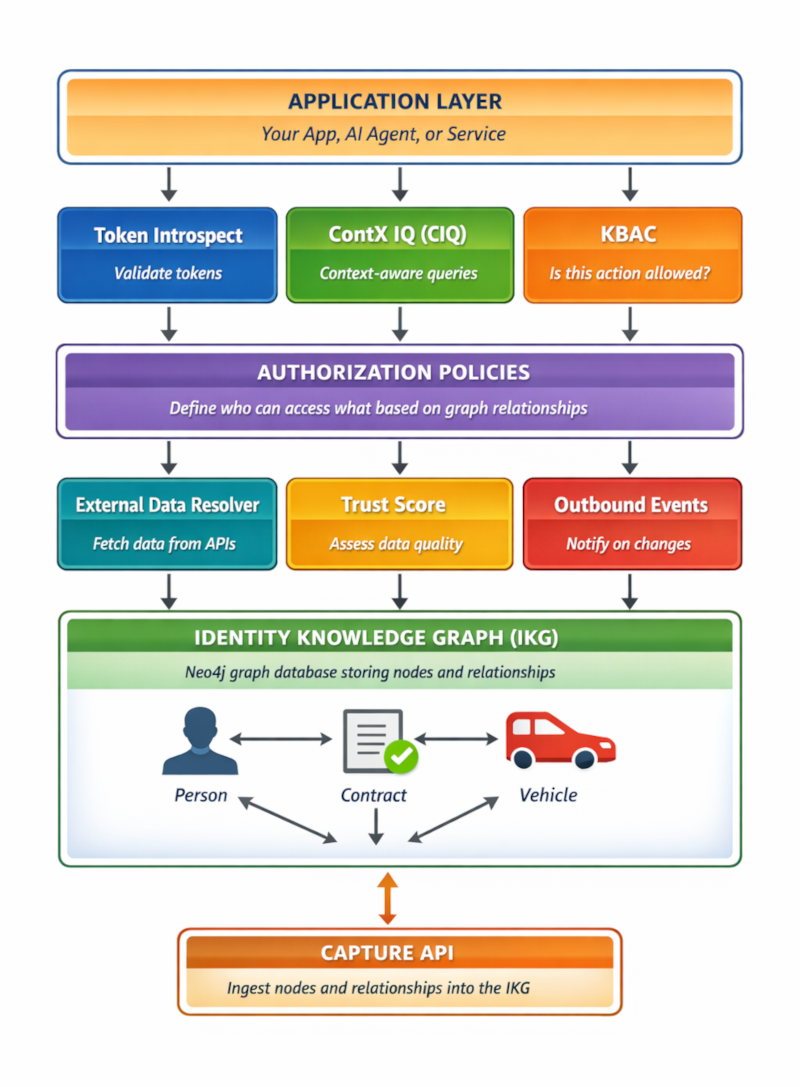
What is the Identity Knowledge Graph (IKG)?
The IKG is a Neo4j graph database that stores your identity and resource data as nodes (entities) and relationships (connections).
What can I store in the IKG?
- Nodes: People, Organizations, Devices, Resources, Contracts, Vehicles, etc.
- Relationships: OWNS, WORKS_FOR, HAS_ACCESS, ACCEPTED, COVERS, etc.
- Properties: Attributes on nodes and relationships (email, name, status, etc.)
How do I add data to the IKG?
Use the Capture API to ingest nodes and relationships:
POST /capture/v1/nodes- Create or update nodesPOST /capture/v1/relationships- Create relationships between nodes
Authentication: Application Agent credentials (X-IK-ClientKey header)
See: Capture API Example
What is ContX IQ (CIQ)?
ContX IQ (Contextual Intelligence Query) is a context-aware query engine. It retrieves data from the Knowledge Graph while enforcing authorization policies based on the context at query time.
What makes CIQ context-aware?
- Query-time evaluation: Authorization decisions are made when the query executes, not pre-computed.
- Caller context: Considers the caller's identity, relationships, and current state.
- Current graph state: Queries reflect the graph as it exists at query time.
- Parameter binding: Pass context parameters (e.g., user email, session data) to filter queries.
What can CIQ do?
- Contextual reads: Query nodes and relationships based on the caller's real-time context.
- Authorized writes: Update data only when the current context permits.
- External data integration: Fetch real-time data from external APIs via External Data Resolver.
How does CIQ work?
- Create an Authorization Policy defining context-based access rules.
- Create a Knowledge Query linked to the policy.
- Execute the query with
POST /contx-iq/v1/executepassing runtime context. - CIQ evaluates the context at query time and returns only authorized data.
Authentication: Application Agent credentials (X-IK-ClientKey header)
See: ContX IQ Guide
What is KBAC?
KBAC (Knowledge-Based Access Control) is an authorization decision engine. It answers the question: "Can this subject perform this action on this resource?"
How is KBAC different from CIQ?
| Aspect | ContX IQ (CIQ) | KBAC |
| Purpose | Query and retrieve data | Make allow/deny decisions |
| Response | Data results (nodes, properties) | ALLOW or DENY |
| Use case | Fetch authorized data | Check if action is permitted |
| Policy type | 1.0-ciq (read/write operations) | 2.0-kbac, or 3.0-kbac for raw Cypher with optional data-residency routing (action-based) |
When should I use KBAC?
- Checking if a user can perform an action before executing it.
- API gateway authorization.
- AI agent guardrails (can this agent access this resource?).
See: AuthZEN Guide | Dynamic Authorization Guide
What is Token Introspect?
Token Introspect validates access tokens from external identity providers and maps them to nodes in your IKG.
How does Token Introspect work?
- Your app receives an access token from an identity provider (Auth0, Okta, etc.).
- Call
POST /identity/v1/introspectwith the token. - IndyKite validates the token and extracts claims (e.g., email).
- IndyKite matches the claim to a node in your IKG (e.g., Person with that email).
- Returns the matched node data enriched with IKG relationships.
When should I use Token Introspect?
- Enriching identity provider tokens with IKG data.
- Bridging external identity systems to your knowledge graph.
- Getting a Person node from a JWT claim.
See: Token Introspect Terraform
What is External Data Resolver?
External Data Resolver fetches data from external APIs during CIQ query execution and makes it available as node properties.
How does it work?
- Configure an External Data Resolver with an API endpoint.
- In your IKG, create a node property with
external_valuepointing to the resolver. - When CIQ queries that property, it calls the external API in real-time.
- The API response is returned as if it were stored in the IKG.
When should I use External Data Resolver?
- Data that changes frequently and shouldn't be stored.
- Data from external systems (CRM, ERP, etc.).
- Calculated or derived values.
See: External Data Resolver Guide
What is Trust Score?
Trust Score assesses data quality based on configurable dimensions and attaches a score to nodes in the IKG.
What dimensions affect Trust Score?
| Dimension | What it measures |
| FRESHNESS | How recently the data was updated |
| ORIGIN | Source system credibility |
| VALIDITY | Whether data is within valid date ranges |
| COMPLETENESS | Percentage of required properties present |
| VERIFICATION | Whether data has been verified |
How can I use Trust Score in authorization?
Reference the _TrustScore node in your KBAC or CIQ policies:
- Only allow access if trust score > 0.8
- Require higher scores for sensitive data
- Filter query results by data quality
See: Trust Score Guide
What are Outbound Events?
Outbound Events push real-time notifications to external systems when data changes in your IKG or configurations are modified.
What events can I capture?
- Capture events: Node/relationship created, updated, or deleted.
- Config events: Policy, query, or configuration changes.
Where can events be sent?
- Kafka (Confluent Cloud)
- Azure Event Grid
- Azure Service Bus
When should I use Outbound Events?
- Triggering workflows when data changes.
- Audit logging of all modifications.
- Synchronizing data with external systems.
See: Outbound Events Guide | Kafka Terraform
What credentials do I need?
| Credential Type | Created At | Used For | Header |
| Service Account | Organization level | Config API (create policies, queries, projects) | Authorization: Bearer {token} |
| Application Agent | Application level | Capture API, CIQ, KBAC, Token Introspect | X-IK-ClientKey: {credential} |
See: Credentials Guide
How do I get started?
Step 1: Create environment
- Create a Sandbox account at IndyKite Hub
- Create Service Account credentials
- Create a Project with an IKG
- Create an Application and Application Agent
Step 2: Capture data
- Use the Capture API to ingest nodes and relationships
- See: Capture API Example
Step 3: Create policies
- Create Authorization Policies defining access rules
- Create Knowledge Queries for CIQ
Step 4: Query and authorize
- Use CIQ to query data with authorization
- Use KBAC for allow/deny decisions
Quick Reference for AI Agents
Common workflows
Query authorized data:
1. POST /capture/v1/nodes (ingest data)
2. POST /configs/v1/authorization-policies (create policy)
3. POST /configs/v1/knowledge-queries (create query)
4. POST /contx-iq/v1/execute (run query)
Check authorization:
1. POST /capture/v1/nodes (ingest data)
2. POST /configs/v1/authorization-policies (create KBAC policy)
3. POST /kbac/v1/is-authorized (check permission)
Validate external token:
1. POST /configs/v1/token-introspects (configure)
2. POST /identity/v1/introspect (validate token)
API base URLs
- EU:
https://eu.api.indykite.com - US:
https://us.api.indykite.com
Machine-readable resources
- OpenAPI: https://openapi.indykite.com
- Resource index: /api/resources.json
- Terraform index: /api/terraform.json
- AI sitemap: /llms.txt
Next steps
- Sandbox guide: Get started with the Sandbox
- Environment setup: Environment Guide
- Code examples: Developer Resources
- Terraform configs: Terraform Examples