
ContX IQ: Query External Data Sources via Data Resolver
This example demonstrates External Data Resolver integration:
What is an External Data Resolver?
A configuration that fetches data from external systems (APIs, databases) during query execution.
Use case: one vehicle's VIN is served by an external system, not stored in the IKG.
Flow:
1. The vin property of Vehicle car1 is captured with external_value naming the resolver (externalDataResolverForCIQName) instead of a value
2. The query requests vehicle.property.vin
3. When the read reaches car1, the External Data Resolver calls the configured URL and applies the response_selector
4. The query returns the IKG data together with the resolved VIN
Benefits:
- Keep sensitive data in external systems
- Real-time data lookups
- Reduce data duplication
- Maintain single source of truth
Use case
Scenario: A car rental app needs to display vehicle VIN numbers, but VINs are stored in a separate vehicle registry system.
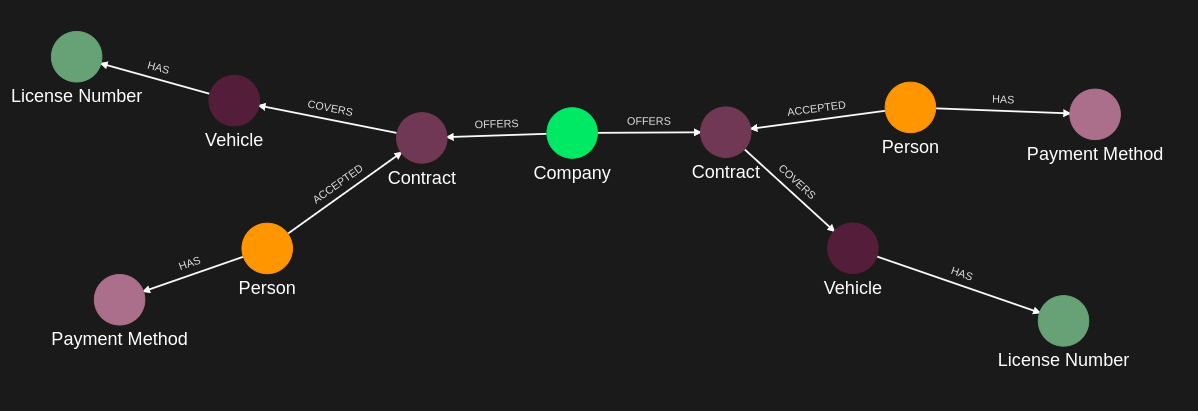
Graph in IKG:
Company(companyParking) -[OFFERS]-> Contract(ct123) <-[ACCEPTED]- Person(alice) -[HAS]-> PaymentMethod(cb123); Contract(ct123) -[COVERS]-> Vehicle(car1) -[HAS]-> LicenseNumber(license1)
Company(companyParking) -[OFFERS]-> Contract(ct234) <-[ACCEPTED]- Person(bob) -[HAS]-> PaymentMethod(kl123); Contract(ct234) -[COVERS]-> Vehicle(car2) -[HAS]-> LicenseNumber(license2)
Vehicle(car1) has: category = "Car", vin = external_value "externalDataResolverForCIQName" (a data reference to the resolver)
Vehicle(car2) has: category = "Car", vin = "rtfhcnvjt471" (plain value)
External Data Resolver:
GET http://whateverUrlWithExternalValue/magic?data=vinmagic, response_selector ".echo" -> "vinmagic"
Query execution:
1. The user requests vehicle details with their token
2. The policy walks Company -[OFFERS]-> Contract <-[ACCEPTED]- subject -[HAS]-> PaymentMethod and Contract -[COVERS]-> Vehicle -[HAS]-> LicenseNumber, bound to the token's sub claim
3. The query reads vehicle, vehicle.property.category and vehicle.property.vin
4. For car1 the vin is a data reference, so the resolver is called and the selected field is returned
5. Recorded response (alice's token; her contract ct123 covers car1): vehicle car1, category "Car", vin "vinmagic"
The VIN never needs to be stored in the IKG - it's fetched at read time.
Requirements
Prerequisites:
- ServiceAccount credentials: For configuration and policy creation (Bearer token)
- AppAgent credentials: For data ingestion and query execution (X-IK-ClientKey)
- User access token: for the Person executing the query (alice in the recorded response; her contract ct123 covers car1)
- External API access: The resolver endpoint must be accessible
External Data Resolver setup:
- Configured via POST /configs/v1/external-data-resolvers
- Defines the url, method, headers, request/response content types and the response_selector
- In this example, returns mock data: vin="vinmagic"
Steps
Step 1: Create External Data Resolver Configuration
- Authentication: ServiceAccount credential (Bearer token)
- Action: POST to /configs/v1/external-data-resolvers
- Configuration includes:
- url: http://whateverUrlWithExternalValue/magic?data=vinmagic, method GET, no headers
- request_content_type and response_content_type JSON
- response_selector ".echo" (how to extract the VIN from the response)
- Result: Resolver ID returned
Step 2: Ingest Nodes with Data References
- Authentication: AppAgent credential (X-IK-ClientKey header)
- Action: POST Person, PaymentMethod, Contract, Vehicle, LicenseNumber and Company nodes, then the HAS, ACCEPTED, COVERS and OFFERS relationships
- Key detail: the vin property of Vehicle car1 is captured with external_value instead of value
- Format: {"type": "vin", "external_value": "externalDataResolverForCIQName"} (the resolver's name)
- Result: Graph ready with an external data reference on car1
Step 3: Create Policy for External Data Access
- Authentication: ServiceAccount credential (Bearer token)
- Action: POST policy with subject type Person, filter subject.external_id = $token.sub, cypher Company -[OFFERS]-> Contract <-[ACCEPTED]- subject -[HAS]-> PaymentMethod, Contract -[COVERS]-> Vehicle -[HAS]-> LicenseNumber, allowing:
- READ on vehicle, ln, vehicle.* and ln.*
- Result: Policy ID returned
Step 4: Create Query Returning External Data
- Authentication: ServiceAccount credential (Bearer token)
- Action: POST query that returns vehicle, vehicle.property.category (IKG) and vehicle.property.vin (resolved for car1)
- The query engine resolves external_value properties when they are read
- Result: Query ID returned
Step 5: Execute Query as Authorized User
- Authentication: AppAgent credential + User token (Bearer header)
- Action: POST to /contx-iq/v1/execute with empty input_params, as alice
- Result: the vehicle covered by the caller's contract (car1), its category and its VIN "vinmagic" from the resolver
Step 1
Create an External Data Resolver which configures the data to retrieve. In this use case, the configuration always returns "vinmagic" as a vin value.
{
  "project_id": "your_project_gid",
  "description": "description of external data reference",
  "display_name": "external data name",
  "name": "externalDataResolverForCIQName",
  "headers": {},
  "method": "GET",
  "request_content_type": "JSON",
  "request_payload": "",
  "response_content_type": "JSON",
  "response_selector": ".echo",
  "url": "http://whateverUrlWithExternalValue/magic?data=vinmagic"
}
Step 2
Capture the nodes needed for this use case.
{
  "nodes": [
    {
      "external_id": "alice",
      "is_identity": true,
      "type": "Person",
      "properties": [
        {
          "type": "email",
          "value": "alice@email.com"
        },
        {
          "type": "given_name",
          "value": "Alice"
        },
        {
          "type": "last_name",
          "value": "Smith"
        }
      ]
    },
    {
      "external_id": "bob",
      "type": "Person",
      "is_identity": true,
      "properties": [
        {
          "type": "email",
          "value": "bob@email.com"
        },
        {
          "type": "given_name",
          "value": "Bob"
        }
      ]
    },
    {
      "external_id": "cb123",
      "type": "PaymentMethod",
      "properties": [
        {
          "type": "payment_name",
          "value": "Credit Card"
        }
      ]
    },
    {
      "external_id": "kl123",
      "type": "PaymentMethod",
      "properties": [
        {
          "type": "payment_name",
          "value": "Klarna"
        }
      ]
    },
    {
      "external_id": "ct123",
      "type": "Contract",
      "properties": [
        {
          "type": "category",
          "value": "Parking"
        },
        {
          "type": "status",
          "value": "Active"
        }
      ]
    },
    {
      "external_id": "ct234",
      "type": "Contract",
      "properties": [
        {
          "type": "category",
          "value": "Parking"
        },
        {
          "type": "status",
          "value": "Active"
        }
      ]
    },
    {
      "external_id": "car1",
      "type": "Vehicle",
      "properties": [
        {
          "type": "category",
          "value": "Car"
        },
        {
          "type": "is_active",
          "value": true
        },
        {
          "type": "vin",
          "external_value": "externalDataResolverForCIQName"
        }
      ]
    },
    {
      "external_id": "car2",
      "type": "Vehicle",
      "properties": [
        {
          "type": "category",
          "value": "Car"
        },
        {
          "type": "is_active",
          "value": true
        },
        {
          "type": "vin",
          "value": "rtfhcnvjt471"
        }
      ]
    },
    {
      "external_id": "license1",
      "type": "LicenseNumber",
      "properties": [
        {
          "type": "status",
          "value": "Active"
        },
        {
          "type": "number",
          "value": "AX123456",
          "metadata": {
            "assurance_level": 3,
            "source": "BRREG"
          }
        }
      ]
    },
    {
      "external_id": "license2",
      "type": "LicenseNumber",
      "properties": [
        {
          "type": "status",
          "value": "Active"
        },
        {
          "type": "number",
          "value": "OL123456",
          "metadata": {
            "assurance_level": 3,
            "source": "BRREG"
          }
        }
      ]
    },
    {
      "external_id": "companyParking",
      "type": "Company",
      "properties": [
        {
          "type": "name",
          "value": "City Parking Inc"
        }
      ]
    }
  ]
}
Capture the relationships needed for this use case.
{
  "relationships": [
    {
      "source": {
        "external_id": "bob",
        "type": "Person"
      },
      "target": {
        "external_id": "kl123",
        "type": "PaymentMethod"
      },
      "type": "HAS"
    },
    {
      "source": {
        "external_id": "alice",
        "type": "Person"
      },
      "target": {
        "external_id": "cb123",
        "type": "PaymentMethod"
      },
      "type": "HAS"
    },
    {
      "source": {
        "external_id": "alice",
        "type": "Person"
      },
      "target": {
        "external_id": "ct123",
        "type": "Contract"
      },
      "type": "ACCEPTED"
    },
    {
      "source": {
        "external_id": "bob",
        "type": "Person"
      },
      "target": {
        "external_id": "ct234",
        "type": "Contract"
      },
      "type": "ACCEPTED"
    },
    {
      "source": {
        "external_id": "ct123",
        "type": "Contract"
      },
      "target": {
        "external_id": "car1",
        "type": "Vehicle"
      },
      "type": "COVERS"
    },
    {
      "source": {
        "external_id": "ct234",
        "type": "Contract"
      },
      "target": {
        "external_id": "car2",
        "type": "Vehicle"
      },
      "type": "COVERS"
    },
    {
      "source": {
        "external_id": "car1",
        "type": "Vehicle"
      },
      "target": {
        "external_id": "license1",
        "type": "LicenseNumber"
      },
      "type": "HAS"
    },
    {
      "source": {
        "external_id": "car2",
        "type": "Vehicle"
      },
      "target": {
        "external_id": "license2",
        "type": "LicenseNumber"
      },
      "type": "HAS"
    },
    {
      "source": {
        "external_id": "companyParking",
        "type": "Company"
      },
      "target": {
        "external_id": "ct234",
        "type": "Contract"
      },
      "type": "OFFERS"
    },
    {
      "source": {
        "external_id": "companyParking",
        "type": "Company"
      },
      "target": {
        "external_id": "ct123",
        "type": "Contract"
      },
      "type": "OFFERS"
    }
  ]
}
Step 3
Create a CIQ Policy which designates the data to retrieve.
{
  "meta": {
    "policy_version": "1.0-ciq"
  },
  "subject": {
    "type": "Person"
  },
  "condition": {
    "cypher": "MATCH (company:Company)-[:OFFERS]->(contract:Contract)<-[:ACCEPTED]-(subject:Person)-[:HAS]->(payment:PaymentMethod), (contract)-[:COVERS]->(vehicle:Vehicle)-[:HAS]->(ln:LicenseNumber)",
    "filter": [
      {
        "attribute": "subject.external_id",
        "operator": "=",
        "value": "$token.sub"
      }
    ]
  },
  "allowed_reads": {
    "nodes": [
      "vehicle",
      "ln",
      "vehicle.*",
      "ln.*"
    ]
  }
}
Request to create the CIQ Policy configuration using REST.
{
  "project_id": "your_project_gid",
  "description": "description of policy",
  "display_name": "policy name",
  "name": "policy-name",
  "policy": "{\"meta\":{\"policy_version\":\"1.0-ciq\"},\"subject\":{\"type\":\"Person\"},\"condition\":{\"cypher\":\"MATCH (company:Company)-[:OFFERS]->(contract:Contract)<-[:ACCEPTED]-(subject:Person)-[:HAS]->(payment:PaymentMethod), (contract)-[:COVERS]->(vehicle:Vehicle)-[:HAS]->(ln:LicenseNumber)\",\"filter\":[{\"attribute\":\"subject.external_id\",\"operator\":\"=\",\"value\":\"$token.sub\"}]},\"allowed_reads\":{\"nodes\":[\"vehicle\",\"ln\",\"vehicle.*\",\"ln.*\"]}}",
  "status": "ACTIVE",
  "tags": []
}
Request to read the CIQ Policy configuration using REST.
{
  "id": "your_policy_configuration_gid"
}
Step 4
Create a CIQ Query in the context of the policy to retrieve the vehicle category and the vehicle vin.
{
  "nodes": [
    "vehicle",
    "vehicle.property.category",
    "vehicle.property.vin"
  ]
}
Request to create a CIQ Query configuration using REST.
{
  "project_id": "your_project_gid",
  "description": "description of knowledge query",
  "display_name": "knowledge query name",
  "name": "knowledge-query-name",
  "policy_id": "your_policy_gid",
  "query": "{\"nodes\":[\"vehicle\",\"vehicle.property.category\",\"vehicle.property.vin\"]}",
  "status": "ACTIVE"
}
Read the CIQ Query Configuration.
{
  "id": "your_knowledge_query_configuration_gid"
}
Step 5
Run a CIQ Execution to actually retrieve the data, from the Person access token.
{
  "id": "knowledge_query_gid",
  "input_params": {},
  "page_token": 1
}
CIQ Execution response.
{
  "data": [
    {
      "nodes": {
        "vehicle": {
          "Id": 9,
          "ElementId": "4:a5c213aa-aa4b-4be5-a17a-a677a80ee634:9",
          "Labels": [
            "Unique",
            "Resource",
            "Vehicle"
          ],
          "Props": {
            "_service": "capture-api",
            "create_time": "2025-07-28T13:47:58.062Z",
            "external_id": "car1",
            "id": "sF_yDttqSKi_oUwiv7OSww",
            "type": "Vehicle",
            "update_time": "2025-07-28T13:47:58.062Z"
          }
        },
        "vehicle.property.category": "Car",
        "vehicle.property.vin": "vinmagic"
      }
    }
  ]
}API Endpoints
/capture/v1/nodes/capture/v1/relationships/configs/v1/authorization-policies/configs/v1/knowledge-queries/contx-iq/v1/execute