
ContX IQ: Manage Node Property Metadata
This example demonstrates property-level metadata management:
What is property metadata?
Additional attributes attached to individual property values, not the node itself.
Example:
Node: Person(name: "Alice")
Property metadata for "name":
- source: "HR_System"
- confidence: 0.95
- last_verified: "2024-01-15"
Operations demonstrated:
1. Add metadata to existing property
2. Create new property with metadata
3. Query/filter by metadata values
Use case
Scenario: Track data provenance and quality scores for identity attributes.
Initial state:
Person(email: "alice@example.com")
After metadata upsert:
Person(email: "alice@example.com")
└── metadata:
- source: "email_verification_service"
- verified: true
- verification_date: "2024-01-15"
Use cases for metadata:
- Data lineage: Track where data came from
- Quality scores: Confidence levels for ML-derived data
- Audit trail: When was data last verified
- Compliance: GDPR-related tracking
Query by metadata:
"Find all Person nodes where email.verified = true"
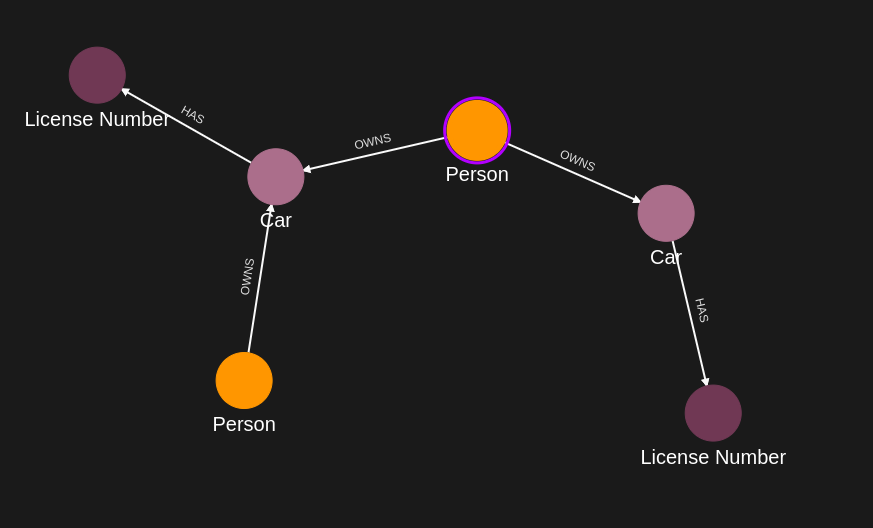
Requirements
Prerequisites:
- ServiceAccount credentials: For creating policies and queries (Bearer token)
- AppAgent credentials: For data ingestion and query execution (X-IK-ClientKey)
- User access token: For authorized user operations
Metadata structure:
- Attached to individual properties, not nodes
- Key-value pairs with any JSON-compatible values
- Queryable/filterable in ContX IQ
Steps
Step 1: Ingest Base Graph Data
- Authentication: AppAgent credential (X-IK-ClientKey header)
- Action: POST nodes and relationships
- Result: Base graph ready for metadata operations
Step 2: Create Metadata Upsert Policy
- Authentication: ServiceAccount credential (Bearer token)
- Action: POST policy allowing:
- READ on subject nodes
- UPSERT on property metadata
- READ on nodes with metadata
- Result: Policy ID returned
Step 3: Create Metadata Upsert Query
- Authentication: ServiceAccount credential (Bearer token)
- Action: POST query that:
- Adds metadata to existing property (e.g., email.source)
- Creates new property with metadata
- Result: Query ID returned
Step 4: Execute Metadata Upsert
- Authentication: AppAgent credential + User token
- Action: POST to /contx-iq/v1/execute
- Result: Properties now have metadata attached
Step 5: Create Metadata Filter Query
- Authentication: ServiceAccount credential (Bearer token)
- Action: POST query that filters by metadata values
- Example: Find nodes where property.metadata.source = "HR_System"
- Result: Query ID returned
Step 6: Execute Metadata Filter Query
- Authentication: AppAgent credential + User token
- Action: POST to /contx-iq/v1/execute
- Result: Only nodes matching metadata filter returned
Step 1
Capture the nodes needed for this use case.
{
  "nodes": [
    {
      "external_id": "alice",
      "type": "Person",
      "is_identity": true,
      "properties": [
        {
          "type": "email",
          "value": "alice@email.com"
        },
        {
          "type": "name",
          "value": "Alice Smith"
        }
      ]
    },
    {
      "external_id": "satchmo",
      "type": "Person",
      "is_identity": true,
      "properties": [
        {
          "type": "email",
          "value": "satchmo@demo.com"
        },
        {
          "type": "name",
          "value": "Louis Armstrong"
        }
      ]
    },
    {
      "external_id": "karel",
      "type": "Person",
      "is_identity": true,
      "properties": [
        {
          "type": "email",
          "value": "karel@demo.com"
        },
        {
          "type": "name",
          "value": "Karel Plihal"
        }
      ]
    },
    {
      "external_id": "kitt",
      "type": "Car",
      "is_identity": false,
      "properties": [
        {
          "type": "manufacturer",
          "value": "pontiac"
        },
        {
          "type": "model",
          "value": "Firebird"
        }
      ]
    },
    {
      "external_id": "caddilacv16",
      "type": "Car",
      "is_identity": false,
      "properties": [
        {
          "type": "manufacturer",
          "value": "Caddilac"
        },
        {
          "type": "model",
          "value": "V-16"
        }
      ]
    },
    {
      "external_id": "harmonika",
      "type": "Bus",
      "is_identity": false,
      "properties": [
        {
          "type": "manufacturer",
          "value": "Ikarus"
        },
        {
          "type": "model",
          "value": "280"
        }
      ]
    },
    {
      "external_id": "ln-xxx",
      "type": "LicenseNumber",
      "is_identity": false,
      "properties": [
        {
          "type": "license",
          "value": "ln-xxx-value"
        }
      ]
    },
    {
      "external_id": "ln-yyy",
      "type": "LicenseNumber",
      "is_identity": false,
      "properties": [
        {
          "type": "license",
          "value": "ln-yyy-value"
        }
      ]
    },
    {
      "external_id": "ln-zzz",
      "type": "LicenseNumber",
      "is_identity": false,
      "properties": [
        {
          "type": "license",
          "value": "ln-zzz-value"
        }
      ]
    }
  ]
}
Capture the relationships needed for this use case.
{
  "relationships": [
    {
      "source": {
        "external_id": "alice",
        "type": "Person"
      },
      "target": {
        "external_id": "kitt",
        "type": "Car"
      },
      "type": "OWNS",
      "properties": [
        {
          "type": "weight",
          "value": 1
        }
      ]
    },
    {
      "source": {
        "external_id": "alice",
        "type": "Person"
      },
      "target": {
        "external_id": "caddilacv16",
        "type": "Car"
      },
      "type": "OWNS",
      "properties": [
        {
          "type": "weight",
          "value": 2
        }
      ]
    },
    {
      "source": {
        "external_id": "satchmo",
        "type": "Person"
      },
      "target": {
        "external_id": "caddilacv16",
        "type": "Car"
      },
      "type": "OWNS"
    },
    {
      "source": {
        "external_id": "karel",
        "type": "Person"
      },
      "target": {
        "external_id": "harmonika",
        "type": "Bus"
      },
      "type": "OWNS"
    },
    {
      "source": {
        "external_id": "kitt",
        "type": "Car"
      },
      "target": {
        "external_id": "ln-xxx",
        "type": "LicenseNumber"
      },
      "type": "HAS",
      "properties": [
        {
          "type": "weight",
          "value": 3
        }
      ]
    },
    {
      "source": {
        "external_id": "caddilacv16",
        "type": "Car"
      },
      "target": {
        "external_id": "ln-zzz",
        "type": "LicenseNumber"
      },
      "type": "HAS"
    },
    {
      "source": {
        "external_id": "harmonika",
        "type": "Bus"
      },
      "target": {
        "external_id": "ln-yyy",
        "type": "LicenseNumber"
      },
      "type": "HAS"
    }
  ]
}
Step 2
Create a CIQ Policy which designates the Subject node, the cypher, the nodes allowed to be upserted and the nodes allowed to be read.
{
  "meta": {
    "policy_version": "1.0-ciq"
  },
  "subject": {
    "type": "Person"
  },
  "condition": {
    "cypher": "MATCH (subject:Person)-[:OWNS]->(car:Car)-[:HAS]->(ln:LicenseNumber)",
    "filter": [
      {
        "attribute": "subject.external_id",
        "operator": "=",
        "value": "$token.sub"
      }
    ]
  },
  "allowed_reads": {
    "nodes": [
      "car",
      "ln",
      "car.*",
      "ln.*"
    ]
  },
  "allowed_upserts": {
    "nodes": {
      "existing_nodes": [
        "ln"
      ]
    }
  }
}
Request to create the CIQ Policy configuration using REST.
{
  "project_id": "your_project_gid",
  "description": "description of policy",
  "display_name": "policy name",
  "name": "policy-name",
  "policy": "{\"meta\":{\"policy_version\":\"1.0-ciq\"},\"subject\":{\"type\":\"Person\"},\"condition\":{\"cypher\":\"MATCH (subject:Person)-[:OWNS]->(car:Car)-[:HAS]->(ln:LicenseNumber)\",\"filter\":[{\"attribute\":\"subject.external_id\",\"operator\":\"=\",\"value\":\"$token.sub\"}]},\"allowed_reads\":{\"nodes\":[\"car\",\"ln\",\"car.*\",\"ln.*\"]},\"allowed_upserts\":{\"nodes\":{\"existing_nodes\":[\"ln\"]}}}",
  "status": "ACTIVE",
  "tags": []
}
Request to read the CIQ Policy configuration using REST.
{
  "id": "your_policy_configuration_gid"
}
Step 3
Create a CIQ Query in the context of the policy to upsert and retrieve properties with metadata on a node.
{
  "nodes": [
    "car",
    "ln.property.status",
    "ln.property.status.metadata.source",
    "ln.property.status.metadata.assurance_level",
    "ln.property.status.metadata.somethingImportant",
    "ln.property.license",
    "ln.property.license.metadata.source"
  ],
  "relationships": [],
  "upsert_nodes": [
    {
      "name": "ln",
      "properties": [
        {
          "type": "status",
          "value": "$status",
          "metadata": [
            {
              "type": "source",
              "value": "$token.iss"
            },
            {
              "type": "assurance_level",
              "value": 2
            },
            {
              "type": "somethingImportant",
              "value": "supercoolvalue"
            }
          ]
        },
        {
          "type": "license",
          "value": "$ln_number",
          "metadata": [
            {
              "type": "source",
              "value": "The government"
            }
          ]
        }
      ]
    }
  ],
  "filter": {
    "attribute": "ln.external_id",
    "operator": "=",
    "value": "$ln_external_id"
  }
}
Request to create a CIQ Query configuration using REST.
{
  "project_id": "your_project_gid",
  "description": "description of knowledge query",
  "display_name": "knowledge query name",
  "name": "knowledge-query-name",
  "policy_id": "your_policy_gid",
  "query": "{\"nodes\":[\"car\",\"ln.property.status\",\"ln.property.status.metadata.source\",\"ln.property.status.metadata.assurance_level\",\"ln.property.status.metadata.somethingImportant\",\"ln.property.license\",\"ln.property.license.metadata.source\"],\"relationships\":[],\"upsert_nodes\":[{\"name\":\"ln\",\"properties\":[{\"type\":\"status\",\"value\":\"$status\",\"metadata\":[{\"type\":\"source\",\"value\":\"$token.iss\"},{\"type\":\"assurance_level\",\"value\":2},{\"type\":\"somethingImportant\",\"value\":\"supercoolvalue\"}]},{\"type\":\"license\",\"value\":\"$ln_number\",\"metadata\":[{\"type\":\"source\",\"value\":\"The government\"}]}]}],\"filter\":{\"attribute\":\"ln.external_id\",\"operator\":\"=\",\"value\":\"$ln_external_id\"}}",
  "status": "ACTIVE"
}
Read the CIQ Query Configuration.
{
  "id": "your_knowledge_query_configuration_gid"
}
Step 4
Run a CIQ Execution to get the newly created property information.
{
  "id": "knowledge_query_gid",
  "input_params": {
    "status": "Valid",
    "ln_number": "ln-xxx-value",
    "ln_external_id": "ln-xxx"
  },
  "page_token": 1
}
CIQ Execution response.
{
  "data": [
    {
      "nodes": {
        "car": {
          "Id": 58,
          "ElementId": "4:a5c213aa-aa4b-4be5-a17a-a677a80ee634:58",
          "Labels": [
            "Unique",
            "Resource",
            "Car"
          ],
          "Props": {
            "_service": "capture-api",
            "create_time": "2025-08-13T17:19:43.014Z",
            "external_id": "kitt",
            "id": "twixV9zqQniA201VtZdzxw",
            "type": "Car",
            "update_time": "2025-08-13T17:20:00.141Z"
          }
        },
        "ln.property.license": "ln-xxx-value",
        "ln.property.license.metadata.source": "The government",
        "ln.property.status": "Valid",
        "ln.property.status.metadata.assurance_level": 2,
        "ln.property.status.metadata.somethingImportant": "supercoolvalue",
        "ln.property.status.metadata.source": "https://issuer_url"
      }
    }
  ]
}
Step 5
Create a CIQ Query in the context of the policy to retrieve property information according to a filter on one of the newly created metadata.
{
  "nodes": [
    "car",
    "ln.property.status",
    "ln.property.status.metadata.source",
    "ln.property.status.metadata.assurance_level"
  ],
  "relationships": [],
  "filter": {
    "attribute": "ln.property.status.metadata.assurance_level",
    "operator": ">=",
    "value": 2
  }
}
Request to create a CIQ Query configuration using REST.
{
  "project_id": "your_project_gid",
  "description": "description of knowledge query",
  "display_name": "knowledge query name",
  "name": "knowledge-query-name",
  "policy_id": "your_policy_gid",
  "query": "{\"nodes\":[\"car\",\"ln.property.status\",\"ln.property.status.metadata.source\",\"ln.property.status.metadata.assurance_level\"],\"relationships\":[],\"filter\":{\"attribute\":\"ln.property.status.metadata.assurance_level\",\"operator\":\">=\",\"value\":2}}",
  "status": "ACTIVE"
}
Read the CIQ Query Configuration.
{
  "id": "your_knowledge_query_configuration_gid"
}
Step 6
Run a CIQ Execution to read the data.
{
  "id": "knowledge_query_gid",
  "input_params": {},
  "page_token": 1
}
CIQ Execution response.
{
  "data": [
    {
      "nodes": {
        "car": {
          "Id": 16,
          "ElementId": "4:a5c213aa-aa4b-4be5-a17a-a677a80ee634:16",
          "Labels": [
            "Unique",
            "Resource",
            "Car"
          ],
          "Props": {
            "_service": "capture-api",
            "create_time": "2025-08-13T14:18:57.565Z",
            "external_id": "kitt",
            "id": "ylK0vV4_T2CeCUxpolR7aw",
            "type": "Car",
            "update_time": "2025-08-13T14:18:57.565Z"
          }
        },
        "ln.property.status": "Valid",
        "ln.property.status.metadata.assurance_level": 2,
        "ln.property.status.metadata.source": "https://issuer_url"
      }
    }
  ]
}API Endpoints
/capture/v1/nodes/capture/v1/relationships/configs/v1/authorization-policies/configs/v1/knowledge-queries/contx-iq/v1/execute