
ContX IQ: Application as Service - Create Person Linked to Multiple Nodes
This example shows Application-as-subject creating nodes with multiple relationships:
Service-to-service pattern:
- No user token involved
- Application authenticates with its API key
- Application creates data on behalf of the system
Operation:
Create Person node with properties and metadata, and link it to two existing nodes:
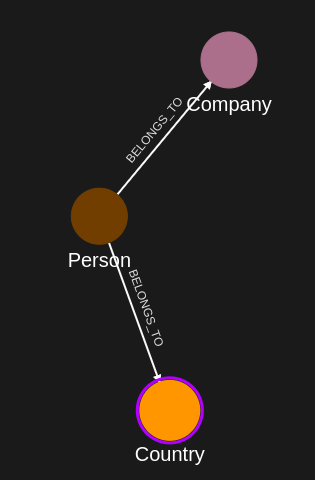
- Person -[BELONGS_TO]-> Country
- Person -[BELONGS_TO]-> Company
Use cases:
- Data import pipelines
- System integrations
- Automated onboarding workflows
Use case
Scenario: An HR integration system automatically creates employee records.
Existing data:
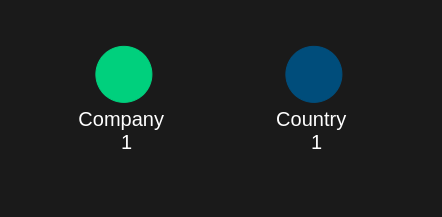
- Country(Norway)
- Company(Forsenty)
Integration operation:
1. HR system triggers employee creation
2. Application creates: Person(456985) with VerificationMethod, Email, PhoneNumber, FirstName and LastName properties, each carrying assurance_level and source metadata
3. Links: Person -[BELONGS_TO]-> Country(Norway)
4. Links: Person -[BELONGS_TO]-> Company(Forsenty)
Final graph:
Country(Norway) <-[BELONGS_TO]- Person(456985) -[BELONGS_TO]-> Company(Forsenty)
Key difference from user-based creation:
- Uses $_appId filter (auto-populated)
- No user token required
- Application is the authorized subject
- The Country and Company to link are selected by input parameters ($country_external_id, $company_external_id) in the policy filter
Requirements
Prerequisites:
- ServiceAccount credentials: For creating policies and queries (Bearer token)
- AppAgent credentials: For data ingestion and query execution (X-IK-ClientKey)
No user token needed:
- Application acts as its own subject
- $_appId automatically identifies the calling application
Steps
Step 1: Ingest Reference Data
- Authentication: AppAgent credential (X-IK-ClientKey header)
- Action: POST Country(Norway) and Company(Forsenty) nodes
- Result: Reference nodes ready for linking
Step 2: Create Node Creation Policy
- Authentication: ServiceAccount credential (Bearer token)
- Action: POST policy with subject type _Application, filter subject.external_id = $_appId AND country.external_id = $country_external_id AND company.external_id = $company_external_id, allowing:
- READ country and company nodes
- UPSERT Person nodes
- UPSERT BELONGS_TO relationships (Person -> Country)
- UPSERT BELONGS_TO relationships (Person -> Company)
- Result: Policy ID returned
Step 3: Create Node Creation Query
- Authentication: ServiceAccount credential (Bearer token)
- Action: POST query that upserts the Person node and two BELONGS_TO relationships, with parameters:
- $person_external_id (for the Person node)
- $verification_method, $email, $phone_number, $first_name, $last_name (property values)
- $assurance_level, $source (metadata on every property)
- $country_external_id, $company_external_id (policy filter, select the nodes to link)
- Result: Query ID returned
Step 4: Execute Creation
- Authentication: AppAgent credential (X-IK-ClientKey header)
- Action: POST to /contx-iq/v1/execute with:
- person_external_id: "456985"
- verification_method: "BREGG", assurance_level: 3, source: "NAV"
- email: "elias@email.com", phone_number: "4725639685", first_name: "Elias", last_name: "Boomy"
- country_external_id: "Norway", company_external_id: "Forsenty"
- Result: Person 456985 created with both BELONGS_TO relationships; the response returns the person node and its external_id
Step 5: Cleanup
- Action: DELETE query and policy configurations
Step 1
Capture the nodes needed for this use case.
{
  "nodes": [
    {
      "external_id": "Norway",
      "type": "Country"
    },
    {
      "external_id": "Forsenty",
      "type": "Company"
    }
  ]
}
Step 2
Policy which designates the derived query can create a Person node, a relationship with a Country node, and a relationship with a Company node.
{
  "meta": {
    "policy_version": "1.0-ciq"
  },
  "subject": {
    "type": "_Application"
  },
  "condition": {
    "cypher": "MATCH (subject:_Application) MATCH (country:Country) MATCH (company:Company)",
    "filter": [
      {
        "app": "app1",
        "operator": "AND",
        "operands": [
          {
            "attribute": "subject.external_id",
            "operator": "=",
            "value": "$_appId"
          },
          {
            "attribute": "country.external_id",
            "operator": "=",
            "value": "$country_external_id"
          },
          {
            "attribute": "company.external_id",
            "operator": "=",
            "value": "$company_external_id"
          }
        ]
      }
    ]
  },
  "allowed_reads": {
    "nodes": [
      "country",
      "country.*",
      "company",
      "company.*"
    ]
  },
  "allowed_upserts": {
    "nodes": {
      "node_types": [
        "Person"
      ]
    },
    "relationships": {
      "relationship_types": [
        {
          "type": "BELONGS_TO",
          "source_node_label": "Person",
          "target_node_label": "Country"
        },
        {
          "type": "BELONGS_TO",
          "source_node_label": "Person",
          "target_node_label": "Company"
        }
      ]
    }
  }
}
Request to create a CIQ Policy configuration using REST.
{
  "project_id": "your_project_gid",
  "description": "description of policy",
  "display_name": "policy name",
  "name": "policy-name",
  "policy": "{\"meta\":{\"policy_version\":\"1.0-ciq\"},\"subject\":{\"type\":\"_Application\"},\"condition\":{\"cypher\":\"MATCH (subject:_Application) MATCH (country:Country) MATCH (company:Company)\",\"filter\":[{\"app\":\"app1\",\"operator\":\"AND\",\"operands\":[{\"attribute\":\"subject.external_id\",\"operator\":\"=\",\"value\":\"$_appId\"},{\"attribute\":\"country.external_id\",\"operator\":\"=\",\"value\":\"$country_external_id\"},{\"attribute\":\"company.external_id\",\"operator\":\"=\",\"value\":\"$company_external_id\"}]}]},\"allowed_reads\":{\"nodes\":[\"country\",\"country.*\",\"company\",\"company.*\"]},\"allowed_upserts\":{\"nodes\":{\"node_types\":[\"Person\"]},\"relationships\":{\"relationship_types\":[{\"type\":\"BELONGS_TO\",\"source_node_label\":\"Person\",\"target_node_label\":\"Country\"},{\"type\":\"BELONGS_TO\",\"source_node_label\":\"Person\",\"target_node_label\":\"Company\"}]}}}",
  "status": "ACTIVE",
  "tags": []
}
Request to read the CIQ Policy configuration using REST.
{
  "id": "your_policy_configuration_gid"
}
Step 3
The CIQ Knowledge Query designates the node to create and the relationships to upsert.
{
  "nodes": [
    "person",
    "person.external_id"
  ],
  "relationships": [],
  "upsert_nodes": [
    {
      "name": "person",
      "type": "Person",
      "external_id": "$person_external_id",
      "properties": [
        {
          "type": "VerificationMethod",
          "value": "$verification_method",
          "metadata": [
            {
              "type": "Assurance_level",
              "value": "$assurance_level"
            },
            {
              "type": "source",
              "value": "$source"
            }
          ]
        },
        {
          "type": "Email",
          "value": "$email",
          "metadata": [
            {
              "type": "Assurance_level",
              "value": "$assurance_level"
            },
            {
              "type": "source",
              "value": "$source"
            }
          ]
        },
        {
          "type": "PhoneNumber",
          "value": "$phone_number",
          "metadata": [
            {
              "type": "assurance_level",
              "value": "$assurance_level"
            },
            {
              "type": "source",
              "value": "$source"
            }
          ]
        },
        {
          "type": "FirstName",
          "value": "$first_name",
          "metadata": [
            {
              "type": "assurance_level",
              "value": "$assurance_level"
            },
            {
              "type": "source",
              "value": "$source"
            }
          ]
        },
        {
          "type": "LastName",
          "value": "$last_name",
          "metadata": [
            {
              "type": "assurance_level",
              "value": "$assurance_level"
            },
            {
              "type": "source",
              "value": "$source"
            }
          ]
        }
      ]
    }
  ],
  "upsert_relationships": [
    {
      "name": "rel1",
      "source": "person",
      "target": "country",
      "type": "BELONGS_TO",
      "properties": []
    },
    {
      "name": "rel2",
      "source": "person",
      "target": "company",
      "type": "BELONGS_TO",
      "properties": []
    }
  ]
}
Request to create a CIQ Knowledge Query configuration using REST.
{
  "project_id": "your_project_gid",
  "description": "description of knowledge query",
  "display_name": "knowledge query name",
  "name": "knowledge-query-name",
  "policy_id": "your_policy_gid",
  "query": "{\"nodes\":[\"person\",\"person.external_id\"],\"relationships\":[],\"upsert_nodes\":[{\"name\":\"person\",\"type\":\"Person\",\"external_id\":\"$person_external_id\",\"properties\":[{\"type\":\"VerificationMethod\",\"value\":\"$verification_method\",\"metadata\":[{\"type\":\"Assurance_level\",\"value\":\"$assurance_level\"},{\"type\":\"source\",\"value\":\"$source\"}]},{\"type\":\"Email\",\"value\":\"$email\",\"metadata\":[{\"type\":\"Assurance_level\",\"value\":\"$assurance_level\"},{\"type\":\"source\",\"value\":\"$source\"}]},{\"type\":\"PhoneNumber\",\"value\":\"$phone_number\",\"metadata\":[{\"type\":\"assurance_level\",\"value\":\"$assurance_level\"},{\"type\":\"source\",\"value\":\"$source\"}]},{\"type\":\"FirstName\",\"value\":\"$first_name\",\"metadata\":[{\"type\":\"assurance_level\",\"value\":\"$assurance_level\"},{\"type\":\"source\",\"value\":\"$source\"}]},{\"type\":\"LastName\",\"value\":\"$last_name\",\"metadata\":[{\"type\":\"assurance_level\",\"value\":\"$assurance_level\"},{\"type\":\"source\",\"value\":\"$source\"}]}]}],\"upsert_relationships\":[{\"name\":\"rel1\",\"source\":\"person\",\"target\":\"country\",\"type\":\"BELONGS_TO\",\"properties\":[]},{\"name\":\"rel2\",\"source\":\"person\",\"target\":\"company\",\"type\":\"BELONGS_TO\",\"properties\":[]}]}",
  "status": "ACTIVE"
}
Read the CIQ Query Configuration.
{
  "id": "your_knowledge_query_configuration_gid"
}
Step 4
CIQ Execution request in json format.
{
  "id": "knowledge_query_gid",
  "input_params": {
    "person_external_id": "456985",
    "verification_method": "BREGG",
    "assurance_level": 3,
    "source": "NAV",
    "email": "elias@email.com",
    "phone_number": "4725639685",
    "first_name": "Elias",
    "last_name": "Boomy",
    "country_external_id": "Norway",
    "company_external_id": "Forsenty"
  },
  "page_token": 1
}
CIQ Execution response in json format.
{
  "data": [
    {
      "nodes": {
        "person": {
          "Id": 5,
          "ElementId": "4:a5c213aa-aa4b-4be5-a17a-a677a80ee634:5",
          "Labels": [
            "Unique",
            "Resource",
            "Person"
          ],
          "Props": {
            "create_time": "2025-09-26T11:29:25.43Z",
            "external_id": "456985",
            "id": "I2kGlVoQQHmj_gfNvH4b-A",
            "type": "Person",
            "update_time": "2025-09-26T11:29:25.43Z"
          }
        },
        "person.external_id": "456985"
      }
    }
  ]
}
Step 5
Delete the CIQ Query.
{
  "id": "your_knowledge_query_configuration_gid"
}
Delete the CIQ Policy.
{
  "id": "your_policy_configuration_gid"
}
API Endpoints
/capture/v1/nodes/capture/v1/relationships/configs/v1/authorization-policies/configs/v1/knowledge-queries/contx-iq/v1/execute