
ContX IQ: Wildcard Property Retrieval - Fetch All Properties
This example demonstrates wildcard property retrieval:
Traditional approach (explicit):
RETURN car.model, car.vin, car.color, car.year
Wildcard approach:
RETURN car.* (returns ALL properties)
Mixed approach in this example:
- LicenseNumber: Retrieve specific property (number)
- Car: Retrieve ALL properties (using wildcard)
- OWNS relationship: Retrieve ALL properties (using wildcard)
Benefits:
- Handles dynamic/evolving schemas
- Simpler queries for complete data exports
- No need to update queries when properties are added
Use case
Scenario: Export complete vehicle data without knowing all property names.
Graph data:
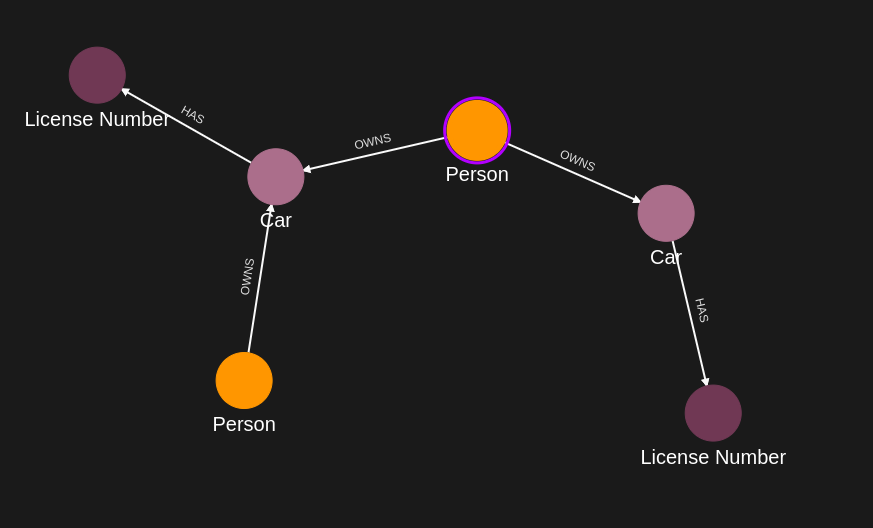
Person(Alice) -[OWNS {weight: "100kg", since: "2020"}]-> Car(model: "Mustang", vin: "ABC", color: "red", year: 2020)
Car -[HAS]-> LicenseNumber(number: "ABC-123")
Query returns:
{
license: "ABC-123", // Specific property
car: {model, vin, color, year, ...any_future_properties}, // All Car properties
owns: {weight, since, ...any_future_properties} // All OWNS properties
}
Future-proof: If Car gains new properties (mileage, insurance), query automatically includes them.
Requirements
Prerequisites:
- ServiceAccount credentials: For creating policies and queries (Bearer token)
- AppAgent credentials: For data ingestion and query execution (X-IK-ClientKey)
- User access token: For authorized read operations
Policy considerations:
- Wildcard read access must be authorized in policy
- Policy can still restrict which node types allow wildcard reads
Steps
Step 1: Ingest Nodes with Multiple Properties
- Authentication: AppAgent credential (X-IK-ClientKey header)
- Action: POST nodes with various properties
- Result: Graph with rich property data
Step 2: Create Wildcard Read Policy
- Authentication: ServiceAccount credential (Bearer token)
- Action: POST policy allowing:
- READ specific properties on some nodes
- READ all properties (*) on others
- Result: Policy ID returned
Step 3: Create Wildcard Query
- Authentication: ServiceAccount credential (Bearer token)
- Action: POST query using:
- Specific: licenseNumber.number
- Wildcard: car.*, owns.*
- Result: Query ID returned
Step 4: Execute Query
- Authentication: AppAgent credential + User token
- Action: POST to /contx-iq/v1/execute
- Result: Complete property data for Car and OWNS, specific property for LicenseNumber
Step 1
Capture the nodes needed for this use case.
{
  "nodes": [
    {
      "external_id": "alice",
      "type": "Person",
      "is_identity": true,
      "properties": [
        {
          "type": "email",
          "value": "alice@email.com"
        },
        {
          "type": "name",
          "value": "Alice Smith"
        }
      ]
    },
    {
      "external_id": "satchmo",
      "type": "Person",
      "is_identity": true,
      "properties": [
        {
          "type": "email",
          "value": "satchmo@demo.com"
        },
        {
          "type": "name",
          "value": "Louis Armstrong"
        }
      ]
    },
    {
      "external_id": "karel",
      "type": "Person",
      "is_identity": true,
      "properties": [
        {
          "type": "email",
          "value": "karel@demo.com"
        },
        {
          "type": "name",
          "value": "Karel Plihal"
        }
      ]
    },
    {
      "external_id": "kitt",
      "type": "Car",
      "is_identity": false,
      "properties": [
        {
          "type": "manufacturer",
          "value": "pontiac"
        },
        {
          "type": "model",
          "value": "Firebird"
        }
      ]
    },
    {
      "external_id": "caddilacv16",
      "type": "Car",
      "is_identity": false,
      "properties": [
        {
          "type": "manufacturer",
          "value": "Caddilac"
        },
        {
          "type": "model",
          "value": "V-16"
        }
      ]
    },
    {
      "external_id": "harmonika",
      "type": "Bus",
      "is_identity": false,
      "properties": [
        {
          "type": "manufacturer",
          "value": "Ikarus"
        },
        {
          "type": "model",
          "value": "280"
        }
      ]
    },
    {
      "external_id": "ln-xxx",
      "type": "LicenseNumber",
      "is_identity": false,
      "properties": [
        {
          "type": "license",
          "value": "ln-xxx-value"
        }
      ]
    },
    {
      "external_id": "ln-yyy",
      "type": "LicenseNumber",
      "is_identity": false,
      "properties": [
        {
          "type": "license",
          "value": "ln-yyy-value"
        }
      ]
    },
    {
      "external_id": "ln-zzz",
      "type": "LicenseNumber",
      "is_identity": false,
      "properties": [
        {
          "type": "license",
          "value": "ln-zzz-value"
        }
      ]
    }
  ]
}
Capture the relationships needed for this use case.
{
  "relationships": [
    {
      "source": {
        "external_id": "alice",
        "type": "Person"
      },
      "target": {
        "external_id": "kitt",
        "type": "Car"
      },
      "type": "OWNS",
      "properties": [
        {
          "type": "weight",
          "value": 1
        }
      ]
    },
    {
      "source": {
        "external_id": "alice",
        "type": "Person"
      },
      "target": {
        "external_id": "caddilacv16",
        "type": "Car"
      },
      "type": "OWNS",
      "properties": [
        {
          "type": "weight",
          "value": 2
        }
      ]
    },
    {
      "source": {
        "external_id": "satchmo",
        "type": "Person"
      },
      "target": {
        "external_id": "caddilacv16",
        "type": "Car"
      },
      "type": "OWNS"
    },
    {
      "source": {
        "external_id": "karel",
        "type": "Person"
      },
      "target": {
        "external_id": "harmonika",
        "type": "Bus"
      },
      "type": "OWNS"
    },
    {
      "source": {
        "external_id": "kitt",
        "type": "Car"
      },
      "target": {
        "external_id": "ln-xxx",
        "type": "LicenseNumber"
      },
      "type": "HAS",
      "properties": [
        {
          "type": "weight",
          "value": 3
        }
      ]
    },
    {
      "source": {
        "external_id": "caddilacv16",
        "type": "Car"
      },
      "target": {
        "external_id": "ln-zzz",
        "type": "LicenseNumber"
      },
      "type": "HAS"
    },
    {
      "source": {
        "external_id": "harmonika",
        "type": "Bus"
      },
      "target": {
        "external_id": "ln-yyy",
        "type": "LicenseNumber"
      },
      "type": "HAS"
    }
  ]
}
Step 2
Create a CIQ Policy which designates the Subject node, the cypher, the nodes allowed to be upserted and the nodes allowed to be read.
{
  "meta": {
    "policy_version": "1.0-ciq"
  },
  "subject": {
    "type": "Person"
  },
  "condition": {
    "cypher": "MATCH (subject:Person)-[owns:OWNS]->(car:Car)-[:HAS]->(ln:LicenseNumber)",
    "filter": [
      {
        "app": "app1",
        "operator": "=",
        "attribute": "subject.external_id",
        "value": "$token.sub"
      }
    ]
  },
  "allowed_reads": {
    "nodes": [
      "car",
      "ln",
      "car.*",
      "ln.property.license"
    ],
    "relationships": [
      "owns.*"
    ]
  },
  "allowed_upserts": {
    "nodes": {
      "existing_nodes": [
        "car"
      ]
    }
  }
}
Request to create the CIQ Policy configuration using REST.
{
  "project_id": "your_project_gid",
  "description": "description of policy",
  "display_name": "policy name",
  "name": "policy-name",
  "policy": "{\"meta\":{\"policy_version\":\"1.0-ciq\"},\"subject\":{\"type\":\"Person\"},\"condition\":{\"cypher\":\"MATCH (subject:Person)-[owns:OWNS]->(car:Car)-[:HAS]->(ln:LicenseNumber)\",\"filter\":[{\"app\":\"app1\",\"operator\":\"=\",\"attribute\":\"subject.external_id\",\"value\":\"$token.sub\"}]},\"allowed_reads\":{\"nodes\":[\"car\",\"ln\",\"car.*\",\"ln.property.license\"],\"relationships\":[\"owns.*\"]},\"allowed_upserts\":{\"nodes\":{\"existing_nodes\":[\"car\"]}}}",
  "status": "ACTIVE",
  "tags": []
}
Request to read the CIQ Policy configuration using REST.
{
  "id": "your_policy_configuration_gid"
}
Step 3
Create a CIQ Query in the context of the policy to retrieve the designated properties.
{
  "nodes": [
    "car.property.*",
    "ln.property.license"
  ],
  "relationships": [
    "owns.*"
  ],
  "filter": {
    "attribute": "ln.property.license",
    "operator": "=",
    "value": "$ln_value"
  }
}
Request to create a CIQ Query configuration using REST.
{
  "project_id": "your_project_gid",
  "description": "description of knowledge query",
  "display_name": "knowledge query name",
  "name": "knowledge-query-name",
  "policy_id": "your_policy_gid",
  "query": "{\"nodes\":[\"car.property.*\",\"ln.property.license\"],\"relationships\":[\"owns.*\"],\"filter\":{\"attribute\":\"ln.property.license\",\"operator\":\"=\",\"value\":\"$ln_value\"}}",
  "status": "ACTIVE"
}
Read the CIQ Query Configuration.
{
  "id": "your_knowledge_query_configuration_gid"
}
Step 4
Run a CIQ Execution to get the designated information.
{
  "id": "knowledge_query_gid",
  "input_params": {
    "ln_value": "ln-xxx-value"
  },
  "page_token": 1
}
CIQ Execution response.
{
  "data": [
    {
      "nodes": {
        "car.property.*": [
          {
            "type": "manufacturer",
            "value": "pontiac"
          },
          {
            "type": "model",
            "value": "Firebird"
          }
        ],
        "ln.property.license": "ln-xxx-value"
      },
      "relationships": {
        "owns.*": {
          "create_time": "2025-09-26T20:41:30.318Z",
          "id": "Wb01b9HYQgKbGkpQl4FDeA",
          "type": "OWNS",
          "update_time": "2025-09-26T20:41:30.318Z",
          "weight": 1
        }
      }
    }
  ]
}API Endpoints
/capture/v1/nodes/capture/v1/relationships/configs/v1/authorization-policies/configs/v1/knowledge-queries/contx-iq/v1/execute