
ContX IQ: Retrieve All Directly Connected Nodes for a User
This example retrieves all directly connected nodes for a user:
Policy pattern:
MATCH (subject:_Application) MATCH (u:User)-[]-(n:Resource)
with filter u.external_id = $user_external_id (and subject.external_id = $_appId)
Returns all nodes with ANY direct relationship to the user:
- Incoming relationships: (other)-[r]->(u)
- Outgoing relationships: (u)-[r]->(other)
- Any relationship type (the pattern -[]- names no type and no direction)
Use cases:
- User profile aggregation
- GDPR data export (all user-related data)
- Impact analysis (what's connected to this user?)
Use case
Scenario: Build a user dashboard showing all related entities.
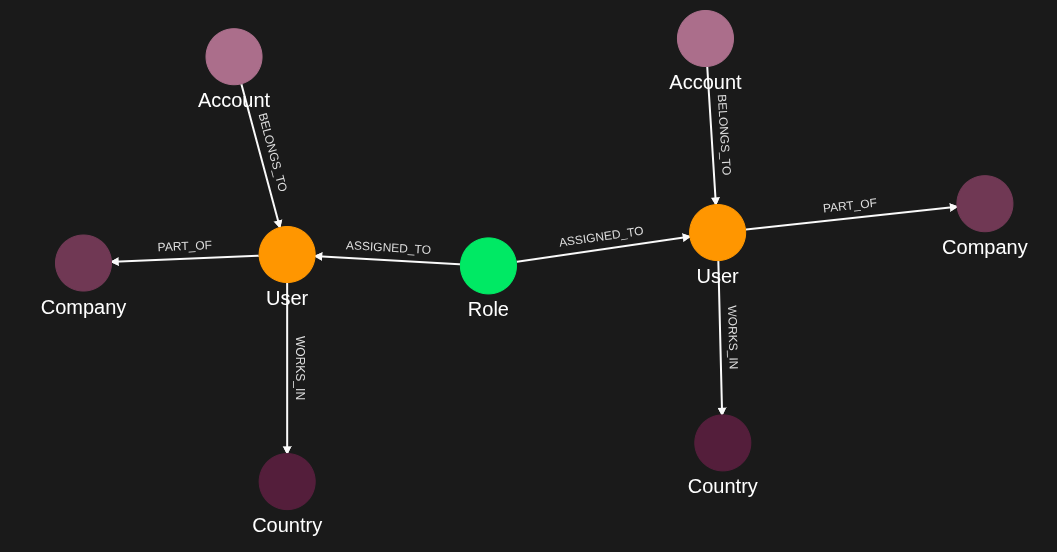
User graph:
User(nico)
-[PART_OF {weight: 1}]-> Company(tyrest)
-[WORKS_IN]-> Country(norway)
<-[ASSIGNED_TO]- Role(customer)
<-[BELONGS_TO]- Account(123456)
User(fred)
-[WORKS_IN]-> Country(sweden)
<-[ASSIGNED_TO]- Role(customer)
<-[BELONGS_TO]- Account(234567)
Query input: user_external_id = "nico"
Query result (one row per connected node: n.external_id, n.type, n.property.*):
[
{type: "Account", id: "123456", properties: [location = CityHub]},
{type: "Role", id: "customer", properties: [source = Head]},
{type: "Country", id: "norway", properties: [name = Norway]},
{type: "Company", id: "tyrest", properties: [name = Tyrest]}
]
All direct connections returned regardless of direction or type.
Requirements
Prerequisites:
- ServiceAccount credentials: For creating policies and queries (Bearer token)
- AppAgent credentials: For data ingestion and query execution (X-IK-ClientKey)
Application as subject:
- Uses $_appId filter (auto-populated)
- No user token required for this pattern
Steps
Step 1: Ingest Users and Related Nodes
- Authentication: AppAgent credential (X-IK-ClientKey header)
- Action: POST User (nico, fred), Role (customer), Country (norway, sweden), Account (123456, 234567) and Company (tyrest, blue) nodes, then the PART_OF (with a weight property), WORKS_IN, ASSIGNED_TO and BELONGS_TO relationships
- Result: Rich user graph ready for traversal
Step 2: Create Related Nodes Policy
- Authentication: ServiceAccount credential (Bearer token)
- Action: POST policy with subject type _Application and cypher MATCH (subject:_Application) MATCH (u:User)-[]-(n:Resource), filter subject.external_id = $_appId AND u.external_id = $user_external_id, allowing READ on u, u.*, n and n.*
- Result: Policy ID returned
Step 3: Create Related Nodes Query
- Authentication: ServiceAccount credential (Bearer token)
- Action: POST query that returns n.external_id, n.type and n.property.* for every node n connected to the user selected by the policy filter (any type, any direction)
- Result: Query ID returned
Step 4: Execute Query
- Authentication: AppAgent credential (X-IK-ClientKey header)
- Action: POST to /contx-iq/v1/execute with input_params user_external_id = nico
- Result: four rows, one per directly connected node (Account 123456, Role customer, Country norway, Company tyrest)
Step 5: Cleanup
- Action: DELETE the query and policy configurations
Step 1
Capture the nodes needed for this use case.
{
  "nodes": [
    {
      "external_id": "nico",
      "type": "User",
      "is_identity": true,
      "properties": [
        {
          "type": "email",
          "value": "nico@email.com"
        }
      ]
    },
    {
      "external_id": "fred",
      "type": "User",
      "is_identity": true,
      "properties": [
        {
          "type": "email",
          "value": "fred@email.com"
        }
      ]
    },
    {
      "external_id": "customer",
      "type": "Role",
      "properties": [
        {
          "type": "source",
          "value": "Head"
        }
      ]
    },
    {
      "external_id": "norway",
      "type": "Country",
      "properties": [
        {
          "type": "name",
          "value": "Norway"
        }
      ]
    },
    {
      "external_id": "sweden",
      "type": "Country",
      "properties": [
        {
          "type": "name",
          "value": "Sweden"
        }
      ]
    },
    {
      "external_id": "123456",
      "type": "Account",
      "properties": [
        {
          "type": "location",
          "value": "CityHub"
        }
      ]
    },
    {
      "external_id": "234567",
      "type": "Account",
      "properties": [
        {
          "type": "location",
          "value": "Palace"
        }
      ]
    },
    {
      "external_id": "tyrest",
      "type": "Company",
      "properties": [
        {
          "type": "name",
          "value": "Tyrest"
        }
      ]
    },
    {
      "external_id": "blue",
      "type": "Company",
      "properties": [
        {
          "type": "name",
          "value": "Blue"
        }
      ]
    }
  ]
}
Capture the relationships needed for this use case.
{
  "relationships": [
    {
      "source": {
        "external_id": "nico",
        "type": "User"
      },
      "target": {
        "external_id": "tyrest",
        "type": "Company"
      },
      "type": "PART_OF",
      "properties": [
        {
          "type": "weight",
          "value": 1
        }
      ]
    },
    {
      "source": {
        "external_id": "nico",
        "type": "User"
      },
      "target": {
        "external_id": "norway",
        "type": "Country"
      },
      "type": "WORKS_IN"
    },
    {
      "source": {
        "external_id": "customer",
        "type": "Role"
      },
      "target": {
        "external_id": "nico",
        "type": "User"
      },
      "type": "ASSIGNED_TO"
    },
    {
      "source": {
        "external_id": "123456",
        "type": "Account"
      },
      "target": {
        "external_id": "nico",
        "type": "User"
      },
      "type": "BELONGS_TO"
    },
    {
      "source": {
        "external_id": "fred",
        "type": "User"
      },
      "target": {
        "external_id": "sweden",
        "type": "Country"
      },
      "type": "WORKS_IN"
    },
    {
      "source": {
        "external_id": "customer",
        "type": "Role"
      },
      "target": {
        "external_id": "fred",
        "type": "User"
      },
      "type": "ASSIGNED_TO"
    },
    {
      "source": {
        "external_id": "234567",
        "type": "Account"
      },
      "target": {
        "external_id": "fred",
        "type": "User"
      },
      "type": "BELONGS_TO"
    }
  ]
}
Step 2
Policy which designates the derived query can retrieve all nodes directly related to a User node.
{
  "meta": {
    "policy_version": "1.0-ciq"
  },
  "subject": {
    "type": "_Application"
  },
  "condition": {
    "cypher": "MATCH (subject:_Application) MATCH (u:User)-[]-(n:Resource)",
    "filter": [
      {
        "app": "app1",
        "operator": "AND",
        "operands": [
          {
            "attribute": "subject.external_id",
            "operator": "=",
            "value": "$_appId"
          },
          {
            "attribute": "u.external_id",
            "operator": "=",
            "value": "$user_external_id"
          }
        ]
      }
    ]
  },
  "allowed_reads": {
    "nodes": [
      "u",
      "u.*",
      "n",
      "n.*"
    ]
  }
}
Request to create a CIQ Policy configuration using REST.
{
  "project_id": "your_project_gid",
  "description": "description of policy",
  "display_name": "policy name",
  "name": "policy-name",
  "policy": "{\"meta\":{\"policy_version\":\"1.0-ciq\"},\"subject\":{\"type\":\"_Application\"},\"condition\":{\"cypher\":\"MATCH (subject:_Application) MATCH (u:User)-[]-(n:Resource)\",\"filter\":[{\"app\":\"app1\",\"operator\":\"AND\",\"operands\":[{\"attribute\":\"subject.external_id\",\"operator\":\"=\",\"value\":\"$_appId\"},{\"attribute\":\"u.external_id\",\"operator\":\"=\",\"value\":\"$user_external_id\"}]}]},\"allowed_reads\":{\"nodes\":[\"u\",\"u.*\",\"n\",\"n.*\"]}}",
  "status": "ACTIVE",
  "tags": []
}
Request to read the CIQ Policy configuration using REST.
{
  "id": "your_policy_configuration_gid"
}
Step 3
The CIQ Knowledge Query designates the information you want to retrieve.
{
  "nodes": [
    "n.external_id",
    "n.type",
    "n.property.*"
  ]
}
Request to create a CIQ Knowledge Query configuration using REST.
{
  "project_id": "your_project_gid",
  "description": "description of knowledge query",
  "display_name": "knowledge query name",
  "name": "knowledge-query-name",
  "policy_id": "your_policy_gid",
  "query": "{\"nodes\":[\"n.external_id\",\"n.type\",\"n.property.*\"]}",
  "status": "ACTIVE"
}
Read the CIQ Query Configuration.
{
  "id": "your_knowledge_query_configuration_gid"
}
Step 4
CIQ Execution request in json format.
{
  "id": "knowledge_query_gid",
  "input_params": {
    "user_external_id": "nico"
  },
  "page_token": 1
}
CIQ Execution response in json format.
{
  "data": [
    {
      "nodes": {
        "n.external_id": "123456",
        "n.property.*": [
          {
            "type": "location",
            "value": "CityHub"
          }
        ],
        "n.type": "Account"
      }
    },
    {
      "nodes": {
        "n.external_id": "customer",
        "n.property.*": [
          {
            "type": "source",
            "value": "Head"
          }
        ],
        "n.type": "Role"
      }
    },
    {
      "nodes": {
        "n.external_id": "norway",
        "n.property.*": [
          {
            "type": "name",
            "value": "Norway"
          }
        ],
        "n.type": "Country"
      }
    },
    {
      "nodes": {
        "n.external_id": "tyrest",
        "n.property.*": [
          {
            "type": "name",
            "value": "Tyrest"
          }
        ],
        "n.type": "Company"
      }
    }
  ]
}
Step 5
Delete the CIQ Query.
{
  "id": "your_knowledge_query_configuration_gid"
}
Delete the CIQ Policy.
{
  "id": "your_policy_configuration_gid"
}API Endpoints
/capture/v1/nodes/capture/v1/relationships/configs/v1/authorization-policies/configs/v1/knowledge-queries/contx-iq/v1/execute