
ContX IQ: Filter Data Using IN Array Operator with User Subject
This example demonstrates using the IN operator for array-based filtering:
What is the IN operator?
The IN operator checks if a value exists within an array. Useful when authorization depends on membership in a list.
Policy pattern (two IN operands combined with AND):
- subject.external_id IN $idList (an array passed as input parameter)
- subject.external_id IN @contract.property.signers (an array property of the matched Contract node, referenced with the @ prefix)
Operations demonstrated:
1. Authenticate the user via token introspection (the policy subject is a Person, so a bearer token is required)
2. Policy checks the subject's external_id against an input array and against an array stored on the resource
3. Query returns the Contract nodes matching both filters
Use cases:
- Allow-list of subjects (check if the subject is in a list passed at execute time)
- Membership stored on the resource (check if the subject is one of the contract's signers)
- Multi-value attribute matching
Use case
Scenario: Retrieve the contracts a person accepted, but only when that person is on an allow-list and is recorded as a signer of the contract.
Graph structure:
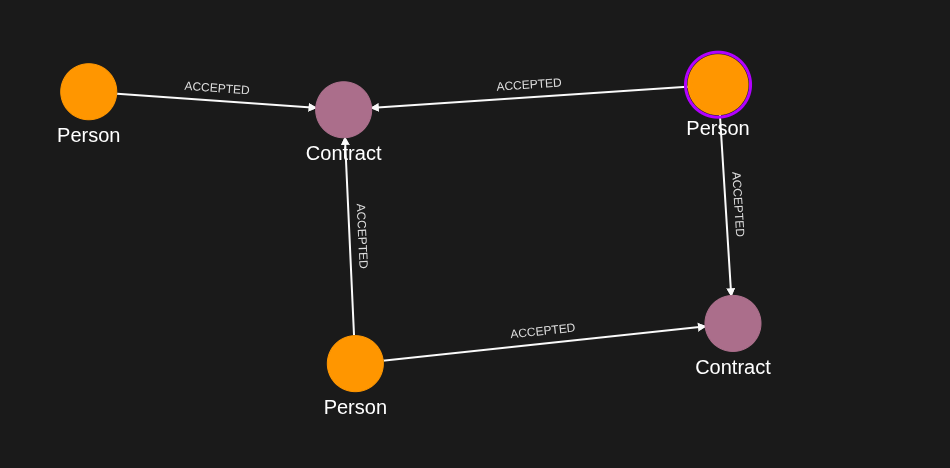
Person(alice_sub_value) -[ACCEPTED]-> Contract(ct985) {signers: [alice_sub_value, ryan, tilda]}
Person(alice_sub_value) -[ACCEPTED]-> Contract(ct234) {signers: [alice_sub_value, ryan]}
Person(ryan) -[ACCEPTED]-> Contract(ct985), Contract(ct234)
Person(tilda) -[ACCEPTED]-> Contract(ct985), Contract(ct123) {signers: [tilda]}
Policy logic:
- The user authenticates with an access token (Person subject)
- Policy cypher: MATCH (subject:Person)-[r1:ACCEPTED]->(contract:Contract)
- Filter: subject.external_id IN $idList AND subject.external_id IN @contract.property.signers
- Only the contracts matching both array filters are returned
Query flow:
1. Execute with input_params idList = ["alice_sub_value", "ryan"]
2. Subjects alice_sub_value and ryan pass the first IN; tilda does not
3. For each of their contracts, the subject must also appear in contract.property.signers
4. Result: ct234 and ct985 are returned (ct985 once per matching subject); ct123 is not, because neither subject is among its signers
Requirements
Prerequisites:
- ServiceAccount credentials: For creating policies and queries (Bearer token)
- AppAgent credentials: For data ingestion and query execution (X-IK-ClientKey)
- User access token: JWT for the Person node to be authenticated
How to pass user token:
- Header: Authorization: Bearer {user_access_token}
- Token is introspected to identify the user and their attributes
Steps
Step 1: Ingest Graph Data
- Authentication: AppAgent credential (X-IK-ClientKey header)
- Action: POST Person nodes (alice_sub_value, ryan, tilda) and Contract nodes (ct123, ct234, ct985) whose signers property is an array, then the ACCEPTED relationships
- Result: Graph ready for array-filtered queries
Step 2: Create Policy with IN Array Filter
- Authentication: ServiceAccount credential (Bearer token)
- Action: POST policy with subject type Person, cypher MATCH (subject:Person)-[r1:ACCEPTED]->(contract:Contract), and an AND filter of:
- subject.external_id IN $idList (input parameter array)
- subject.external_id IN @contract.property.signers (array property of the contract)
- Allowed reads: contract.*, r1.*
- Result: Policy ID returned
Step 3: Create Query for Contract Properties
- Authentication: ServiceAccount credential (Bearer token)
- Action: POST query that retrieves contract.external_id, contract.property.signers and contract.property.category
- Query respects the IN array filters from the policy
- Result: Query ID returned
Step 4: Execute Query as Authenticated User
- Authentication: AppAgent credential + User token (Bearer header)
- Action: POST to /contx-iq/v1/execute with input_params idList = ["alice_sub_value", "ryan"]
- Result: ct234 and ct985 returned with their signers and category
Step 1
Capture the nodes needed for this use case.
{
  "nodes": [
    {
      "external_id": "alice_sub_value",
      "is_identity": true,
      "type": "Person",
      "properties": [
        {
          "type": "email",
          "value": "alice@email.com"
        },
        {
          "type": "given_name",
          "value": "Alice"
        },
        {
          "type": "last_name",
          "value": "Smith"
        }
      ]
    },
    {
      "external_id": "ryan",
      "is_identity": true,
      "type": "Person",
      "properties": [
        {
          "type": "email",
          "value": "ryan@yahoo.co.uk"
        },
        {
          "type": "given_name",
          "value": "ryan"
        },
        {
          "type": "last_name",
          "value": "mushu"
        }
      ]
    },
    {
      "external_id": "tilda",
      "is_identity": true,
      "type": "Person",
      "properties": [
        {
          "type": "email",
          "value": "tilda@yahoo.co.uk"
        },
        {
          "type": "given_name",
          "value": "tilda"
        },
        {
          "type": "last_name",
          "value": "mushu"
        }
      ]
    },
    {
      "external_id": "ct123",
      "type": "Contract",
      "properties": [
        {
          "type": "category",
          "value": "Insurance"
        },
        {
          "type": "status",
          "value": "Active"
        },
        {
          "type": "signers",
          "value": [
            "tilda"
          ]
        }
      ]
    },
    {
      "external_id": "ct234",
      "type": "Contract",
      "properties": [
        {
          "type": "category",
          "value": "Insurance"
        },
        {
          "type": "status",
          "value": "Active"
        },
        {
          "type": "signers",
          "value": [
            "alice_sub_value",
            "ryan"
          ]
        }
      ]
    },
    {
      "external_id": "ct985",
      "type": "Contract",
      "properties": [
        {
          "type": "category",
          "value": "Insurance"
        },
        {
          "type": "status",
          "value": "Active"
        },
        {
          "type": "signers",
          "value": [
            "alice_sub_value",
            "ryan",
            "tilda"
          ]
        }
      ]
    }
  ]
}
Capture the relationships needed for this use case.
{
  "relationships": [
    {
      "source": {
        "external_id": "alice_sub_value",
        "type": "Person"
      },
      "target": {
        "external_id": "ct985",
        "type": "Contract"
      },
      "type": "ACCEPTED"
    },
    {
      "source": {
        "external_id": "alice_sub_value",
        "type": "Person"
      },
      "target": {
        "external_id": "ct234",
        "type": "Contract"
      },
      "type": "ACCEPTED"
    },
    {
      "source": {
        "external_id": "ryan",
        "type": "Person"
      },
      "target": {
        "external_id": "ct985",
        "type": "Contract"
      },
      "type": "ACCEPTED"
    },
    {
      "source": {
        "external_id": "ryan",
        "type": "Person"
      },
      "target": {
        "external_id": "ct234",
        "type": "Contract"
      },
      "type": "ACCEPTED"
    },
    {
      "source": {
        "external_id": "tilda",
        "type": "Person"
      },
      "target": {
        "external_id": "ct985",
        "type": "Contract"
      },
      "type": "ACCEPTED"
    },
    {
      "source": {
        "external_id": "tilda",
        "type": "Person"
      },
      "target": {
        "external_id": "ct123",
        "type": "Contract"
      },
      "type": "ACCEPTED"
    }
  ]
}
Step 2
Create a CIQ Policy which designates the Subject node, the cypher, the nodes allowed to be upserted and the nodes allowed to be read.
{
  "meta": {
    "policy_version": "1.0-ciq"
  },
  "subject": {
    "type": "Person"
  },
  "condition": {
    "cypher": "MATCH (subject:Person)-[r1:ACCEPTED]->(contract:Contract)",
    "filter": [
      {
        "app": "app1",
        "operator": "AND",
        "operands": [
          {
            "attribute": "subject.external_id",
            "operator": "IN",
            "value": "$idList"
          },
          {
            "attribute": "subject.external_id",
            "operator": "IN",
            "value": "@contract.property.signers"
          }
        ]
      }
    ]
  },
  "allowed_reads": {
    "nodes": [
      "contract.*"
    ],
    "relationships": [
      "r1.*"
    ]
  }
}
Request to create the CIQ Policy configuration using REST.
{
  "project_id": "your_project_gid",
  "description": "description of policy",
  "display_name": "policy name",
  "name": "policy-name",
  "policy": "{\"meta\":{\"policy_version\":\"1.0-ciq\"},\"subject\":{\"type\":\"Person\"},\"condition\":{\"cypher\":\"MATCH (subject:Person)-[r1:ACCEPTED]->(contract:Contract)\",\"filter\":[{\"app\":\"app1\",\"operator\":\"AND\",\"operands\":[{\"attribute\":\"subject.external_id\",\"operator\":\"IN\",\"value\":\"$idList\"},{\"attribute\":\"subject.external_id\",\"operator\":\"IN\",\"value\":\"@contract.property.signers\"}]}]},\"allowed_reads\":{\"nodes\":[\"contract.*\"],\"relationships\":[\"r1.*\"]}}",
  "status": "ACTIVE",
  "tags": []
}
Request to read the CIQ Policy configuration using REST.
{
  "id": "your_policy_configuration_gid"
}
Step 3
Create a CIQ Query in the context of the policy to retrieve the designated properties.
{
  "nodes": [
    "contract.external_id",
    "contract.property.signers",
    "contract.property.category"
  ]
}
Request to create a CIQ Query configuration using REST.
{
  "project_id": "your_project_gid",
  "description": "description of knowledge query",
  "display_name": "knowledge query name",
  "name": "knowledge-query-name",
  "policy_id": "your_policy_gid",
  "query": "{\"nodes\":[\"contract.external_id\",\"contract.property.signers\",\"contract.property.category\"]}",
  "status": "ACTIVE"
}
Read the CIQ Query Configuration.
{
  "id": "your_knowledge_query_configuration_gid"
}
Step 4
Run a CIQ Execution to get the designated information.
{
  "id": "knowledge_query_gid",
  "input_params": {
    "idList": [
      "alice_sub_value",
      "ryan"
    ]
  },
  "page_token": 1
}
CIQ Execution response.
{
  "data": [
    {
      "nodes": {
        "contract.external_id": "ct234",
        "contract.property.category": "Insurance",
        "contract.property.signers": [
          "alice_sub_value",
          "ryan"
        ]
      }
    },
    {
      "nodes": {
        "contract.external_id": "ct985",
        "contract.property.category": "Insurance",
        "contract.property.signers": [
          "alice_sub_value",
          "ryan",
          "tilda"
        ]
      }
    },
    {
      "nodes": {
        "contract.external_id": "ct985",
        "contract.property.category": "Insurance",
        "contract.property.signers": [
          "alice_sub_value",
          "ryan",
          "tilda"
        ]
      }
    }
  ]
}API Endpoints
/capture/v1/nodes/capture/v1/relationships/configs/v1/authorization-policies/configs/v1/knowledge-queries/contx-iq/v1/execute